ArchTranslator

Useful tools for ArchWiki translators, now written in TypeScript.

You will need to install an extension such as Tampermonkey, Greasemonkey or Violentmonkey to install this script.

You will need to install an extension such as Tampermonkey to install this script.

You will need to install an extension such as Tampermonkey or Violentmonkey to install this script.

You will need to install an extension such as Tampermonkey or Userscripts to install this script.

You will need to install an extension such as Tampermonkey to install this script.

You will need to install a user script manager extension to install this script.

(Tôi đã có Trình quản lý tập lệnh người dùng, hãy cài đặt nó!)

You will need to install an extension such as Stylus to install this style.

You will need to install an extension such as Stylus to install this style.

You will need to install an extension such as Stylus to install this style.

You will need to install a user style manager extension to install this style.

You will need to install a user style manager extension to install this style.

You will need to install a user style manager extension to install this style.

(I already have a user style manager, let me install it!)

Tác giả
bonk-dev
Cài đặt hàng ngày
0
Số lần cài đặt
7
Đánh giá
0 0 0
Phiên bản
2.0.5
Đã tạo
24-05-2024
Đã cập nhật
20-03-2025
Kích thước
50 KB
Giấy phép
MIT
Áp dụng cho

ArchTranslator

License Badge

Useful tools for ArchWiki translators, now written in TypeScript.

Usage

  • Install the UserScript
  • Change the active language (the default is Polish):

Change language tool

Build

You can build the script yourself:

Clone the repo: git clone https://github.com/bonk-dev/arch-translator.git

Remember to install the dev dependencies: npm install

Single build: npm run build

Build on change: npm run watch

The three (two usable) files will be in the build/ directory:

  • arch-translator.user.js - ready to use UserScript
  • arch-translator.srcmap.user.js - ready to use UserScript but with inlined sourcemap
  • arch-translator.js - raw output from esbuild (no UserScript header)

Features

  • Copies and pastes the original source;
  • Inserts the localized {{TranslationStatus}} template;
  • Inserts the English interlanguage link;
  • Sorts the header elements according to the ArchWiki style;
  • Scans the page content for already translated articles.

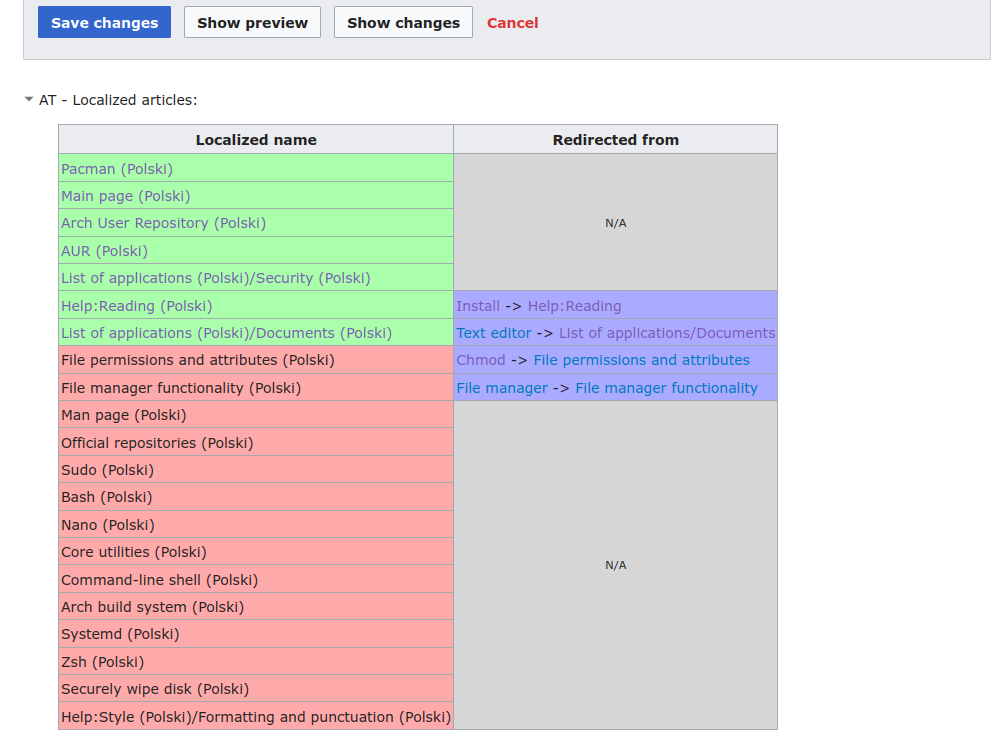
Translated articles scanner

The script scans the article for links to other articles and checks if these articles have been already translated to the language of choice.

In this example we can see that the page content contains many links to English pages. Pages highlighted in green have a translation page. Translated articles scanner UI