Google Search Custom Sidebar

Adds a customizable sidebar and horizontal toolbar to Google Search with instant filters (language, time, filetype, country, site, date range), saveable My Filters, Active Filters HUD, exclude mode, multi-select, and built-in tools — draggable, multilingual, fully themeable.

You will need to install an extension such as Tampermonkey, Greasemonkey or Violentmonkey to install this script.

You will need to install an extension such as Tampermonkey or Violentmonkey to install this script.

You will need to install an extension such as Tampermonkey or Violentmonkey to install this script.

You will need to install an extension such as Tampermonkey or Userscripts to install this script.

You will need to install an extension such as Tampermonkey to install this script.

You will need to install a user script manager extension to install this script.

(I already have a user script manager, let me install it!)

You will need to install an extension such as Stylus to install this style.

You will need to install an extension such as Stylus to install this style.

You will need to install an extension such as Stylus to install this style.

You will need to install a user style manager extension to install this style.

You will need to install a user style manager extension to install this style.

You will need to install a user style manager extension to install this style.

(I already have a user style manager, let me install it!)

Author
StonedKhajiit
Daily installs
2
Total installs
638
Ratings
17 0 0
Version
0.7.2
Created
2025-05-11
Updated
2026-07-30
Size
642 KB
License
MIT
Applies to

Google Search Custom Sidebar (v0.7.2)

⚠️ IMPORTANT — Officially released ONLY on Greasy Fork. Do not install the Chrome Web Store extension under the same name (published by "generouslline / Generous Life"). It is an unauthorized repackaged version that may inject ads or contain PUPs. See Reddit discussions for details.

Adds a custom sidebar and horizontal toolbar to Google Search: provides quick access to filters, favorite sites, and advanced tools — switchable layout modes, fully customizable, draggable, and multilingual.


📐 Dual Layout Modes (Sidebar / Horizontal Toolbar)

Switch anytime under "Settings ⚙️ -> General -> Interface Layout Mode":

  • Sidebar Mode: Freely draggable and repositionable. All filter options can be set to remain expanded for immediate one-click selection, making it the fastest and most efficient mode for heavy filtering.
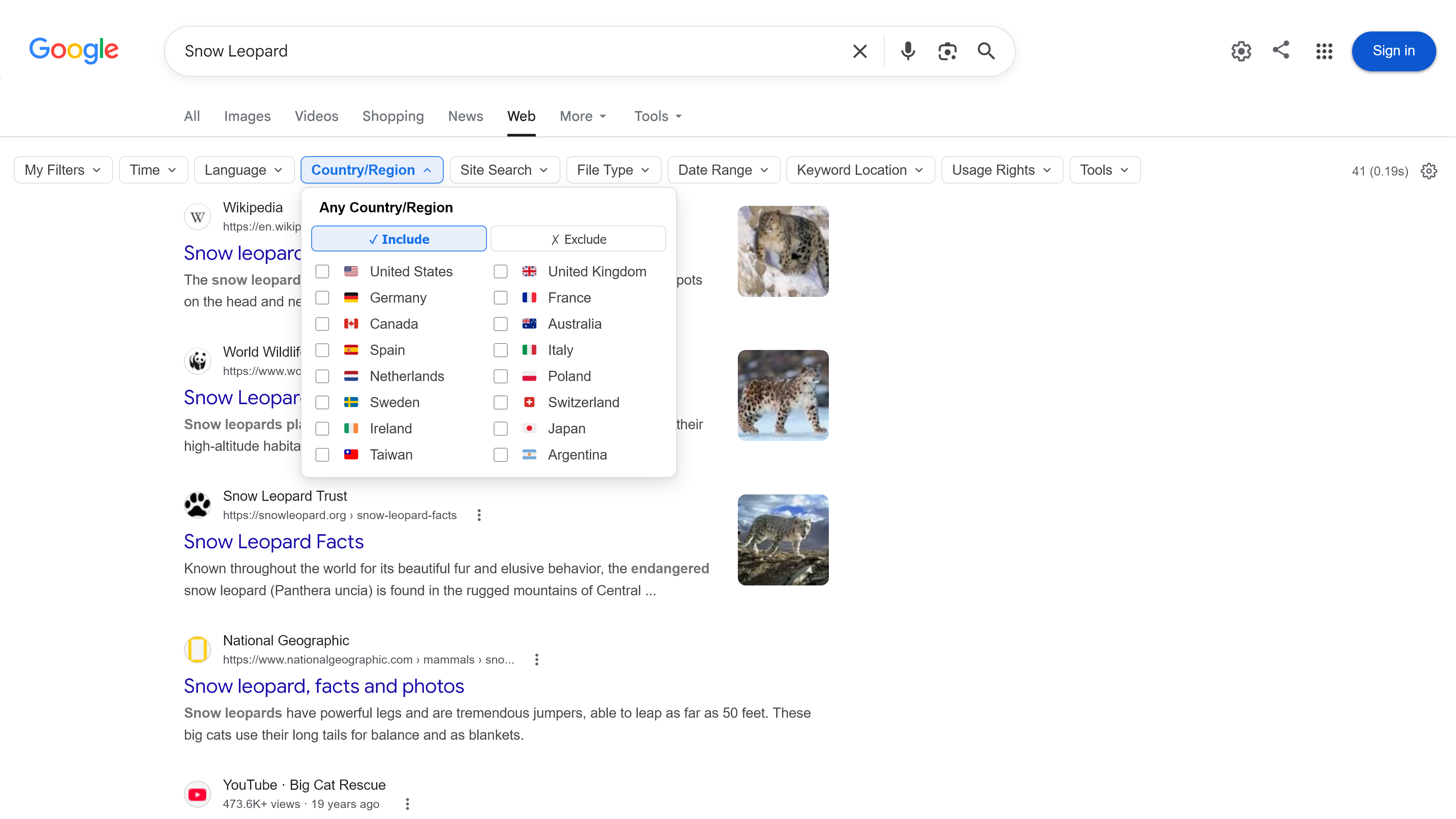
  • Horizontal Toolbar Mode: Compactly integrated into the top bar with popover dropdowns. Supports "Sticky" mode on scroll. Ideal for narrow screens or vertical tabs.

Google Search Custom Sidebar — Sidebar Mode Overview

Sidebar Mode: Fully expands filter sections and tools for the fastest one-click filtering experience.

Google Search Custom Sidebar — Horizontal Toolbar Mode

Horizontal Toolbar Mode: Seamlessly integrates into Google Search top bar with popover dropdowns for zero vertical clutter.


⚡ Core Features Overview

1. Instant Filters

Apply search filters with a single click (💡 Middle-click any option to open results in a background new tab):

  • Language & Country: Restrict to single or multiple languages/countries. Multi-select enabled by default, supports exclude mode and flag icons 🇺🇸 🇯🇵 🇹🇼.
  • Time Range: Predefined ranges (15 min – 1 year), plus a custom date picker with validation.
  • File Type: Individual extensions (PDF, DOCX…) or built-in Document/Spreadsheet groups.
  • Site Search: Search favorite websites with sub-paths, OR groups, favicons, and exclude mode.
  • Keyword Location: Restrict keywords to title (intitle:), body (intext:), URL (inurl:), or inbound links.

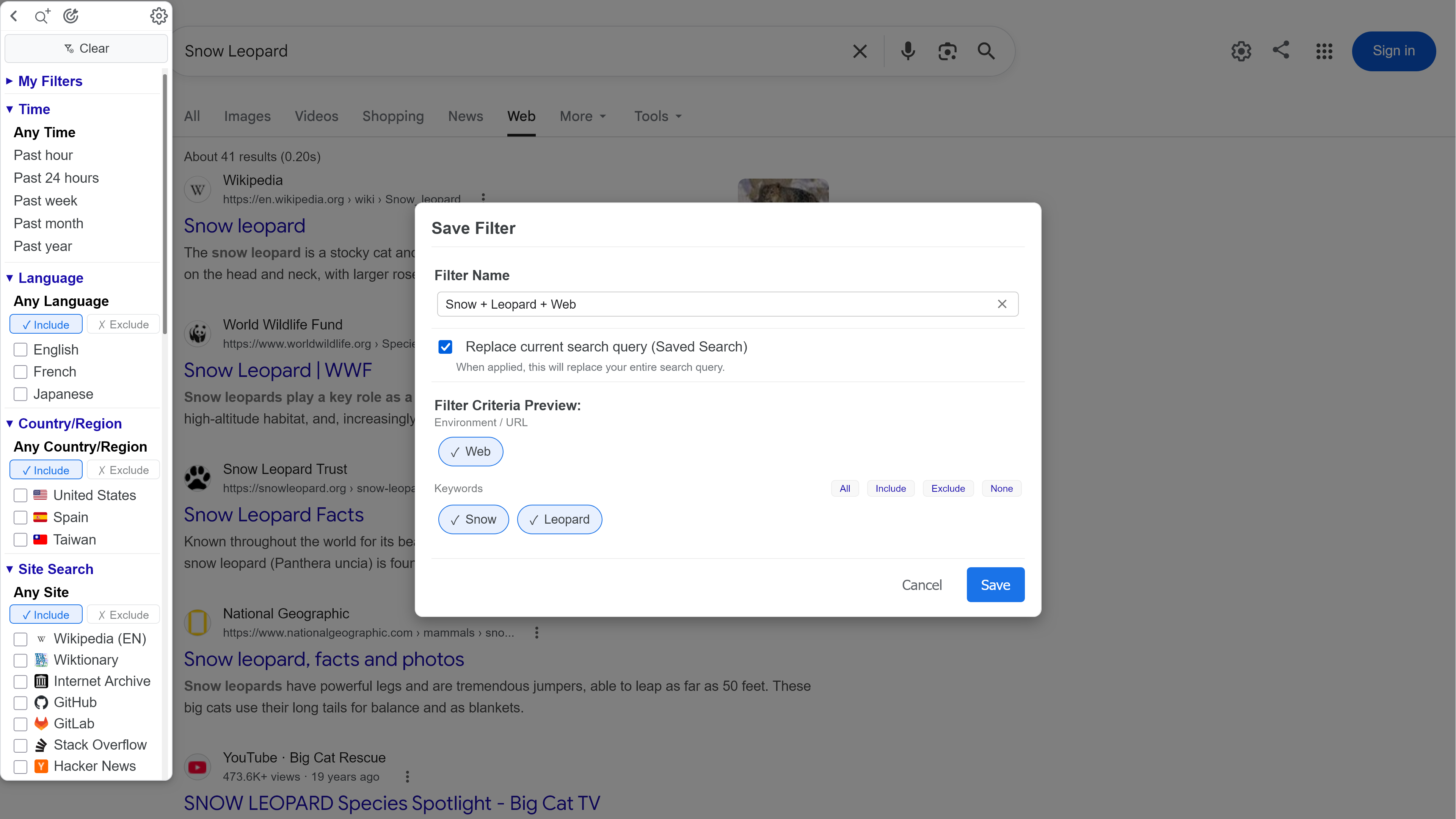
2. ⭐ My Filters — Save & Reuse

Save your active search combinations (language, time, country, site, filetype, keywords) as shortcut filters. Automatically named by system (e.g. "Reddit / PDF / Past Year"); manage or delete anytime directly from the sidebar.

3. 🛠️ Built-in Advanced Tools

One-click toggles for Verbatim, De-personalization, or jump directly to Google Advanced Search, Scholar, Trends, and Dataset Search. Buttons can be positioned in header, top block, tools section, or hidden.

4. 🏷️ Active Filters HUD & Result Stats

Floating overlay near the search box shows active filter chips (click to remove instantly). Result Stats dynamically displays total result count and query time.

💡 Common Use Cases
  • 🎓 Academic Research — Combine language + time + PDF filetype to quickly find recent papers and save as a "My Filter".
  • 💼 Competitive Analysis & Price Comparison — Use site search to scan competitor or e-commerce sites; middle-click to open background tabs for side-by-side comparison.
  • 🔧 Technical Troubleshooting — Filter by time range (past week) and title location to pinpoint Stack Overflow threads or GitHub Issues.
  • 📰 News & Local Monitoring — Set a 24-hour time filter plus specific country restriction for daily one-click localized updates.
  • 🚫 Noise Reduction — Use exclude filters to hide results from specific languages, countries, or content farms.

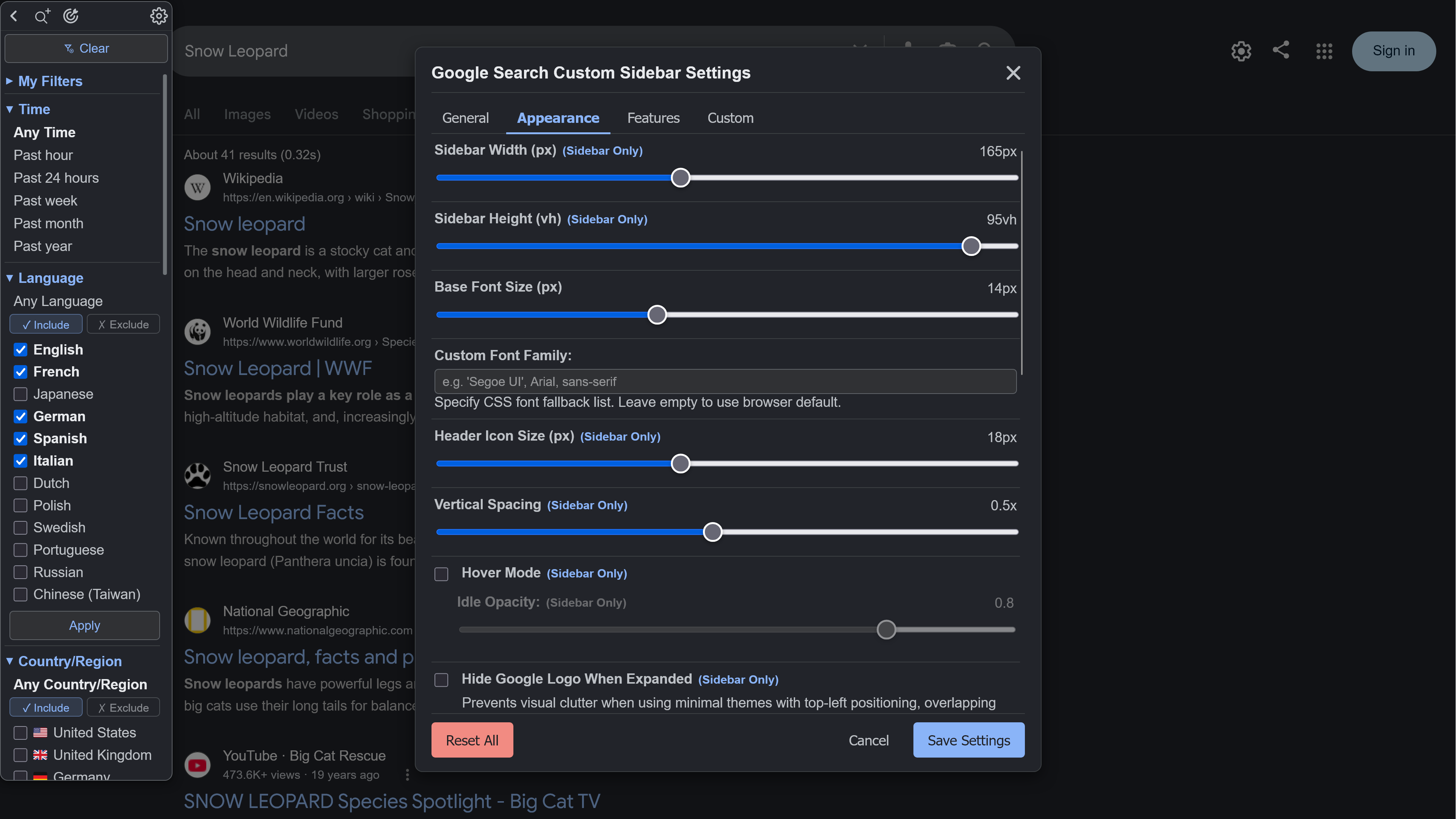
🎨 Customization, Layout & Custom Options Google Search Custom Sidebar — Settings Panel

Themes & Colors — Light, Dark, Minimal Light, Minimal Dark, and System Auto, with 15 customizable color tokens (background, text, links, buttons, etc.).

Dimensions & Spacing — Fine-tune sidebar width (90–270px), height (25–100vh), font size (8–24pt), header icon size, vertical spacing, and hover opacity.

Section Ordering & Expansion — 9 sections can be hidden or dragged to reorder (My Filters, Time, Language, Country, Site Search, File Type, Date Range, Keyword Location, Tools), supporting remember state, expand all, collapse all, or accordion mode.

Custom Option Manager — Freely add and manage your own custom websites, language codes, country codes, time ranges, and filetypes.


⚠️ Known Issues & Troubleshooting

1. Option labels show [ERR_NF] error?

If updating caused a data schema conflict, go to ⚙️ Settings -> Custom -> Manage Options, delete the error items, and click "Add Built-in Option" to reset data structure.


2. Google Search Operators (inurl:, intitle:, intext:) Outage

Recent Google Search algorithm changes (since May 2026) cause advanced search operators to fail in certain scenarios; this is an upstream issue with Google Search itself. (Related community discussions: Reddit r/SEO Thread 1 · Reddit r/searchengines Thread 2)


ℹ️ Project Info & Compatibility

Item Details
Script Managers Violentmonkey · Tampermonkey · Greasemonkey 4+
Browsers Chrome · Firefox · Edge · Safari · Brave · Opera
Languages 8 built-in languages (English 🇺🇸 🇹🇼 🇯🇵 🇫🇷 🇩🇪 🇪🇸 🇮🇹 🇷🇺), auto-detect or manual switch
License MIT License
Support & Feedback Welcome to share feedback on Greasy Fork Feedback area
🔗 Companion Tools & 🔐 Permissions Explained

Recommended Extensions & UserScripts:

  • Infy Scroll (Extension) — Adds infinite scrolling functionality to Google search result pages.
  • Google Search Better Favicons & Toolbox (Script) — Replaces HD favicons and adds context menu, site exclusion, webmaster tools (Wayback, PageSpeed, BuiltWith), and inline AI panels.
  • Google Images Tools Enhanced (Script) — Adds a custom toolbar with exact size, aspect ratio, custom date picker, colors, and presets to Google Images.
  • Google Images Advanced Toolbox (Script) — Displays thumbnail metadata badges, EXIF/C2PA forensics, color palette analysis, one-click transcoding/downloads, and Photopea editor integration.
  • uBlacklist (Extension) / Google Hit Hider by Domain (Script) — Permanently block unwanted domains and content farms.

Permissions Explained:

  • GM_addStyle: Inject sidebar and toolbar CSS styles.
  • GM_getValue / GM_setValue / GM_deleteValue: Persist user settings and custom filters.
  • GM_registerMenuCommand: Register the "⚙️ Open Settings" command in Userscript manager menu.
  • GM_openInTab: Open middle-clicked results in background new tabs.
  • GM_xmlhttpRequest: Cross-origin verification and fetching of website favicons.
  • GM_getResourceText / @resource: Load flag-icons CSS resource for country flag display.