Google Images Advanced Toolbox

Displays resolution and file size on Google Images & Google Lens thumbnails. Features an interactive preview lightbox with EXIF/C2PA metadata, RGB color analysis, image downloading/transcoding, online editor integration, and reverse image search.

You will need to install an extension such as Tampermonkey, Greasemonkey or Violentmonkey to install this script.

You will need to install an extension such as Tampermonkey or Violentmonkey to install this script.

You will need to install an extension such as Tampermonkey or Violentmonkey to install this script.

You will need to install an extension such as Tampermonkey or Userscripts to install this script.

You will need to install an extension such as Tampermonkey to install this script.

You will need to install a user script manager extension to install this script.

(I already have a user script manager, let me install it!)

You will need to install an extension such as Stylus to install this style.

You will need to install an extension such as Stylus to install this style.

You will need to install an extension such as Stylus to install this style.

You will need to install a user style manager extension to install this style.

You will need to install a user style manager extension to install this style.

You will need to install a user style manager extension to install this style.

(I already have a user style manager, let me install it!)

Author
StonedKhajiit
Daily installs
2
Total installs
123
Ratings
3 0 0
Version
0.2.3
Created
2026-07-05
Updated
2026-08-15
Size
654 KB
License
MIT
Applies to

Google Images Advanced Toolbox (GIAT) - Greasy Fork Description

Description

Google Images Advanced Toolbox (GIAT) is a browser userscript designed to enhance Google Images and Google Lens search results. It automatically resolves and displays uncompressed raw images, labeling file dimensions and sizes directly on search thumbnails. Featuring an interactive preview lightbox with metadata inspection and color analysis, GIAT also supports batch selection, image downloading/transcoding, and SERP data export for an efficient workflow.
Screenshots

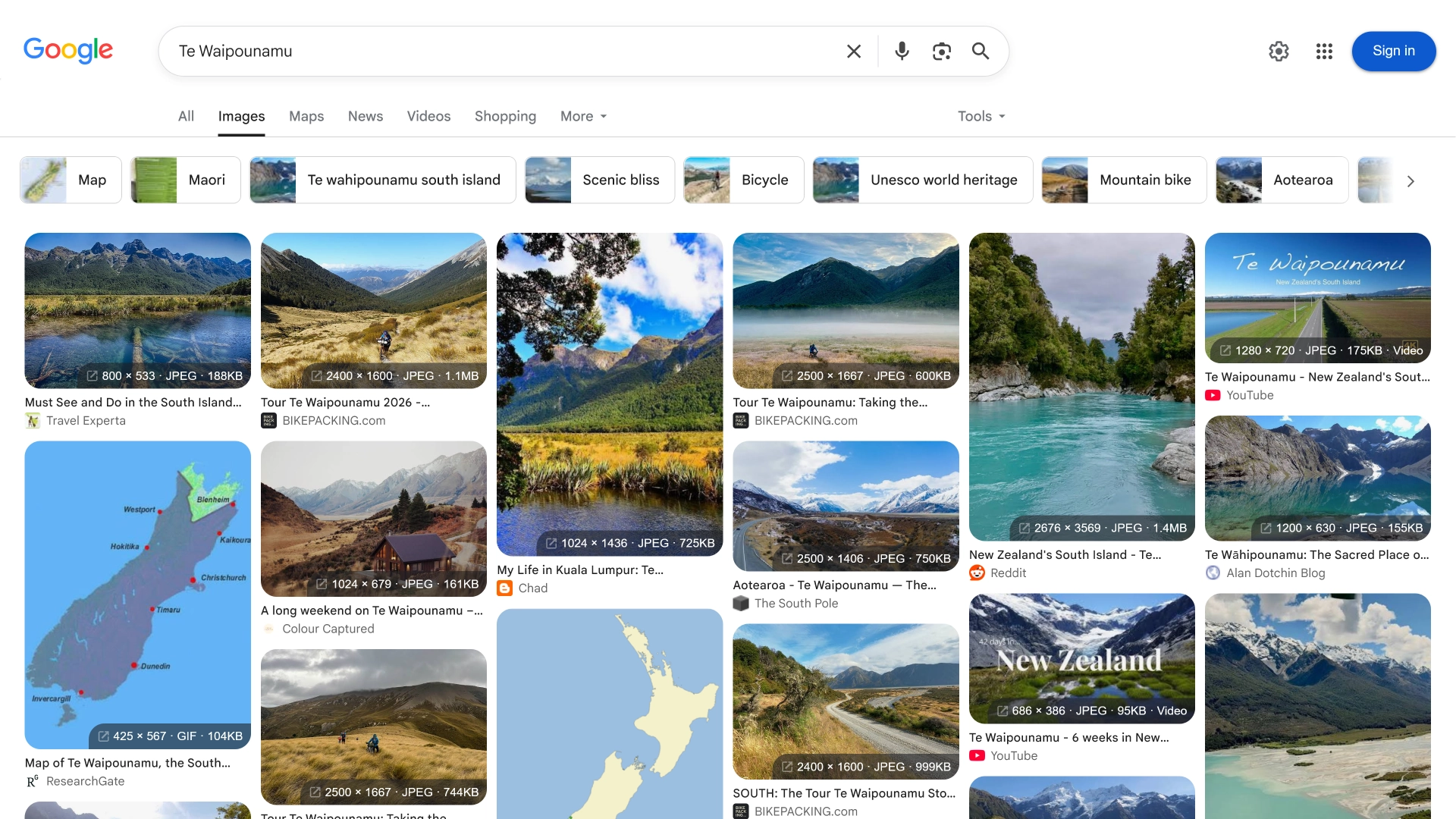
  • Thumbnail Info Badges: Thumbnail Info Badges
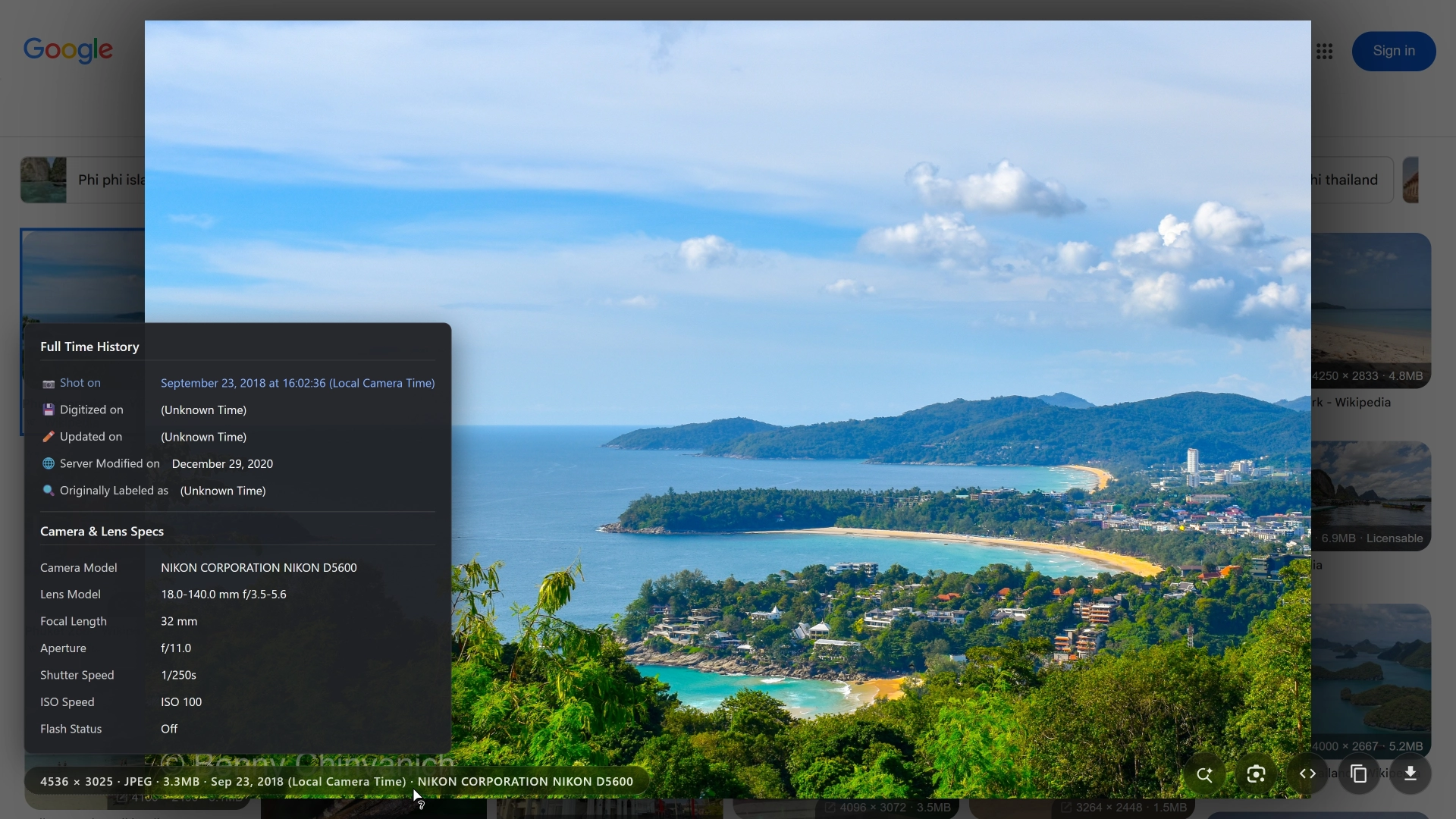
  • Custom Interactive Lightbox & EXIF/C2PA Panel: Custom Lightbox & EXIF Panel

Key Features

  • High-Res Interactive Lightbox: Click thumbnail badges to open lightbox, supporting gesture/wheel zoom, panning, and key navigation.
  • Thumbnail Hover Action Buttons: Quick-action buttons to download raw images, copy image/Base64, or trigger reverse image search.
  • Thumbnail Click Action Toggle: Configurable option to choose whether Ctrl+Left Click or Middle-Click on thumbnails opens the raw image directly or the native Google preview tab (without affecting title links).
  • Batch Selection & Data Export: Batch download raw images or ZIP archives (with Missed Items panel for retries), and export Markdown, JSON, CSV, or IDM lists.
  • SERP Rank & Visual Hotkey Guide: Displays natural search rank (#1, #2...) and H/? visual hotkey guide inside lightbox.
  • Original High-Res Upgrade: Automatically cleans cropping/compression parameters across 300+ domains to restore uncompressed raw images.
  • Live Thumbnail Metadata Badges: Displays resolution and file size directly on search thumbnails for easy filtering.
  • Image Saving & Transcoding: Direct raw image downloads, automatic WebP/AVIF to PNG/JPEG conversion, and clipboard copying.
  • Authentic Format & Extension Detection: Inspects image header Magic Bytes to accurately identify authentic file formats and extensions.
  • Camera Metadata & Date Forensics: Parses EXIF/C2PA credentials, camera settings, and AI-generated content indicators (🤖/🛡️).
  • Color Palette Analysis: Extracts 5 dominant colors (click to copy hex) and renders RGB distribution histograms.
  • Minimalist Interface & Title Hover: Smooth fade-in hover controls and unabbreviated title previews on hover.
  • Online Editor Integration: Sends raw images directly to Photopea (raster) or Vectorpea (vector) for instant editing.
  • Multi-Source Reverse Search: Integrates Google Lens, Yandex, and Bing reverse image search engines.
  • Custom Filename Patterns: Supports 5 naming presets and custom templates with dynamic tokens ({query}, {domain}, {title}, {dims}, {index}, etc.).
  • YouTube Lightbox Autoplay: Automatically plays video when opening YouTube thumbnails in lightbox, with instant toggle to view high-res cover artwork.
  • Visited Results Marking: Automatically marks viewed or clicked results with 4 styles (Dim/Desaturate, Purple Border, Checkmark Badge, Subtle Dim), restoring on hover.
  • Dedicated Settings & Themes: Built-in settings panel to customize hotkeys, click actions, color themes, and transparency.

Quick Controls

  • Thumbnail Clicks & Navigation:
    • Ctrl+Left Click or Middle-Click on Thumbnail: Opens the raw full-resolution image in a new tab (default) or opens the native Google preview tab based on settings.
    • Left-Click on Thumbnail: Retains native Google behavior, expanding the side preview panel on the current page.
    • Clicking Title / Source Page Links: Retains native browser behavior, navigating to the source webpage article.
  • Visited Mark:
    • Triggers: Left-click, middle-click (new tab), lightbox preview, or quick buttons.
    • 4 Styles: Dim & Desaturate (default), Purple Glow Border (16px corners), Checkmark Badge (merges with rank as ✓ #1), and Subtle Dim.
    • Hover Restore: Hovering restores original brightness instantly.
    • Management: View live recorded count and clear history in settings.
  • Batch Selection & Data Export:
    • "Batch Select" (Bottom-Right): Enter batch mode to select all/clear items with live size stats.
    • Shift + Click Range Selection: Click the first item, then hold Shift and click the target item to select all items in the range.
    • "Export ZIP" / "Download Images": Download as a ZIP archive or parallel files (failed items route to "Missed Items").
    • "Export Data": Copy or download Markdown, JSON, CSV, or IDM URL lists.
  • SERP Ranks & Hotkey Guide:
    • #1, #2 Rank Badges: Displays SERP rank order (⚠️ indicates data export support with download restrictions).
    • H / ? Key (Inside Lightbox): Toggle the visual Hotkey & Gesture Guide.
  • Resolution Badges:
    • Left-click Resolution Badge: Opens the interactive preview lightbox to view full-sized images, metadata, and color analysis.
    • Middle-click or Ctrl+Click Resolution Badge: Opens the raw high-resolution image directly in a new tab.
  • Action Buttons:
    • 📥 (Download): Save original image (with automatic JPEG/PNG conversion option).
    • 📋 (Copy): Copy image data to clipboard.
    • ⚡ (Base64): Copy Base64 string to clipboard.
    • 🎨 (Photopea) / 📐 (Vectorpea): Open image directly in online editors.
    • 🔍 (Lens) / 🌐 (Yandex) / 🖼️ (Bing): Perform reverse image search on selected search engine.
    • 🤖 (AI): Send image and custom prompt to Google AI Search.
  • Lightbox Controls & Shortcuts:
    • H or ? Key (Inside Lightbox): Displays the full visual Hotkey & Gesture Guide.
    • / : Switch to the previous or next search result image.
    • D: Download the raw original image with one key.
    • C: Copy image data to clipboard with one key.
    • R Key or Double-click Image or Middle-click: Reset image zoom scale and pan position.
    • ESC or click backdrop: Close the preview lightbox.
    • Single Left-click Image: Toggle 2.5x zoom in / 1.0x reset.
    • Mouse Wheel / Touch Pinch: Smooth zoom in/out centered on the mouse cursor position.
    • Left-click Drag: Move / pan the zoomed image details.
    • YouTube Player / Cover Toggle: Click the top-right pill button in lightbox to switch between video playback and raw cover artwork.
    • Enter Key: Open image in a new tab if loading is blocked or fails.
  • Open Settings Menu:
    1. Click the ⚙️ (Settings) icon in the bottom-right corner of the lightbox.
    2. Or select "GIAT Settings" from your userscript manager menu (e.g., Violentmonkey, Tampermonkey).


💡 Notes & Limitations
  • Metadata Disclaimer: EXIF/C2PA data may be removed. Server dates (Last-Modified) may reflect CDN caching rather than capture time.
  • Recommended Manager: Violentmonkey is recommended for optimal compatibility and image pipeline performance.
  • AI Search Dependency: Automated AI Search upload depends on Google's DOM layout and may briefly pause during Google UI updates.
  • Restricted Raw Image Domains: Domains with strict tokens (e.g., TikTok, Lookaside) support SERP data export, but raw image downloads are automatically routed to Missed Items.
🔒 Privacy, Security & Permissions

1. Privacy & Security

  • Zero Pre-fetching & On-Demand Only: Operates offline while browsing search results. Connects to target image servers only when opening the lightbox, downloading, or copying images.
  • Fully Local Processing: All EXIF/C2PA parsing, color analysis, and image transcoding run locally inside your browser sandbox. No tracking, no ads, zero analytics uploads.

2. Technical Transparency & Permissions

  • External Resource (@require ExifReader): Loads ExifReader via cdn.jsdelivr.net to parse image metadata locally.
  • Network Scope (@connect *): Allows fetching raw high-res images from global third-party image hosts upon user request.
  • API Permissions (@grant):
    • GM_xmlhttpRequest: Bypass CORS and hotlink protection (403 HTTP errors) to fetch original images.
    • GM_download: Invoke browser native download engine for raw images and ZIP archives.
    • GM_setClipboard: Safely copy image data and SERP export lists (Markdown/JSON/CSV/IDM) to clipboard bypassing DOM focus restrictions.
    • GM_getValue / GM_setValue / GM_deleteValue: Save/retrieve user configuration, LRU cache, and clean temp data locally.
    • GM_addValueChangeListener / GM_removeValueChangeListener: Real-time event broadcasting for instant AI search upload.
    • GM_registerMenuCommand: Add "GIAT Settings" entry to userscript manager menu.
    • unsafeWindow: Access page global scope to quickly inspect original image dimensions.
⚖️ Credits & Licenses
  1. Google Image Search - Show Image Dimensions: Dimension display features are inspired by and adapted from Tad Wohlrapp's open-source project Google Image Search - Show Image Dimensions (MIT License).
  2. Image Max URL (IMU): Image optimization rules are derived and adapted from the open-source project Image Max URL (Apache License 2.0).
  3. ExifReader: Metadata parsing is powered by ExifReader (MIT License).
  4. Interface Vector Icons: UI elements and badges utilize SVG vector icons sourced from SVG Repo and All SVG Icons under the MIT License. Special thanks to the creators and platforms.
🛠️ Developer Technical Reference

1. 3-Tier Image Data Extraction Fallback

  • Tier 1 (DOM imgres Link Parsing): Decodes imgurl, w, and h query parameters directly from <a href*="/imgres"> nodes.
  • Tier 2 (Wiz Controller Semantic Matcher): Inspects jscontroller's pending.value dynamically to maintain robustness against Google layout changes.
  • Tier 3 (Global window.W_jd Scan): Queries window-scoped cache objects using node data-docid identifiers.

2. File Size Extraction & O(1) Path Caching

  • Relative Property Path Discovery: Scans pending.value for the path leading to Wiz key "2000" file size strings.
  • O(1) Local Caching: Pairs path offsets with Google JS version hashes in local storage for 0ms lookup latency.
  • Circuit Breaker: Pauses background DFS scans for 30 seconds after 5 consecutive misses to protect CPU main thread.

3. Image URL Upgrades & Anti-Hotlink Async Engine

  • O(1) Domain Hash Router: Maps 300+ domain rules to strip -1024x768 and ?w= compression parameters.
  • Anti-Hotlink Async Engine: Configures custom Referer headers and fallback chains in asyncOptimizers.ts, resolving 403 Forbidden issues paired with fetchImageBlobWithFallback.

4. Zero-Copy & FIFO Paced Download Engine

  • Zero-Copy BlobPart Packaging: ZIP archiving uses native BlobPart array composition, lowering RAM usage by ~70%.
  • 150ms FIFO Paced Queue: Direct downloads maintain a 150ms single-threaded queue with immediate Blob URL revocation, preventing browser download prompts.
  • Hybrid Sentinel Engine: Combines CSS animationstart events with requestIdleCallback for sub-millisecond detection.
  • FastDOM Batching: Defers DOM mutations to requestAnimationFrame to eliminate Layout Thrashing.