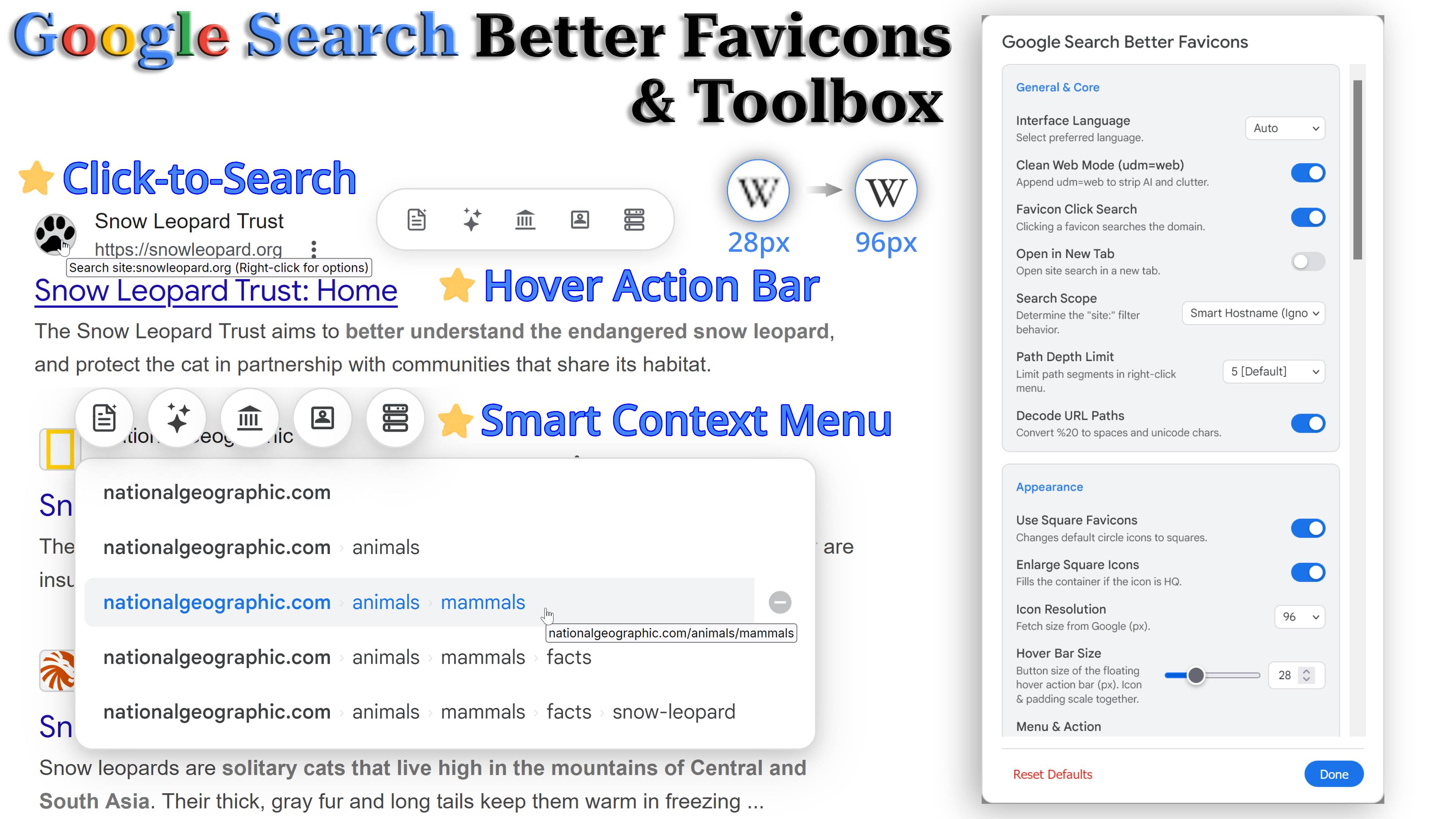
Google Search Better Favicons & Toolbox

Replaces Google search favicons with high-quality versions and adds a powerful context menu with site exclusion, click-to-search, and comprehensive webmaster tools (Wayback, PageSpeed, BuiltWith, etc.).

You will need to install an extension such as Tampermonkey, Greasemonkey or Violentmonkey to install this script.

You will need to install an extension such as Tampermonkey to install this script.

You will need to install an extension such as Tampermonkey or Violentmonkey to install this script.

You will need to install an extension such as Tampermonkey or Userscripts to install this script.

You will need to install an extension such as Tampermonkey to install this script.

You will need to install a user script manager extension to install this script.

(I already have a user script manager, let me install it!)

You will need to install an extension such as Stylus to install this style.

You will need to install an extension such as Stylus to install this style.

You will need to install an extension such as Stylus to install this style.

You will need to install a user style manager extension to install this style.

You will need to install a user style manager extension to install this style.

You will need to install a user style manager extension to install this style.

(I already have a user style manager, let me install it!)

Author
StonedKhajiit
Daily installs
0
Total installs
95
Ratings
3 0 0
Version
1.1.1
Created
2025-08-07
Updated
2026-05-09
Size
222 KB
License
MIT
Applies to

Replaces low-resolution favicons in Google search results with higher-quality versions, adds click-to-search functionality, and introduces a powerful smart context menu for path-specific searching, domain exclusions, and a comprehensive suite of site analysis tools (Wayback Machine, Google AI, WhoIs, PageSpeed, BuiltWith, and Check-Host). Now with a floating hover action bar and inline AI panels that display Google AI summaries directly within search results.

Features

🎬 Video Demo: Watch on Streamable

💡 Usage Scenarios

  • Efficient Research: When you find a helpful forum thread or documentation page (e.g., a specific subreddit or a GitHub repo), use the right-click menu to instantly restrict your search to that specific path, digging deeper without retyping queries.
  • Content Filtering: Encountering spam sites, content farms, or irrelevant domains? Hover over the path in the context menu and click the "Minus" button to immediately exclude them from your current search results (-site:...).
  • Webmaster & Tech Analysis: Instantly evaluate a website before even clicking the link. Check its performance via PageSpeed Insights, uncover its tech stack using BuiltWith, or verify server/IP info with Check-Host directly from the hover action bar or floating action menu.
  • Archived Content Retrieval: Want to see a previous version of a webpage or verify recently deleted info? Click the floating archive button to view the page's historical snapshot on the Wayback Machine.
  • Instant AI Insights: Curious about a site in your search results? Hover over the result card and click the AI button on the action bar to get a summary or site info displayed directly below the card — no new tab needed. AI responses stream in real-time with retry support if something goes wrong.
  • Site Background & WhoIs: Need a quick check on domain registration or ownership? Use the WhoIs button to instantly investigate the domain.
  • Visual Consistency: For users with high-DPI displays who find standard Google favicons blurry or inconsistent, this script provides sharp, uniform (square or circle) icons for a modern browsing experience.

✨ Features

🔍 Search Enhancement & Navigation

  • Click-to-Search: Left or middle-click a favicon to search within its specific domain. Supports opening results in a new tab.
  • Smart Context Menu: Right-click a favicon to reveal a hierarchical breadcrumb menu of the URL path for quick navigation or exclusion. Path depth can be limited, and encoded URL characters (e.g., %20) can be decoded for readability.
  • Hover Action Bar: A floating horizontal toolbar appears when you hover over a search result card, providing one-click access to all analysis tools. Position can be set to left, center, or right. The floating tool buttons next to the right-click context menu can also be toggled independently.
  • Ergonomic Exclusion: Configure the exclusion ("Minus") button to align left or right for faster access.
  • Search Scope: Configurable click-to-search target (Smart Hostname, Root Domain, or Exact Hostname).
  • Clean Web Mode: Option to automatically append udm=web to your searches, stripping away AI overviews and clutter for a pure web results experience.
  • Hide Distractions: Options to hide the "⋮" (About this result) button and the "Translate this page" link next to each search result for a cleaner interface.

🛠️ Site Analysis & Webmaster Tools

  • Google AI — Site Info: Trigger a Google AI search to get background information, main content, and reputation of a website. Customizable prompts via the settings panel using the {URL} placeholder.
  • Google AI — Page Summary: Ask Google AI to summarize the detailed content and key points of a specific webpage. Supports a separate custom prompt.
  • Inline AI Panel (Experimental): Fetch AI results in a background tab and display them directly below the search result card with real-time streaming output. Includes a collapsible view with adjustable max height, copy-to-clipboard (as Markdown), and an elapsed time indicator.
  • AI Retry & Timeout: Configurable timeout (1–120 seconds) for AI requests. A retry button appears on failure or timeout, allowing you to re-invoke without navigating away.
  • CAPTCHA Handling: If Google blocks the background AI request with a CAPTCHA, the panel displays a clear notification with instructions to solve it in the background tab. AI results auto-resume once resolved.
  • Wayback Machine: Access page historical snapshots instantly. Options include clean mode, standard toolbar, or calendar overview.
  • PageSpeed Insights: Analyze loading speed and core web vitals of the target URL with one click.
  • BuiltWith: Lookup the technology profile and scripts running on the target domain.
  • Check-Host: Check server location and IP information effortlessly.
  • WhoIs Lookup: Extract the root domain and redirect to who.is for instant registration and ownership details.

🎨 Visuals & Personalization

  • High-Resolution Icons: Replaces default icons with higher-quality versions (adjustable from 12px to 128px).
  • Shape & Fill: Toggle between square and circle icons. Option to fill the container when using square high-quality icons.
  • Menu Styles: Choose from 4 right-click menu styles (Breadcrumbs, Terminal, Chips, Standard) to suit your visual preference.
  • Adjustable Sizes: Independently control the hover action bar button size and the context menu / FAB button size via slider controls.
  • Button Reordering: Drag-and-drop or use keyboard shortcuts (Alt + ↑/↓) to customize the display order of tool buttons in the action bar and FAB.
  • Visual Feedback: Includes hover effects, custom active states, and transition animations adaptable to Google's Light and Dark themes.

⚙️ System & Compatibility

  • Settings Panel: Built-in configuration interface with 35+ options organized in groups, adjustable directly on the search page without modifying the code.
  • Multi-Language: Interface supports English, Traditional Chinese, Japanese, French, German, Spanish, Italian, and Russian, with automatic language detection.
  • Cross-Tab Sync: Settings changes are automatically synchronized across all open Google Search tabs in real-time.
  • Dynamic Content Compatibility: Fully supports dynamically loaded results, including Google Images (udm=2) and third-party extensions like "Infy Scroll" that enable infinite scrolling. Also works on Google News (tbm=nws).
  • Security: External dependencies (tldts) use Subresource Integrity (SRI) hashes. AI content passes through a multi-layer sanitization pipeline before display.
  • Permissions (@grant): This script requests the following UserScript API permissions — GM_addStyle (inject CSS), GM_getValue / GM_setValue / GM_deleteValue (persist settings), GM_registerMenuCommand / GM_unregisterMenuCommand (settings entry in script menu), GM_addValueChangeListener / GM_removeValueChangeListener (cross-tab settings sync), and GM_openInTab (open tool links and background AI tabs). No external network request APIs are used.

🔧 How to Configure

  1. Click your UserScript manager icon (e.g., Tampermonkey, Violentmonkey) while on a Google Search page.
  2. Select "⚙️ GSBF Settings" from the script menu to open the configuration panel.

📝 Notes

  • The "Google AI" features in this script use Google Search's AI Mode (udm=50). While responses are fast, their quality may be lower than dedicated Gemini models, APIs, or the Gemini web app (gemini.google.com). Expect occasional inaccuracies or incomplete answers. Availability may vary by region.
  • Icons are fetched from the Google Favicon service (https://www.google.com/s2/favicons?sz={size}&domain={domain}).
  • The default requested icon size is 96px, which can be adjusted via the settings panel.
  • The Inline AI Panel is an experimental feature that opens a background tab to extract Google AI responses. It works best on standard web search result pages.
  • If a high-quality favicon is unavailable, the script safely defaults to the original icon.
  • This script bundles Preact v10.29.1 (MIT License, © Jason Miller) and loads tldts v7.0.28 (MIT License, © Thomas Parisot, Rémi Berson) via @require with SRI verification.