WTR-Lab Novel Reviewer
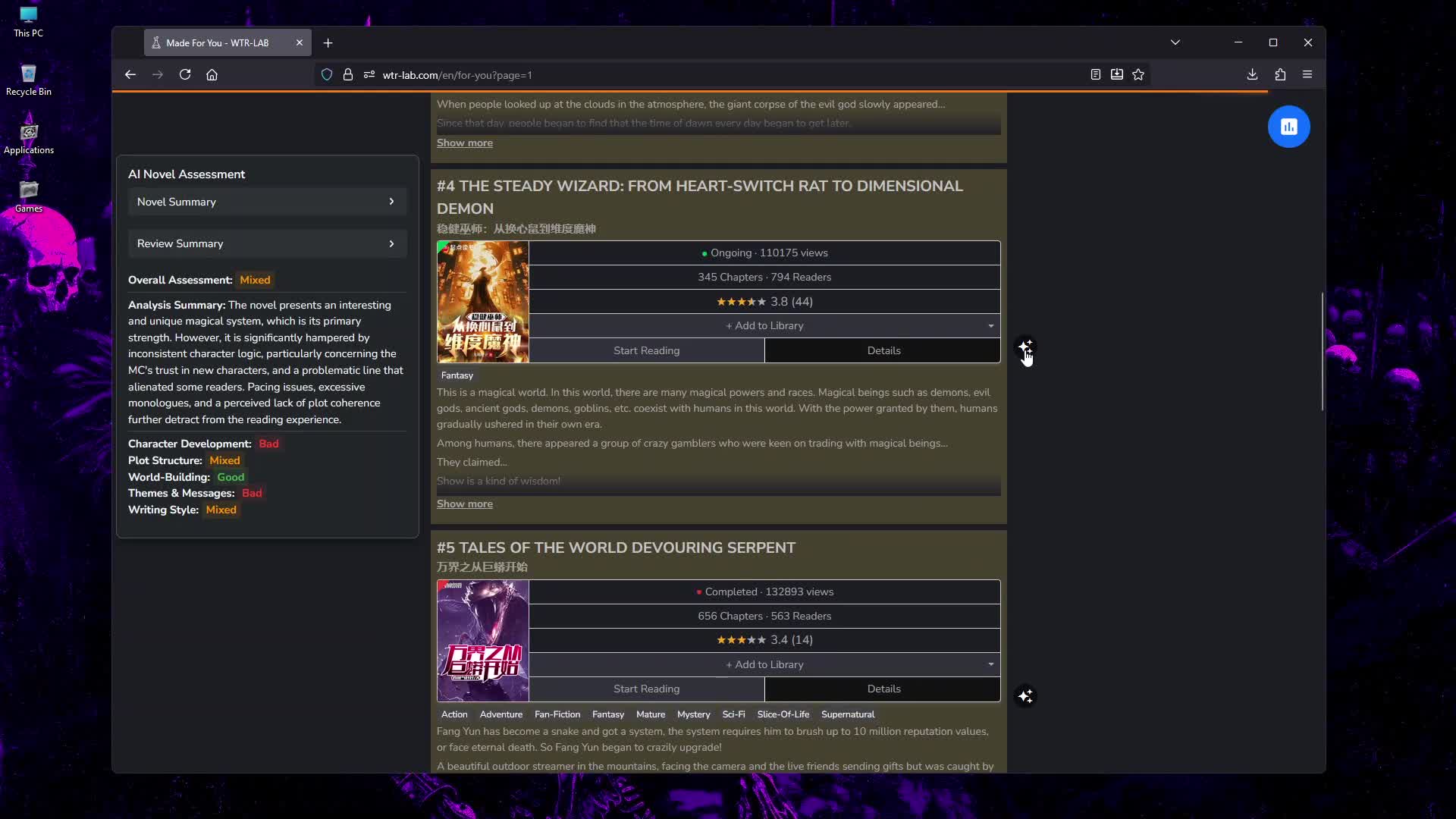
A powerful userscript that uses Google's Gemini AI to analyze novels on WTR-Lab. Get comprehensive AI-powered assessments, color-coded review summaries, and detailed analysis across multiple categories without leaving the "For You" page.



✨ Features
🤖 AI-Powered Analysis
-
Comprehensive Novel Assessment: Get detailed analysis across 5 categories: Character Development, Plot Structure, World-Building, Themes & Messages, and Writing Style
-
Smart Rating System: Each category rated as Good, Mixed, Bad, or Unknown (for insufficient data)
-
Single Novel Processing: Optimized to process one novel at a time for better control
-
Optimized API Usage: Smart review fetching with intelligent pagination (60-80% reduction in unnecessary API calls)
🎨 Visual Enhancements
-
Color-Coded Review Summaries: Username attribution with 20-color accessible palette for easy reading
-
Visual Highlighting: Cards color-coded based on overall assessment (Good=Dark Green, Mixed=Dark Yellow, Bad=Dark Red)
-
Enhanced UI: Clean pop-up summaries with collapsible sections and smooth animations
-
Modern Interface: Complete UI/UX modernization with contemporary design patterns
-
Mobile Responsive: Optimized display for all screen sizes with modal overlay functionality
🛠️ Advanced Features
-
Smart Caching System: Local storage caching prevents redundant API calls
-
Cache Management: Dedicated cache clearing functionality with user confirmation
-
Context-Aware UI: Button functionality adapts based on novel analysis state
-
Error Recovery: Robust retry logic with comprehensive error handling
-
Genre System: Standardized genre labeling replacing outdated "tags" terminology
-
Debug Mode: Optional logging for troubleshooting and optimization
-
Accessibility: Color-blind friendly design with proper contrast ratios
📱 Mobile Enhancements
-
Modal Overlay: AI Summary Panel displays as fixed overlay on mobile screens (≤768px)
-
Touch-Optimized: Improved button sizing and spacing for mobile interactions
-
Responsive Design: Advanced responsive patterns ensuring optimal viewing on all devices
-
Cross-Device Consistency: Unified design system implementation across all screen sizes
🚀 Installation & Setup
Prerequisites
Step 1: Get Your Gemini API Key
- Visit Google AI Studio
- Sign in with your Google account
- Click "Create API key"
- Copy the generated key
- Note: The Gemini API has a generous free tier, but check Google's pricing for heavy usage
Step 2: Install the Script
- Click the "Install" button at the top of the Greasy Fork page
- Confirm installation in your userscript manager
Step 3: Configure Your API Key
- Navigate to the WTR-Lab "For You" page
- Click the Tampermonkey icon in your browser's toolbar
- Under "WTR-Lab Novel Reviewer", click "Open Settings"
- Paste your Gemini API Key into the input field
- Click "Save"
Step 4: Start Analyzing!
- Navigate to either "For You" page or "Novel Finder" page
- Look for analysis buttons (📊) in the top-right corner of novel card titles
- Click individual buttons to analyze each novel separately
- Hover over the ✨ icon on processed cards to view detailed assessments
- Use "Clear Analyzed Novel Cache" in settings when needed
- The script automatically handles client-side navigation and route changes
⚙️ Configuration
Access settings anytime through the Tampermonkey menu or the floating settings icon.
Available Settings
| Setting |
Description |
Default |
| Gemini API Key |
Your Google AI API key (required) |
- |
| Gemini Model |
AI model for analysis |
gemini-2.5-flash |
| Debug Logging |
Enable detailed logging for troubleshooting |
Disabled |
| Cache Management |
Clear analyzed novel cache functionality |
- |
Gemini Model Options
-
gemini-2.5-flash: Fast and cost-effective, perfect for general use
-
gemini-2.5-pro: More powerful model for detailed analysis (higher cost)
-
gemini-flash-latest: Latest flash model with recent improvements
-
gemini-flash-lite-latest: Ultra-fast model for quick assessments
-
gemini-2.5-flash-lite: Lightweight version for efficient processing
📊 Understanding the Analysis
Rating System
Each novel receives assessments across multiple categories:
Overall Assessment
-
Good ⭐: High-quality novel with positive user feedback
-
Mixed ⚖️: Average quality with mixed reviews
-
Bad ❌: Poor quality or problematic content
Category Ratings
-
Good: Strong implementation of that aspect
-
Mixed: Average or inconsistent execution
-
Bad: Poor or problematic implementation
-
Unknown: Insufficient data to make a reliable assessment
Analysis Categories
-
Character Development: Character depth, growth, consistency, dialogue authenticity
-
Plot Structure: Pacing, narrative flow, story coherence, conflict resolution
-
World-Building: Setting details, consistency, immersion, cultural depth
-
Themes & Messages: Clarity, relevance, integration, thought provocation
-
Writing Style: Prose quality, descriptive language, dialogue naturalness
Color-Coded Elements
-
Review Summaries: Usernames are color-coded for easy identification
-
Card Highlighting: Background colors indicate overall assessment
-
Rating Badges: Colored tags show individual category ratings
Context-Aware Button System
-
"Analyze Novel": Appears for novels without cached analysis
-
"Show AI Summary": Appears for novels with cached analysis
-
Adaptive Tooltips: Button text changes based on novel state
-
Individual Control: Each novel card has its own analysis trigger
🆘 Troubleshooting
Common Issues & Solutions
"Analysis Failed" or Processing Errors
Check the browser console (F12 → Console tab) for detailed error messages:
Common Causes:
- Invalid or incorrect API key
- API request blocked by safety filters
- Network connectivity issues
- Rate limiting from Google API
- Missing cache permissions
Solutions:
- Verify your API key is correct and active
- Try refreshing the page and analyzing again
- Check your Google AI Studio for any usage limits
- Enable Debug Logging for more detailed error information
- Clear cache and retry if using cached data
No Analysis Button Appears
- The button appears after the novel list loads completely
- Try refreshing the page
- Ensure you're on the WTR-Lab "For You" page
- Check that the script is enabled in your userscript manager
- Verify the page URL includes query parameters if using pagination
"Serie ID Mapping Failed" Notification
- This indicates a technical issue with WTR-Lab's website structure
- Refresh the page to retry the mapping process
- If the issue persists, try clearing browser cache
- The script includes automatic retry logic to handle temporary failures
Cache-Related Issues
Symptoms: Outdated or corrupted analysis data
Solutions:
- Use "Clear Analyzed Novel Cache" button in settings
- Confirm cache clearing in the prompt dialog
- Page will automatically reload after successful clearing
- Re-analyze novels to get fresh assessments
Performance Issues
- The script now processes one novel at a time for better control
- Use
gemini-2.5-flash model for faster processing
- The script includes intelligent caching to minimize API calls
- Enable Debug Logging to monitor processing times
- Clear cache periodically to prevent data buildup
High API Usage
- The script includes smart pagination to fetch only necessary review data
- Processing one novel at a time gives you better control over API usage
- Consider using
gemini-2.5-flash for cost-effective analysis
- Check your Google AI Studio usage dashboard for monitoring
- Use cache management to avoid redundant analyses
Debug Mode
Enable Debug Logging in settings to see:
- API request/response details
- Processing status updates
- Error stack traces
- Performance metrics
- Cache management operations
- Button state changes
🔄 Version History
Changelog
For detailed version history, see Changelog.md
Current Version: 1.8.6 (November 19, 2025)
Enhanced Navigation & Route Support:
- 🚀 Reactive Execution: Implemented reactive script execution for client-side route changes in Next.js SPA environment
- 🛣️ Novel Finder Support: Extended full support to
https://wtr-lab.com/en/novel-finder* pages with dedicated card parser
- 🔄 Route Handling: Added robust route change detection with debouncing (500ms) to prevent race conditions
- 🛡️ Route Whitelisting: Implemented scope restrictions to prevent processing on unsupported pages
- 🐛 Bug Fixes: Resolved route leakage issues and fixed critical serie_id mapping bug on novel-finder pages
Version: 1.8.5 (November 18, 2025)
Novel Finder Integration:
- 🚀 Page Support: Extended web scraping capabilities to support
https://wtr-lab.com/en/novel-finder* URL pattern
- 🏗️ Parser Integration: Implemented new card parser for novel-finder page's unique HTML structure
- 🐛 Critical Fix: Corrected wrong serie_id usage ensuring accurate review data for novel-finder analysis
- 🔧 Build Fix: Resolved multiple linting errors that were causing build failures
Version: 1.8.4 (November 16, 2025)
Major UI/UX Improvements:
- 🚀 Cache Management: Implemented dedicated cache clearing functionality with user confirmation
- 🔄 UI Consolidation: Removed floating analysis button and centralized functionality in card-level triggers
- 🏗️ Interface Modernization: Complete UI/UX modernization with responsive design improvements
- 🐛 Bug Fixes: Resolved pagination matching issues and positioning problems
- 📱 Mobile Enhancement: Added modal overlay behavior for AI Summary Panel on mobile devices
- 🎨 Design System: Applied Flexbox-based solutions and modern design patterns
Version: 1.8.3 (November 16, 2025)
CSS Architecture Overhaul:
- 🏗️ CSS Modularization: Complete modularization of 1,325-line monolithic CSS into component-based structure
- ❌ Cleanup: Eliminated duplicate CSS and dynamic style injection
- 🔄 Build System: Switched to webpack's CSS processing for better optimization
- 📊 Metrics: 7 component files created, 480+ lines of duplicate code removed
Version: 1.8.2 (November 16, 2025)
Simplified Processing:
- ❌ Batch Processing: Removed configurable batch processing, now processes 1 novel at a time
- 🏗️ Architecture: Streamlined processing architecture for better control
- 📊 Metrics: 20% reduction in settings complexity, eliminated processing variability
Previous Version: 1.8.1 (November 16, 2025)
Major Refactor:
- 🏗️ Complete Modularization: Transform from single 1,325-line file to maintainable 24-file architecture
- 📁 Code Organization: Clear separation of concerns across 8 modular directories
- 📊 Metrics: 2,300% modularity increase, 96% complexity reduction per file
- 🔧 Build System: Enhanced validation and error resolution
- 🚀 Deployment: Optimized for three deployment targets
Previous Version: 1.8.0 (November 13, 2025)
Major Features:
- ✨ Color-coded review summary system with username attribution
- 🎨 20-color accessible palette for consistent username colors
- 📊 Enhanced assessment categories with "Unknown" ratings for insufficient data
- 🚀 Optimized review fetching with smart pagination
- 🛡️ Enhanced error handling and user notification system
- 🏷️ Standardized genre labeling system
- ⚡ Improved performance with caching and retry logic
🤝 Contributing
This is an open-source project. Contributions and feedback are welcome!
Reporting Issues
When reporting bugs, please include:
- Browser and userscript manager version
- Console error messages (if any)
- Steps to reproduce the issue
- Settings configuration
- Cache status and whether clearing cache helped
Feature Requests
We welcome suggestions for new features and improvements!
Development
For developers interested in contributing:
- The project uses modern JavaScript with modular architecture
- Build system includes webpack, ESLint, Prettier, and Stylelint
- Supports multiple build targets (Performance, GreasyFork, Development)
- Comprehensive debugging and logging capabilities
📝 License
This project is licensed under the MIT License - see the LICENSE file for details.
🙏 Acknowledgments
-
Google Gemini AI for powering the novel analysis
-
WTR-Lab for providing the platform
-
Greasy Fork community for hosting and feedback
-
Userscript community for inspiration and best practices
-
Modern Web Technologies for enabling responsive design and performance optimization
📞 Support
Need help? Here's where to get support:
-
Issues: Report bugs or request features via GitHub Issues
-
Documentation: Check this README and the Changelog
-
Community: Visit the Greasy Fork script page for user discussions
-
Debug Mode: Enable detailed logging for troubleshooting assistance
Quick Solutions
-
Clear Cache: Use the "Clear Analyzed Novel Cache" button in settings
-
Refresh Page: Most issues resolve with a simple page refresh
-
Check API Key: Verify your Gemini API key is correct and active
-
Enable Debug: Turn on Debug Logging for detailed error information
Happy novel discovering! 📚✨


