Custom Link Jump

Quickly jump to the specified link from the current site.
You will need to install an extension such as Tampermonkey, Greasemonkey or Violentmonkey to install this script.

You will need to install an extension such as Tampermonkey to install this script.

You will need to install an extension such as Tampermonkey or Violentmonkey to install this script.

You will need to install an extension such as Tampermonkey or Userscripts to install this script.

You will need to install an extension such as Tampermonkey to install this script.

You will need to install a user script manager extension to install this script.

(I already have a user script manager, let me install it!)

You will need to install an extension such as Stylus to install this style.

You will need to install an extension such as Stylus to install this style.

You will need to install an extension such as Stylus to install this style.

You will need to install a user style manager extension to install this style.

You will need to install a user style manager extension to install this style.

You will need to install a user style manager extension to install this style.

(I already have a user style manager, let me install it!)

Author
大鱼丸
Daily installs
0
Total installs
0
Ratings
0 0 0
Version
1.0.1
Created
2026-01-19
Updated
2026-01-19
Size
13.1 KB
License
MIT
Applies to
All sites

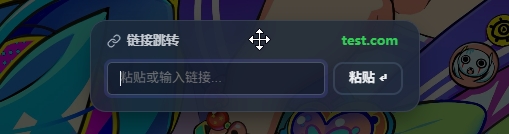
preview image

🚀 Custom Link Jump Tool

A minimalist link redirection tool designed to bypass Referer restrictions on specific websites.

✨ Key Features

  • Custom Redirection: Easily handle links that restrict access based on the source (Referer), requiring them to be opened from a specific site.
  • Clipboard Recognition: Supports one-click "Paste & Jump" or jumping by pressing Enter after typing a URL.
  • Multi-language Support: Automatically adapts to your system language (Supports Simplified Chinese, Traditional Chinese, and English).
  • Modern UI: Floating window design with drag-and-drop support and native dark mode adaptation.

📖 Use Case

If a target website requires that you must arrive from aaa.com, simply open the tool on aaa.com, paste your target link, and jump.

🛠️ Configuration

By default, it is only enabled on specific domains. To use it on more sites, please edit the beginning of the script:

const enableDomains = [
    ...getDefault(),
    'example.com', // Add the domain names you want to enable here
];