YouTube Speed and Loop

Enhances YouTube with playback speeds beyond 2x and repeat functionality

As of 2025-05-27. See the latest version.

You will need to install an extension such as Tampermonkey, Greasemonkey or Violentmonkey to install this script.

You will need to install an extension such as Tampermonkey to install this script.

You will need to install an extension such as Tampermonkey or Violentmonkey to install this script.

You will need to install an extension such as Tampermonkey or Userscripts to install this script.

You will need to install an extension such as Tampermonkey to install this script.

You will need to install a user script manager extension to install this script.

(I already have a user script manager, let me install it!)

You will need to install an extension such as Stylus to install this style.

You will need to install an extension such as Stylus to install this style.

You will need to install an extension such as Stylus to install this style.

You will need to install a user style manager extension to install this style.

You will need to install a user style manager extension to install this style.

You will need to install a user style manager extension to install this style.

(I already have a user style manager, let me install it!)

Author
Hank8933
Ratings
0 0 0
Version
1.0.1
Created
2025-03-08
Updated
2025-05-27
Size
15.1 KB
License
MIT
Applies to

YouTube-Speed-and-Loop

Enhances YouTube with playback speeds beyond 2x and repeat functionality.

Features

  • Playback Speed Control: Adjust playback speed from 0.25x to 5x using a slider or preset buttons.
  • Loop Playback: Toggle loop playback on/off for the entire video.
  • Loop Range: Set specific start and end times to loop a section of the video.

Installation

  1. Install a userscript manager like Tampermonkey and enable developer mode (see this guide).
  2. Go to Greasy Fork to install the script.

Usage

  • Playback Speed:
    • Use the slider to adjust the speed dynamically.
    • Click preset buttons (1x, 1.5x, 2x, 3x, 4x, 5x) for quick selection.
  • Loop Playback:
    • Click the "Loop Playback" button to toggle looping on/off.
  • Loop Range:
    • Click "Set Start" to mark the loop start time.
    • Click "Set End" to mark the loop end time.
    • Click "Clear" to reset the loop range.

Screenshots

Collapsed Control Panel

The control panel in its minimized state.
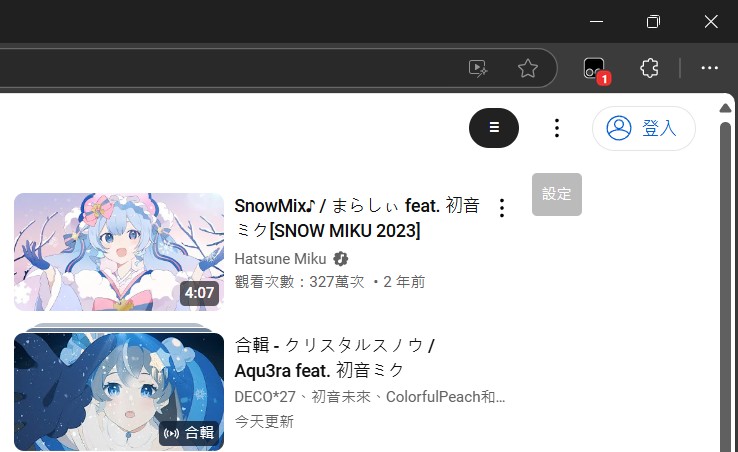
Control Panel Collapsed

Expanded Control Panel

The full panel with all options visible.
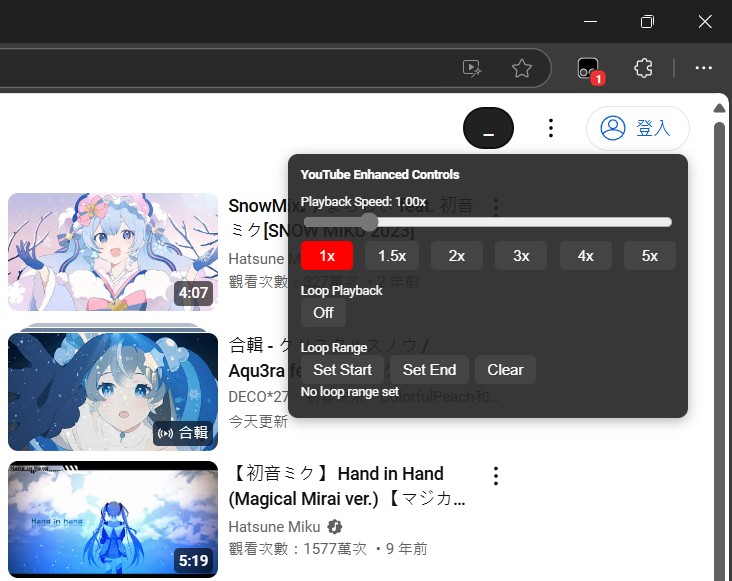
Control Panel Expanded

📦 Changelog

  • v1.0

    • Initial release with playback speed and loop functionality.
  • v1.0.1 (Current)

    • 🛠️ Fix: Prevent multiple control panels from appearing.
    • 🔄 Fix: Keep custom loop toggle in sync with the native video loop state.

License

MIT License