BIT-乐学-修改侧边栏课程

在侧边栏添加并重新排列课程

You will need to install an extension such as Tampermonkey, Greasemonkey or Violentmonkey to install this script.

You will need to install an extension such as Tampermonkey to install this script.

You will need to install an extension such as Tampermonkey or Violentmonkey to install this script.

You will need to install an extension such as Tampermonkey or Userscripts to install this script.

You will need to install an extension such as Tampermonkey to install this script.

You will need to install a user script manager extension to install this script.

(I already have a user script manager, let me install it!)

You will need to install an extension such as Stylus to install this style.

You will need to install an extension such as Stylus to install this style.

You will need to install an extension such as Stylus to install this style.

You will need to install a user style manager extension to install this style.

You will need to install a user style manager extension to install this style.

You will need to install a user style manager extension to install this style.

(I already have a user style manager, let me install it!)

Author
YDX-2147483647
Daily installs
0
Total installs
6
Ratings
0 0 0
Version
1.3.1
Created
2023-07-14
Updated
2023-07-17
Size
3.9 KB
License
GPL-3.0-or-later
Applies to

BIT-乐学-修改侧边栏课程

北京理工大学的乐学(Moodle)的侧边栏好像是按某种规则挑选出最多 10 个课程。然而它并不能完全猜中,还不时更新,导致每次更新都要改。

这段脚本可以自主定义侧边栏课程。如下图,右侧 InPrivate 窗口是原版,左侧是此脚本修改后的。
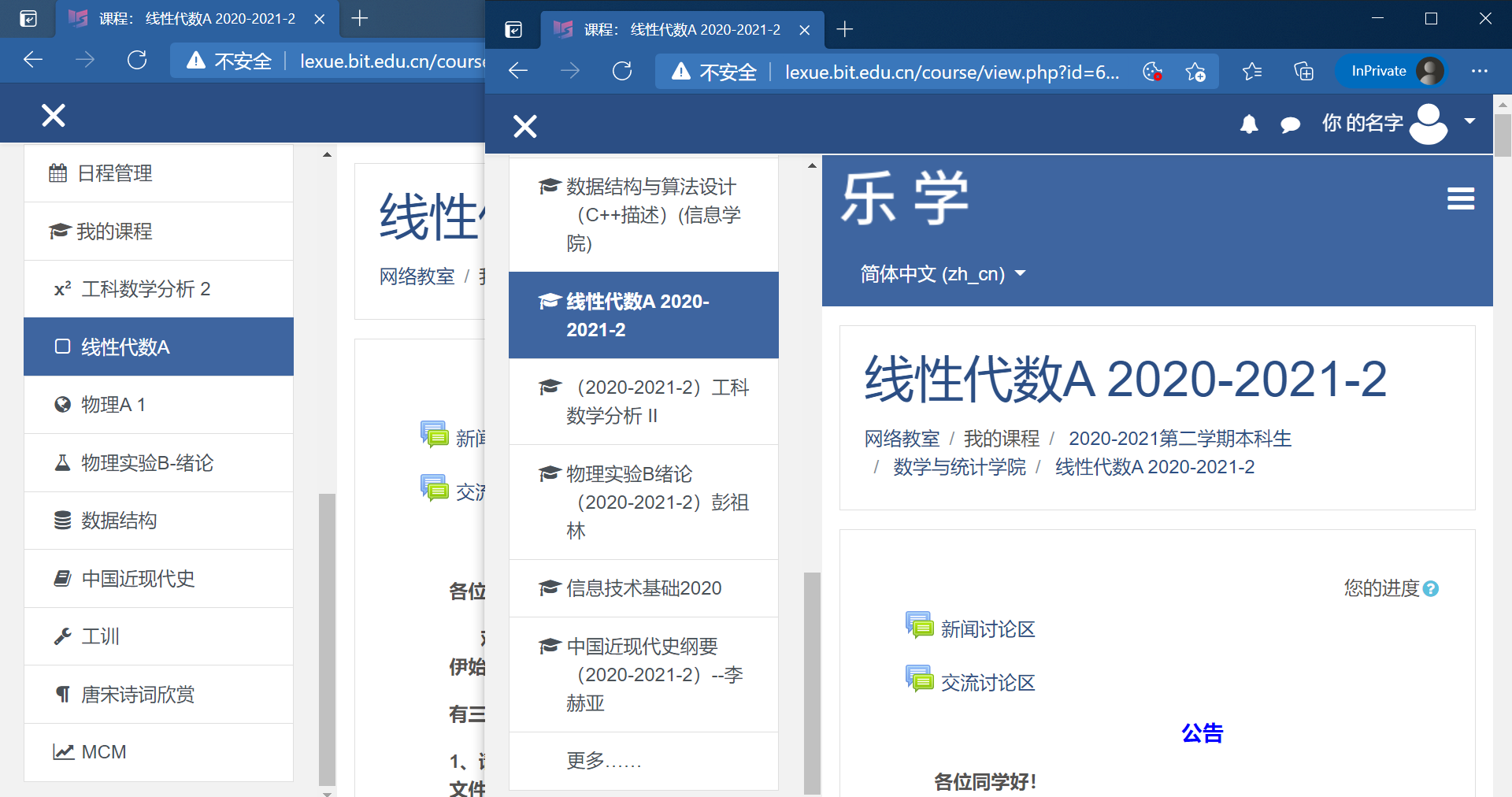
乐学-课程页

您也可考虑替代方案——在“个人主页 → 课程概览”可以筛选“进行中”“尚未开始的”或“过去的”课程。

配置

您需要自己配置哪些课程要隐藏,哪些要显示。

  1. 改为高级配置模式:前往 TamperMonkey → 设置 → 通用 → 配置模式,选为“高级”。

  2. 找到“存储”:到这个脚本的编辑页,在上边栏切换到“存储”(位置与“编辑器”“设置”并排)。

  3. 写入配置:在“存储”一栏写入 JSON,一般照猫画虎即可。

    例如——

    {
        "show": [
            { "name": "信号与系统-实验", "id": "10664", "icon": "signal" },
            { "name": "电磁场与电磁波", "id": "10713", "icon": "globe" }
        ],
        "hide": [
            { "name": "物理实验B-绪论", "id": "7661", "icon": "flask" },
            "更多",
            { "name": "学术用途英语12021-2022-1许子艳", "id": "8751", "comment": "错误课程" },
            "乐学使用简明教程"
        ]
    }
    

    详情见源代码注释里的ConfigCourseDescription

兼容性

这段脚本与“BIT-乐学-修改侧边栏课程-GUI”矛盾,同时启用时效果不确定。

  • GUI版的操作方式远比此脚本直观,直接拖动即可;而且能拉取全部课程列表,方便每学期更新。
  • 此脚本是原初版本,功能已经全面落后,除了代码简洁外基本没有优势。
  • 网上新增课程后,目前两脚本设计了不同的默认行为。此脚本不作为,无论网上原本显示与否,都保持原样;而GUI版会将新课插入“隐藏的课程”列表开头,并用红色粗体标识;

欢迎有志之士前往 YDX-2147483647/BIT-enhanced 帮忙合并两段脚本。