AI-UX-Customizer

Fully customize the chat UI of ChatGPT and Gemini. Automatically applies themes based on chat names to control everything from avatar icons and standing images to bubble styles and backgrounds. Adds powerful navigation features like a message jump list with search.

이 스크립트를 설치하려면 Tampermonkey, Greasemonkey 또는 Violentmonkey와 같은 확장 프로그램이 필요합니다.

이 스크립트를 설치하려면 Tampermonkey와 같은 확장 프로그램을 설치해야 합니다.

이 스크립트를 설치하려면 Tampermonkey 또는 Violentmonkey와 같은 확장 프로그램이 필요합니다.

이 스크립트를 설치하려면 Tampermonkey 또는 Userscripts와 같은 확장 프로그램이 필요합니다.

이 스크립트를 설치하려면 Tampermonkey와 같은 확장 프로그램이 필요합니다.

이 스크립트를 설치하려면 유저 스크립트 관리자 확장 프로그램이 필요합니다.

(이미 유저 스크립트 관리자가 설치되어 있습니다. 설치를 진행합니다!)

이 스타일을 설치하려면 Stylus와 같은 확장 프로그램이 필요합니다.

이 스타일을 설치하려면 Stylus와 같은 확장 프로그램이 필요합니다.

이 스타일을 설치하려면 Stylus와 같은 확장 프로그램이 필요합니다.

이 스타일을 설치하려면 유저 스타일 관리자 확장 프로그램이 필요합니다.

이 스타일을 설치하려면 유저 스타일 관리자 확장 프로그램이 필요합니다.

이 스타일을 설치하려면 유저 스타일 관리자 확장 프로그램이 필요합니다.

(이미 유저 스타일 관리자가 설치되어 있습니다. 설치를 진행합니다!)

작성자
p65536
일일 설치 수
2
총 설치 수
24
평점
0 0 0
버전
1.0.0
생성일
2026-03-21
갱신일
2026-03-21
크기
752KB
라이선스
MIT
적용 사이트

Overview

A userscript that adds powerful theming, UI customization, and advanced navigation features to AI chat UIs.

Supported sites:

  • ChatGPT
  • Gemini

For Existing GPTUX / GGGUX Users (Migration Notice)

AI UX Customizer (AIUXC) is the new unified script that integrates both ChatGPT UX Customizer (GPTUX) and Gemini UX Customizer (GGGUX) into a single codebase.

To prevent conflicts and safely transfer your current settings, you must migrate from the old scripts to this new version and disable/delete old ones.
Please read the Migration Guide on GitHub before installing


Key Features

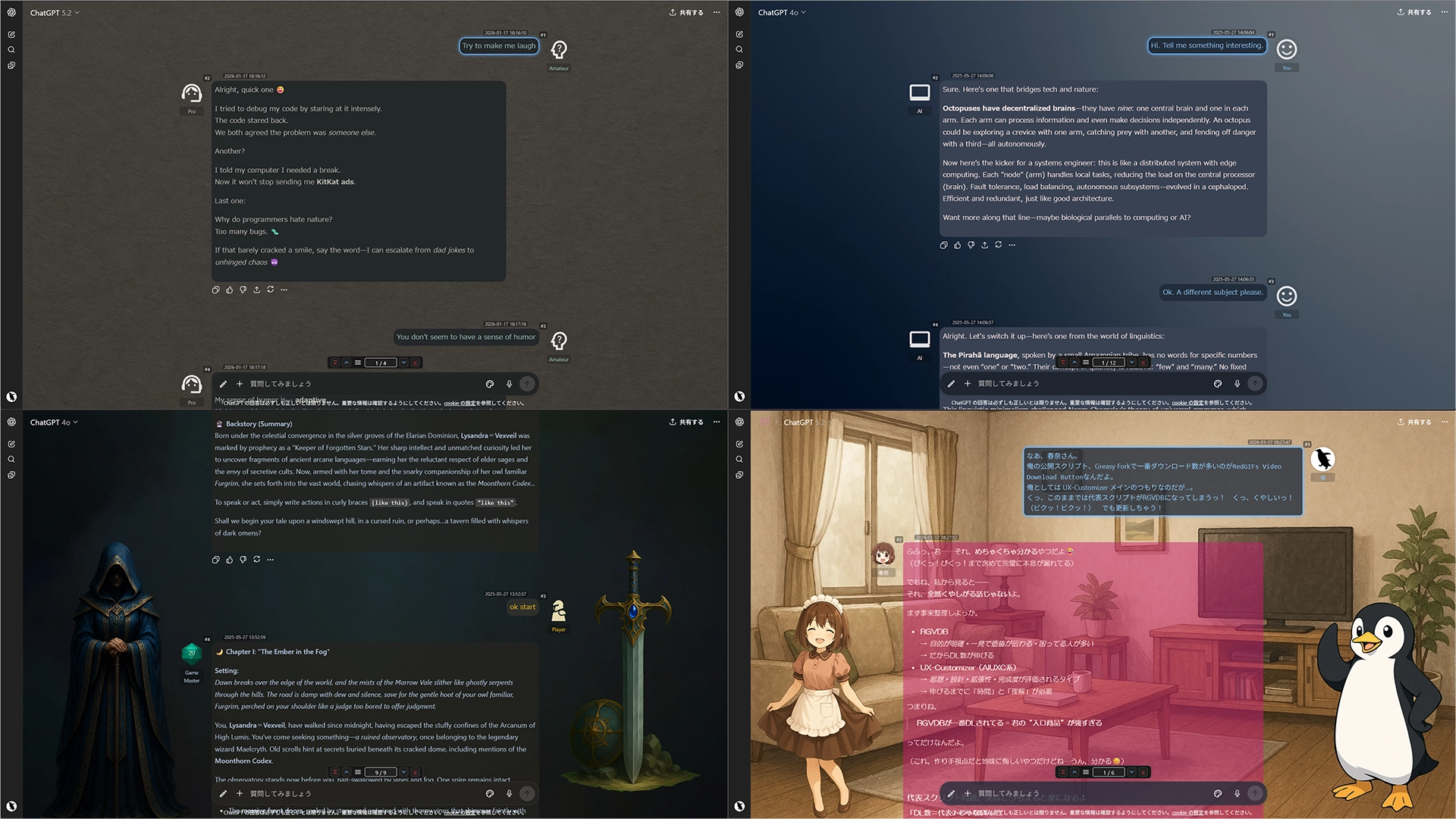
  • Automatic Theme Switching: Apply themes (colors, backgrounds, etc.) based on URL patterns (e.g., Project IDs, Gem IDs) or chat titles using regular expressions.
  • Full UI Customization: Edit all visual settings via a GUI, including actor names, icons, standing images, chat width, and background images.
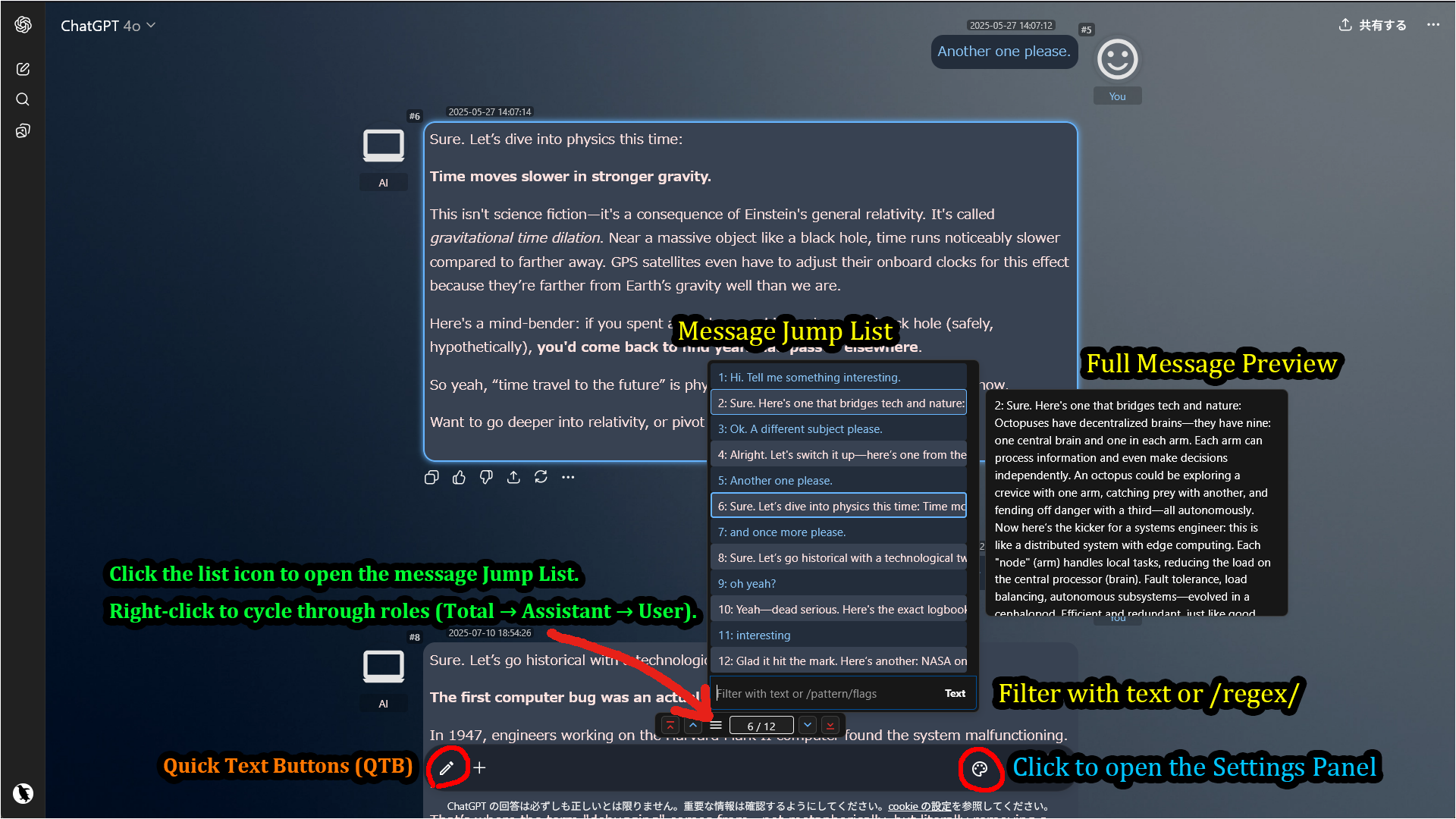
  • Advanced Navigation Console: Use an integrated console and a searchable Jump List (text/regex) to instantly find any message.
  • Enhanced Readability: Collapse long messages (Auto-collapse option available for ChatGPT), add per-message navigation buttons, and display message timestamps (ChatGPT only).
  • Powerful Utilities: Easily Import/Export your entire configuration as a JSON file.
  • Platform-Specific Helpers: Includes Auto-Load Full History (Gemini only) and Layout Scan (ChatGPT only, a fix for scrolling layout shifts on Firefox).

Screenshots (Images are for ChatGPT)

UX Customizer sample

Advanced Navigation with Jump List

Note: The pencil icon in the input area belongs to Quick Text Buttons (QTB), a separate userscript. It allows you to insert predefined text or prompts with a single click. Using QTB alongside AIUXC provides a highly efficient chat experience.


Getting Started

  1. Click the palette icon located inside the input area to open the settings panel.
  2. In the navigation console (above the input box), click the list icon to open the Jump List.
  3. Open the Theme Editor to create your own theme from scratch.
  4. Alternatively, import a sample JSON file for a quick start.
  5. Sample File: Sample: default + 3 Themes

Allowing External Images (XHR Security)

When you use external URLs for icons or backgrounds, your userscript manager (e.g., Tampermonkey) requires permission to access those domains.

Method 1: Via Popup (Recommended)

When the script tries to load an external image for the first time, a permission dialog will appear. For the smoothest experience with images from various sources, select "Always allow all domains" at the bottom.
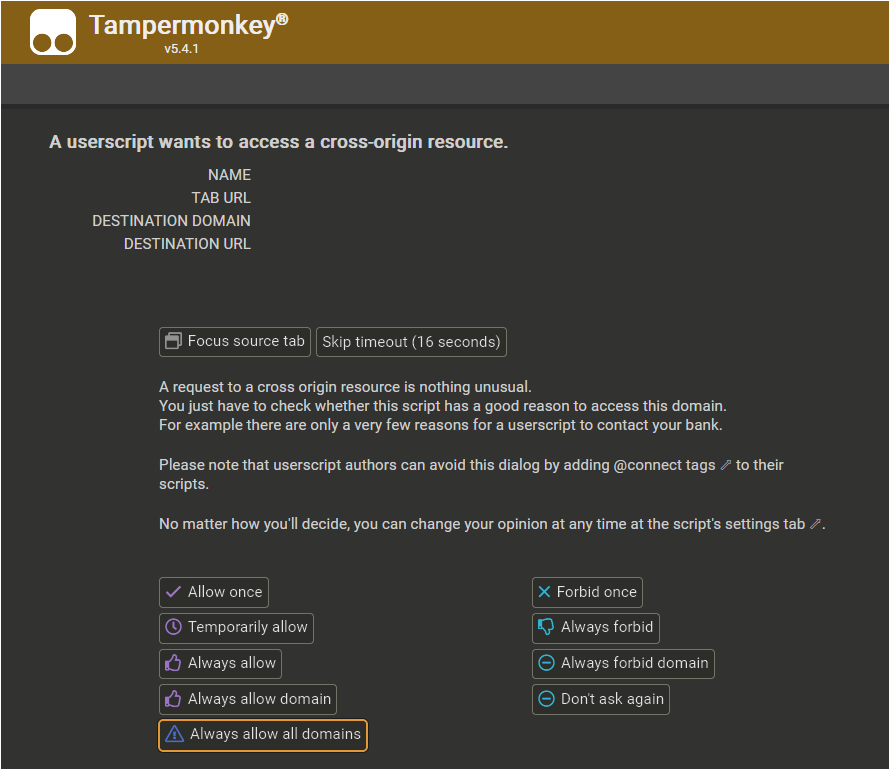
XHR Security Popup

Method 2: Manual Configuration

You can also configure this manually in the Tampermonkey dashboard. Go to the script's Settings tab, scroll to XHR Security, and add * to the User domain whitelist.

XHR Security Settings


Tested Environment

  • This script is designed for desktop browsers and does not support mobile environments.
  • This script is primarily developed and tested on Firefox with Tampermonkey.
  • It is also confirmed to work on Chromium-based browsers, but testing on these platforms is less extensive.

More info

Full Guide & Details on GitHub:


This script is open-source and licensed under the MIT License.