Steam Essentials

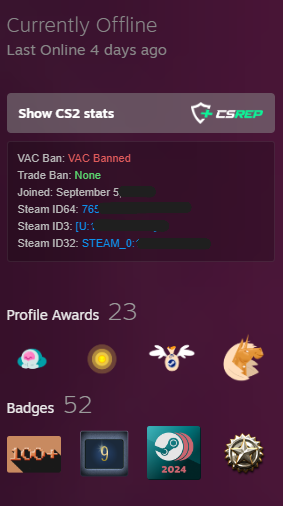
Standalone Steam profile tools: CSRep button, Steam ID info box, ban status, joined date, and Open in Steam button.

You will need to install an extension such as Tampermonkey, Greasemonkey or Violentmonkey to install this script.

You will need to install an extension such as Tampermonkey to install this script.

You will need to install an extension such as Tampermonkey or Violentmonkey to install this script.

You will need to install an extension such as Tampermonkey or Userscripts to install this script.

You will need to install an extension such as Tampermonkey to install this script.

You will need to install a user script manager extension to install this script.

(I already have a user script manager, let me install it!)

You will need to install an extension such as Stylus to install this style.

You will need to install an extension such as Stylus to install this style.

You will need to install an extension such as Stylus to install this style.

You will need to install a user style manager extension to install this style.

You will need to install a user style manager extension to install this style.

You will need to install a user style manager extension to install this style.

(I already have a user style manager, let me install it!)

Author
esteban-cz
Daily installs
0
Total installs
3
Ratings
0 0 0
Version
2.2.0
Created
2026-05-31
Updated
2026-06-01
Size
409 KB
License
MIT
Applies to

Steam Essentials

Standalone Tampermonkey userscript that adds practical profile and store-page tools to Steam.

Screenshots

Store header actions

Steam store header actions

Purchase actions

Steam purchase action buttons

Profile tools

Steam profile tools

Features

  • Adds a CSRep shortcut on Steam profile pages.
  • Shows Steam profile details from Steam's XML profile endpoint:
    • VAC ban status
    • Trade ban status
    • Joined date
    • Steam ID64, Steam ID3, and Steam ID32
  • Makes Steam IDs clickable to copy.
  • Adds an Open client button on Steam store app pages using steam://store/<appId>.
  • Restyles the Steam Community Hub button to match the added controls.
  • Adds AllKeyShop links near the store page header and purchase actions.
  • Adds external rating blocks from GameSpot and GameRankings when available.
  • Attempts to bypass Steam store and community age gates by setting mature-content cookies and proceeding through age prompts.

Install

  1. Install a userscript manager such as Tampermonkey or Violentmonkey.
  2. Open main.js.
  3. Copy the script into a new userscript.
  4. Save it and visit a supported Steam page.

Supported Pages

The script runs on:

Permissions

The userscript metadata requests:

  • GM_xmlhttpRequest for external rating lookups.
  • @connect www.gamespot.com
  • @connect www.gamerankings.com

Steam profile data is fetched from the current Steam profile page with ?xml=1.

Development

This repository is intentionally simple:

  • main.js contains the complete userscript, including embedded visual assets.
  • There is no build step.
  • Edit main.js, then reload or reinstall the userscript in your userscript manager.

License

MIT, as declared in the userscript metadata.