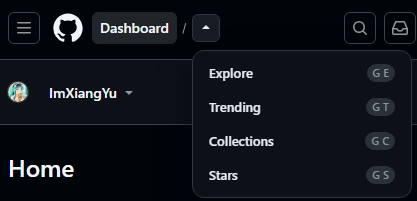
Better GitHub Navigation

Supports adding commonly used sections such as Dashboard, Explore, Trending, Collections, and Stars to the navigation bar for one-click access. Allows customization of visibility and order. Supports dark mode and narrow-screen layouts. Also includes a “GitHub Top Repositories” feature for pinning repositories, making frequently used repositories easy to access.

You will need to install an extension such as Tampermonkey, Greasemonkey or Violentmonkey to install this script.

You will need to install an extension such as Tampermonkey to install this script.

You will need to install an extension such as Tampermonkey or Violentmonkey to install this script.

You will need to install an extension such as Tampermonkey or Userscripts to install this script.

You will need to install an extension such as Tampermonkey to install this script.

You will need to install a user script manager extension to install this script.

(I already have a user script manager, let me install it!)

Advertisement:

You will need to install an extension such as Stylus to install this style.

You will need to install an extension such as Stylus to install this style.

You will need to install an extension such as Stylus to install this style.

You will need to install a user style manager extension to install this style.

You will need to install a user style manager extension to install this style.

You will need to install a user style manager extension to install this style.

(I already have a user style manager, let me install it!)

Advertisement:

Author
anmi255 H
Daily installs
0
Total installs
0
Ratings
0 0 0
Version
0.1.52
Created
2026-05-28
Updated
2026-05-28
Size
91 KB
License
MIT
Applies to

Better GitHub Navigation

中文说明 | English

中文说明

致谢

本项目在 Better GitHub Navigation(作者 Ayubass / ImXiangYu)的基础上进行扩展。感谢原作者开源了这一优秀的 GitHub 导航增强脚本,本仓库在保留其核心能力的同时,增加了对 Watch Later 工作流的支持。

关于本仓库

Better GitHub Navigation(含 Watch Later 集成) 是一款给 GitHub 补效率的 Tampermonkey(油猴)脚本。

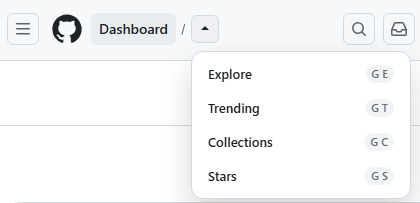
支持将 DashBoard、Explore、Trending、Collections、Stars、Laters 这些常用入口放入导航栏中一键直达。支持自定义是否显示、自定义顺序。支持深色模式、窄屏场景。同时加入了 GitHub Top repositories 显示仓库置顶功能,常用仓库一键置顶,方便查看。

在顶部导航中新增 Laters 入口,可与 GitHub Watch Later 搭配使用:在仓库页一键暂存、集中查看稍后阅读的仓库,从导航栏即可打开列表。

推荐搭配安装

为获得完整的「稍后阅读」体验,建议同时安装 GitHub Watch Later

👉 GreasyFork: GitHub Watch Later

  • 仓库页 Later 按钮:一键加入 / 移出稍后列表
  • 侧栏管理面板:搜索、排序、导入导出
  • 快捷键 Alt + L 与右下角浮动入口
  • 与本脚本的 Laters 导航项联动,随时打开列表

相关项目:github-WatchLater

🚀 核心功能

  • 常用页面一键直达:把 DashboardExploreTrendingCollectionsStarsLaters 这些常用入口补到顶部导航。 image-20260314111704936
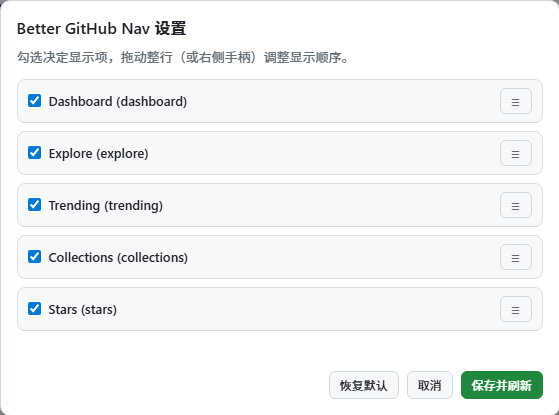
  • 快捷入口自定义显示:想显示哪些、放什么顺序,都可以自己调整,导航栏终于能配合你的工作流。
    image-20260314111810164
  • 窄屏和移动端适配:窗口变窄时,常用入口依然好找好点,小屏浏览 GitHub 也不会被拥挤的头部打断节奏。
    image-20260314111848110
  • 常用仓库固定:GitHub 首页左侧 Top repositories 支持一键置顶,把你真正常开的仓库留在最前面。
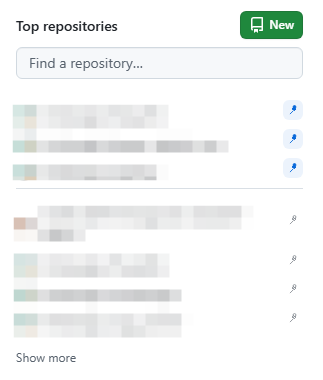

    image-20260314111928748
  • 跨页浏览:在 GitHub 里切页面时,增强入口会持续生效。
    image-20260314111954077
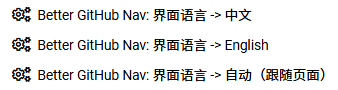
  • 双语界面:支持中文和英文,自动跟随页面语言。
    image-20260314112134041 image-20260314112154596
  • 深色模式适配:深色场景下依然适用。
    image-20260314112223000 image-20260314112245868

🛠️ 如何使用

  1. 安装脚本后,在 GitHub 页面点击油猴扩展图标。
  2. 在脚本菜单中选择 "Better GitHub Nav: 打开设置面板"。
  3. 勾选你想保留的快捷入口,并拖动顺序,整理出最适合自己的导航栏。
  4. 回到 GitHub 首页,点击 Top repositories 每个仓库后方的置顶按钮,把最常用的仓库固定到前面。

🔍 关键词

GitHub 首页增强, GitHub 导航增强, Top repositories 置顶, 常用仓库固定, Dashboard 快捷入口, Stars 快速访问, Watch Later, 稍后阅读, Tampermonkey 油猴脚本, GitHub 效率工具.


English Description

Credits

This project extends Better GitHub Navigation by Ayubass / ImXiangYu. Thank you to the original author for open-sourcing this excellent GitHub navigation enhancement. This repository keeps the core experience and adds support for a Watch Later workflow.

About This Repository

Better GitHub Navigation (with Watch Later integration) is a Tampermonkey userscript built to make GitHub more efficient.

It adds one-click access to Dashboard, Explore, Trending, Collections, Stars, and Laters in the top navigation. You can customize which shortcuts appear and in what order. It supports dark mode and narrow-screen layouts, and lets you pin your most-used repositories in GitHub’s Top repositories sidebar.

A new Laters item in the top navigation works with GitHub Watch Later: save repos to read later on any repository page and open your list from the nav bar.

Recommended Companion Script

For the full “read later” experience, install GitHub Watch Later alongside this script:

👉 GreasyFork: GitHub Watch Later

  • Later button on repository pages — add or remove repos from your list
  • Side panel — search, sort, import, and export
  • Shortcut Alt + L and a floating Later button on the page
  • Works with this script’s Laters nav item to open your list anytime

Related project: github-WatchLater

🚀 Key Features

  • One-click access to the pages you use most: Add Dashboard, Explore, Trending, Collections, Stars, and Laters directly to the top navigation.
    image-20260314111704936
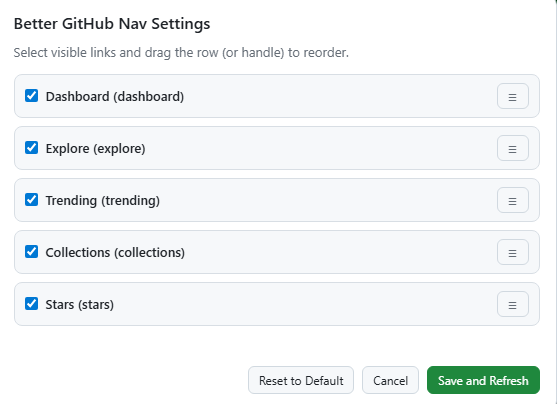
  • Customize which shortcuts appear: Decide what to show and in what order, so the header finally matches your workflow.
    image-20260314111810164
  • Works well on narrow screens and mobile layouts: Even when the window gets smaller, your shortcuts stay easy to find and click.
    image-20260314111848110
  • Pin your most-used repositories: On the GitHub home page, Top repositories gets one-click pinning so your real daily repos stay at the front.
    image-20260314111928748
  • Keeps working while you move across GitHub: The enhanced entry points stay available as you switch pages.
    image-20260314111954077
  • Bilingual UI: Supports both Chinese and English, and follows the page language automatically.
    image-20260314112134041 image-20260314112154596
  • Dark mode ready: Still clear and comfortable to use in dark mode.
    image-20260314112223000 image-20260314112245868

🛠️ How to Use

  1. After installation, click the Tampermonkey icon on any GitHub page.
  2. Select "Better GitHub Nav: Open Settings Panel" from the script menu.
  3. Keep the shortcuts you want, then drag them into the order that fits you best.
  4. Go back to the GitHub home page and click the pin button next to each repo in Top repositories to keep your most-used repos at the front.

🔍 Keywords

GitHub navigation shortcuts, GitHub home sidebar, Top repositories pinning, favorite repositories, Watch Later, read later list, GitHub productivity, GitHub userscript, Tampermonkey, GitHub workflow.