Gemini Default Model Setter

Automatically selects a specific model (e.g., "Pro") for Gemini upon page load, URL change, or tab return. The target model name and script state can be easily configured via the extension menu.

You will need to install an extension such as Tampermonkey, Greasemonkey or Violentmonkey to install this script.

You will need to install an extension such as Tampermonkey to install this script.

You will need to install an extension such as Tampermonkey or Violentmonkey to install this script.

You will need to install an extension such as Tampermonkey or Userscripts to install this script.

You will need to install an extension such as Tampermonkey to install this script.

You will need to install a user script manager extension to install this script.

(I already have a user script manager, let me install it!)

You will need to install an extension such as Stylus to install this style.

You will need to install an extension such as Stylus to install this style.

You will need to install an extension such as Stylus to install this style.

You will need to install a user style manager extension to install this style.

You will need to install a user style manager extension to install this style.

You will need to install a user style manager extension to install this style.

(I already have a user style manager, let me install it!)

Author
p65536
Daily installs
1
Total installs
2
Ratings
0 0 0
Version
1.0.0
Created
2026-05-14
Updated
2026-05-14
Size
34.3 KB
License
MIT
Applies to

Overview

Gemini Default Model Setter (GDMS) is a helper script designed for AI power users. It automatically forces Google Gemini to use your preferred specific model (e.g., "Pro" or "Advanced") upon page load, URL change, or tab return.

Stop manually selecting your preferred model every time you start a new conversation. This script ensures you always start with your target model, while still preserving your freedom to manually switch to a different model (like "Flash" for quicker tasks) during the chat.

It supports the following AI service:

  • Google Gemini

Key Features

  • Automatic Selection: Instantly selects your specified target model when starting a new chat or opening an existing history thread.
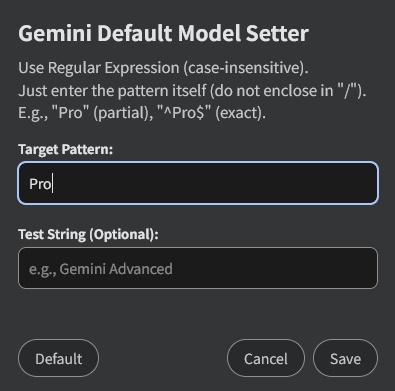
  • Regex Targeting: Easily configure your target model using case-insensitive Regular Expressions (e.g., Pro, Flash, Advanced) via an intuitive settings modal.
  • Multilingual Support: Since the model names are captured via user-defined Regular Expressions, the script is inherently compatible with all Gemini interface languages without any extra setup.
  • Preserves Manual Control: Sets the initial state but allows you to seamlessly switch models manually if you need a different engine mid-task.
  • Auto-Check on Re-focus: An optional fail-safe feature that re-verifies and sets the model when returning to the Gemini tab (useful for background loads or idle sessions).
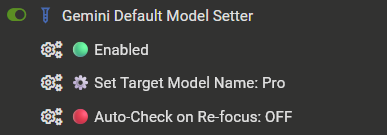
  • Extension Menu Integration: Toggle the script's active state, change the target pattern, and manage visibility settings directly from your userscript manager's menu (Tampermonkey / Violentmonkey).

Screenshots & Integration

Extension Menu

Settings Modal

  • Perfect Match: Works seamlessly with AI UX Customizer to enhance the overall visual interface and navigation of your AI chats.

Getting Started & Usage Guide

  • Initial Setup: Click your userscript manager extension icon (e.g., Tampermonkey) while on the Gemini page. Click "⚙️ Set Target Model Name" to open the settings modal and input your desired model pattern (e.g., simply type Pro).
  • Enable/Disable: You can easily suspend the script by clicking the "🟢 Enabled / 🔴 Disabled" toggle in the extension menu.
  • Past Chat History: When you click a past chat thread from the sidebar, the script will automatically switch it to your target model, allowing you to seamlessly continue past brainstorming with your highest-tier model.
  • About "Auto-Check on Re-focus":
    • Default is OFF.
    • When turned ON, the script checks the model every time you switch back to the Gemini tab. This is great for idle tabs, but note: if you manually switched to "Flash" and then switched browser tabs, returning to Gemini will automatically reset it back to "Pro". Keep this OFF if you frequently use manual switching alongside heavy tab-switching.

Tested Environment

  • This script is primarily developed and tested on Firefox with Tampermonkey.
  • It is also confirmed to work on Chromium-based browsers, but testing on these platforms is less extensive.

More info

Full Guide & Details on GitHub:


This script is open-source and licensed under the MIT License.