Roblox Presence Dashboard + Fit Cloner (USD Packs + Last Seen) — finished

Track multiple users; show last seen; join; show/clone fit; USD-optimal Robux combo; dynamic add/remove

You will need to install an extension such as Tampermonkey, Greasemonkey or Violentmonkey to install this script.

You will need to install an extension such as Tampermonkey to install this script.

You will need to install an extension such as Tampermonkey or Violentmonkey to install this script.

You will need to install an extension such as Tampermonkey or Userscripts to install this script.

You will need to install an extension such as Tampermonkey to install this script.

You will need to install a user script manager extension to install this script.

(I already have a user script manager, let me install it!)

You will need to install an extension such as Stylus to install this style.

You will need to install an extension such as Stylus to install this style.

You will need to install an extension such as Stylus to install this style.

You will need to install a user style manager extension to install this style.

You will need to install a user style manager extension to install this style.

You will need to install a user style manager extension to install this style.

(I already have a user style manager, let me install it!)

Author
Gaston_
Daily installs
1
Total installs
18
Ratings
0 0 0
Version
1.3.3
Created
2025-09-03
Updated
2025-09-03
Size
32.1 KB
License
MIT
Applies to

RobloxWatcher Userscript

This is the Tampermonkey/Greasemonkey userscript part of RobloxWatcher.
It adds a floating HUD on Roblox pages to track user presence, join servers, and clone outfits.


📸 Screenshots

Presence HUD
Track friends/users, see their status, join instantly:
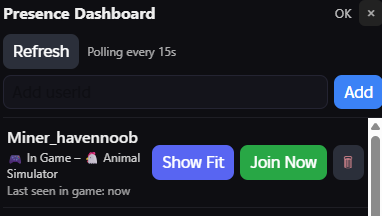
Presence HUD

Show Fit HUD
Inspect worn items, prices, bundles, and get Robux pack suggestions:
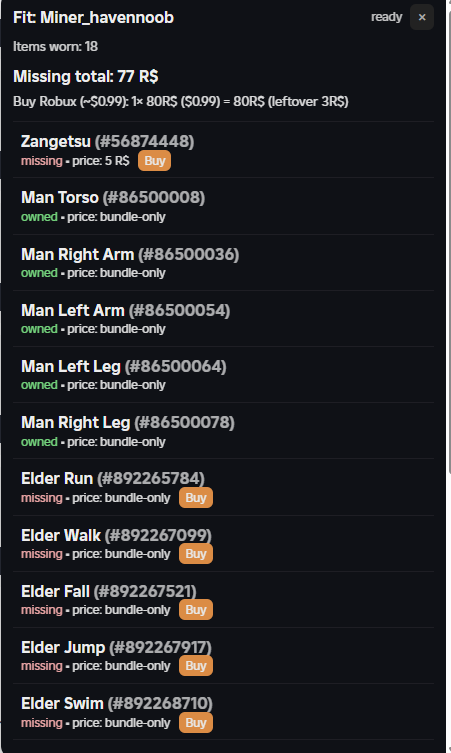
Show Fit HUD

✨ Features

  • Presence dashboard in the top-right corner
  • Tracks multiple users (add/remove dynamically)
  • Shows: Username – Status – Last seen
  • “Join Now” button (deep-links to Roblox)
  • “Show Fit” → lists worn assets/bundles, price, owned/missing
  • USD-optimal Robux pack combo calculator
  • “Clone Fit” and “Buy Missing” buttons open relevant pages
  • Profile pages get an Add/Remove User button

📦 Requirements


🔧 Setup

  1. Install Tampermonkey.
  2. Click Install on this GreasyFork page to add the script.
  3. Clone & run the RobloxWatcher server locally: bash git clone https://github.com/gaston1799/RobloxWatcher.git cd RobloxWatcher npm install cp .env.example .env # add your .ROBLOSECURITY cookie npm run dev
  4. The userscript will auto-connect to http://localhost:3000.

🖥 Usage

  • Press Ctrl+Shift+F to toggle the HUD.
  • Use the HUD to add/remove userIds, refresh, or join servers.
  • On profile pages, use the Add/Remove User button.
  • “Show Fit” → see items, prices, Robux pack suggestions.

⚠️ Notes

  • Requires your Roblox cookie in the server .env for API calls.
  • Cookie stays on your local machine; never commit/share it.
  • Works for public games when Roblox exposes the placeId and gameId.

🔒 Security

  • The script itself never touches your cookie.
  • All sensitive requests are proxied via your local server.