Melvor Idle Item Dashboard (MIID)

Track -everything- over time!

You will need to install an extension such as Tampermonkey, Greasemonkey or Violentmonkey to install this script.

You will need to install an extension such as Tampermonkey to install this script.

You will need to install an extension such as Tampermonkey or Violentmonkey to install this script.

You will need to install an extension such as Tampermonkey or Userscripts to install this script.

You will need to install an extension such as Tampermonkey to install this script.

You will need to install a user script manager extension to install this script.

(I already have a user script manager, let me install it!)

You will need to install an extension such as Stylus to install this style.

You will need to install an extension such as Stylus to install this style.

You will need to install an extension such as Stylus to install this style.

You will need to install a user style manager extension to install this style.

You will need to install a user style manager extension to install this style.

You will need to install a user style manager extension to install this style.

(I already have a user style manager, let me install it!)

Author
Gardens
Daily installs
0
Total installs
870
Ratings
0 0 0
Version
2.4
Created
2021-02-22
Updated
2021-11-28
Size
31.7 KB
License
GNU GPLv3
Applies to

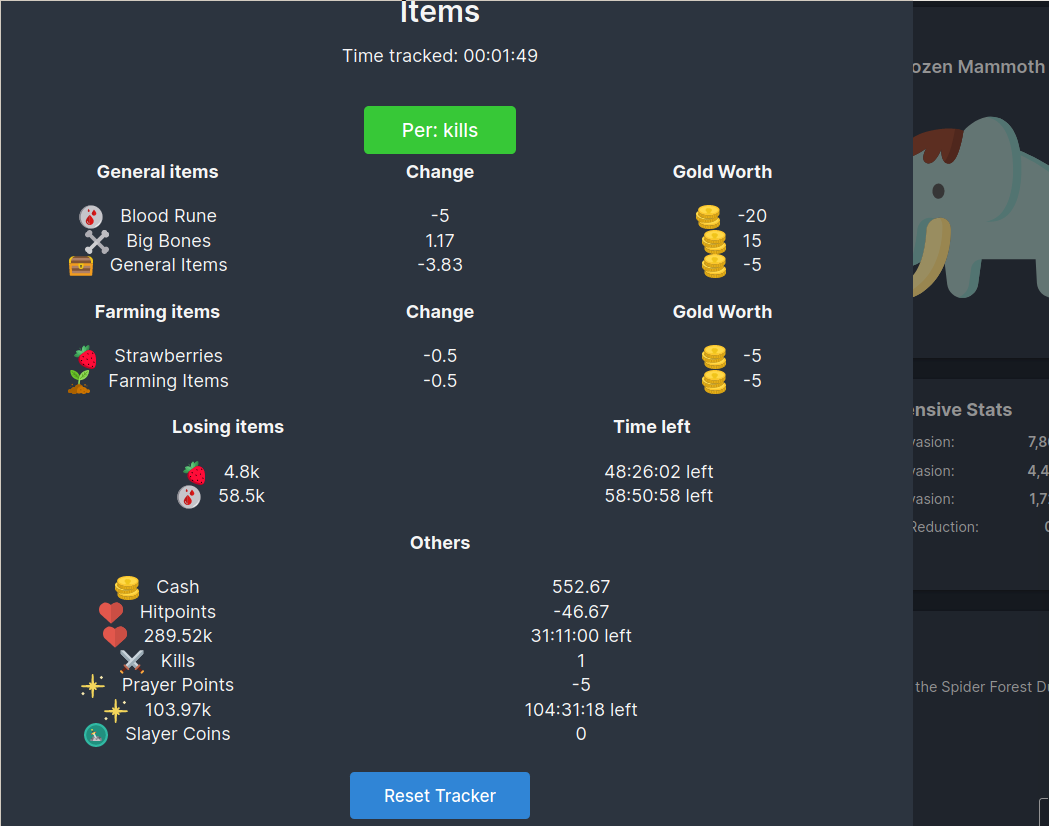
UPDATE: click items or points to make all info relative to them (e.g. bones per kill, ores per bar, etc.)

Big dashboard to track average items, gold value, kills and resources over time.
Meant for single-action experiments, e.g. "does cooking this make more gold than fishing" or "how many kills can I get per minute with this setup".

Great for theorycrafting and relative comparisons!
Use the new button on the left, that displays gold/sec!
Uses localStorage with the "itemTracker" key, so it should count offline progress!

Console use: Check the itemsOwned() function for everything you have, and the itemTracker{} and resDiff{} objects for the numbers behind the dashboard.
Calling trackerTick(false) (silent=false) shows you what's currently happening with your resources, as the dashboard does.

To Do:
- better mobile support
- better rounding function
- more customisability

Done:
- hiding certain items
- setting custom interval
- relative item tracking (ores per bar, HP/XP per kill)
- track XP and Mastery Pool