Quick-Text-Buttons

Adds customizable text buttons to paste frequently used prompts into ChatGPT/Gemini inputs.

You will need to install an extension such as Tampermonkey, Greasemonkey or Violentmonkey to install this script.

You will need to install an extension such as Tampermonkey to install this script.

You will need to install an extension such as Tampermonkey or Violentmonkey to install this script.

You will need to install an extension such as Tampermonkey or Userscripts to install this script.

You will need to install an extension such as Tampermonkey to install this script.

You will need to install a user script manager extension to install this script.

(I already have a user script manager, let me install it!)

You will need to install an extension such as Stylus to install this style.

You will need to install an extension such as Stylus to install this style.

You will need to install an extension such as Stylus to install this style.

You will need to install a user style manager extension to install this style.

You will need to install a user style manager extension to install this style.

You will need to install a user style manager extension to install this style.

(I already have a user style manager, let me install it!)

Skaber
p65536
Daglige installationer
0
Installationer i alt
34
Bedømmelser
0 0 0
Version
3.1.2
Oprettet
05.08.2025
Opdateret
20.02.2026
Size
317 kB
Licens
MIT
Gælder for

Overview

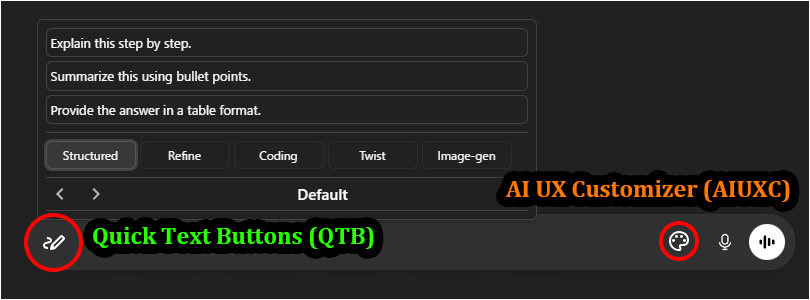
Quick-Text-Buttons (QTB) is a Prompt Manager script designed for AI power users. It adds a customizable text button directly to the ChatGPT and Gemini input fields, allowing you to insert frequently used prompts, snippets, and templates with a single click.

Stop typing the same instructions repeatedly. Efficiently manage and utilize your text assets by organizing them into "Profiles" and "Categories" to boost your productivity.

It supports the following AI services:

  • ChatGPT
  • Gemini

Recommended Companion: Pair this with UX Customizer (UXC) for a complete UI overhaul.
QTB optimizes Input, while UXC optimizes UI & Navigation—together, they provide a highly efficient chat experience.

[IMPORTANT] Compatibility: Due to updates in the DOM observation engine (Sentinel), if using this script with UX Customizer (AIUXC/GPTUX/GGGUX), strict version matching is required:

  • QTB v3.1.2+ with AIUXC v1.0.0-b489+ / GPTUX v2.4.2+ / GGGUX v2.4.2+

Key Features

  • Seamless Input Integration: A non-intrusive button placed directly inside the chat input area.
  • Prompt Management: Easily create, edit, and organize prompts via an intuitive GUI.
  • Profiles & Categories: Switch context instantly (e.g., "Coding", "Writing", "Image Gen") using profile switching.
  • Flexible Insertion: Choose to insert prompts at the cursor, start, or end of the text.
  • Smart Handling: Option to automatically insert a newline before or after the text.
  • Quick Access: Open your prompt library via Hover or Click.
  • Import/Export: Settings export/import functionality (in JSON format). Includes a sample prompt set to get you started.

Screenshots (Images are for ChatGPT)

Quick Text Buttons Showcase Image

  • Perfect Match: Works seamlessly with UX Customizer ( ChatGPT / Gemini ) to enhance the visual interface and navigation.

Getting Started

  • Insert Text: Hovering (or Clicking, depending on settings) over the Quick Text button (pen icon) at the bottom-left of the chat input field will display the list of registered texts. Clicking one will insert the text into the input field.
  • Settings: Right-clicking the button opens the Settings Panel to edit texts, manage profiles, and change options.
  • The easiest way to get started is to import the sample file and modify its contents to your liking.
    Please import the sample JSON from the link above via the script's settings screen (JSON modal).

More info

Full Guide & Details on GitHub:


This script is open-source and licensed under the MIT License.