Export SteamDB Search

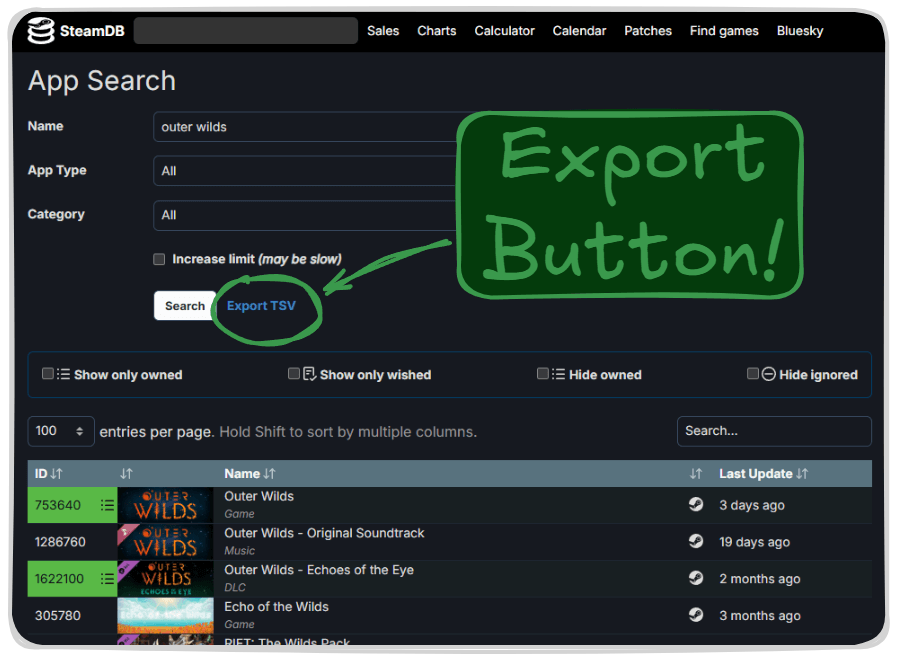
Adds a button to export current search in SteamDB as TSV

You will need to install an extension such as Tampermonkey, Greasemonkey or Violentmonkey to install this script.

You will need to install an extension such as Tampermonkey or Violentmonkey to install this script.

You will need to install an extension such as Tampermonkey or Violentmonkey to install this script.

You will need to install an extension such as Tampermonkey or Userscripts to install this script.

You will need to install an extension such as Tampermonkey to install this script.

You will need to install a user script manager extension to install this script.

(I already have a user script manager, let me install it!)

You will need to install an extension such as Stylus to install this style.

You will need to install an extension such as Stylus to install this style.

ستحتاج إلى تثبيت إضافة مثل Stylus لتثبيت هذا النمط.

ستحتاج إلى تثبيت إضافة لإدارة أنماط المستخدم لتتمكن من تثبيت هذا النمط.

ستحتاج إلى تثبيت إضافة لإدارة أنماط المستخدم لتثبيت هذا النمط.

ستحتاج إلى تثبيت إضافة لإدارة أنماط المستخدم لتثبيت هذا النمط.

(لدي بالفعل مثبت أنماط للمستخدم، دعني أقم بتثبيته!)

المؤلف
JLCareglio
التثبيت اليومي
0
إجمالي التثبيت
39
التقييمات
0 0 0
الإصدار
2.3.9
تم إنشاؤه
07-08-2023
تم تحديثه
04-02-2025
الحجم
8.34 KB
التوافق
متوافق مع Firefox متوافق مع Chrome متوافق مع Opera متوافق مع Safari متوافق مع Edge
الترخيص
MIT
ينطبق على

Export SteamDB Search

This script or UserScript adds a button to export current search results in SteamDB as TSV format.

image

License: MIT Tampermonkey SteamDB

Firefox Chrome Opera Safari Edge Brave

✨ Features

  • Adds "Export TSV" button next to the search filters
  • Exports detailed information of all search results in TSV format
  • Includes:
    • App ID
    • Game name
    • Last Update (UTC)
  • Compatible with multiple browsers

🚀 Installation

  1. Install Tampermonkey or other userscript manager
  2. Click here to install the script
  3. Visit SteamDB Search to try it

💡 Usage

  1. Go to SteamDB Search page
  2. Perform your search
  3. You'll find a new "Export TSV" button in the filters section
  4. Click "Export TSV" to start the export and wait
  5. The TSV file will download automatically