BlueCat Address Manager Direct Actions (Deploy)

Add direct buttons for Deploy Actions in BlueCat Address Manager

您需要先安裝使用者腳本管理器擴展,如 TampermonkeyGreasemonkeyViolentmonkey 之後才能安裝該腳本。

您需要先安裝使用者腳本管理器擴充功能,如 TampermonkeyViolentmonkey 後才能安裝該腳本。

您需要先安裝使用者腳本管理器擴充功能,如 TampermonkeyViolentmonkey 後才能安裝該腳本。

您需要先安裝使用者腳本管理器擴充功能,如 TampermonkeyUserscripts 後才能安裝該腳本。

你需要先安裝一款使用者腳本管理器擴展,比如 Tampermonkey,才能安裝此腳本

您需要先安裝使用者腳本管理器擴充功能後才能安裝該腳本。

(我已經安裝了使用者腳本管理器,讓我安裝!)

你需要先安裝一款使用者樣式管理器擴展,比如 Stylus,才能安裝此樣式

你需要先安裝一款使用者樣式管理器擴展,比如 Stylus,才能安裝此樣式

你需要先安裝一款使用者樣式管理器擴展,比如 Stylus,才能安裝此樣式

你需要先安裝一款使用者樣式管理器擴展後才能安裝此樣式

你需要先安裝一款使用者樣式管理器擴展後才能安裝此樣式

你需要先安裝一款使用者樣式管理器擴展後才能安裝此樣式

(我已經安裝了使用者樣式管理器,讓我安裝!)

作者
Marius Galm
今日安裝
0
安裝總數
0
評價
0 0 0
版本
5
建立日期
2018-03-27
更新日期
2018-08-23
尺寸
5.3 KB
授權條款
MIT
腳本執行於

Hello to all BlueCat Administrators out there.

Doing stuff over and over again always costs time, why not save some clicks. This will add additional buttons next to the actions menu, where you can directly access the Deployment functions in the Server List:
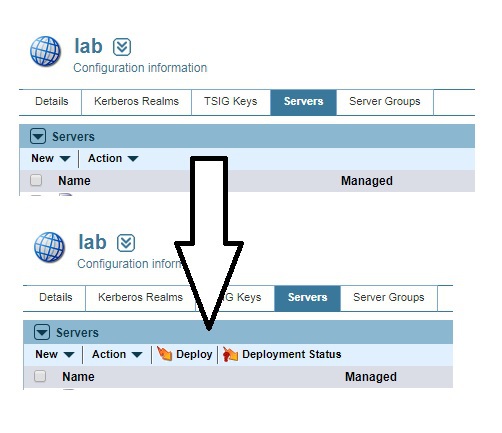
Here a picture worth a thousand words

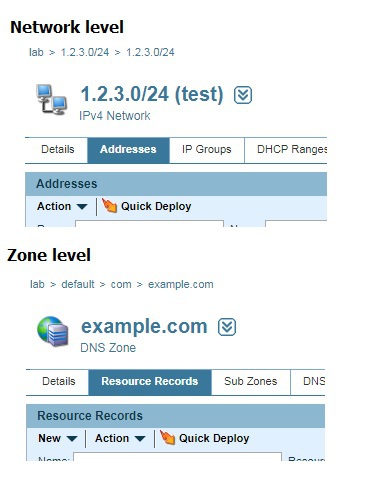
The Quick Deployment will also be more accessable in the Network Page and Zone Page:
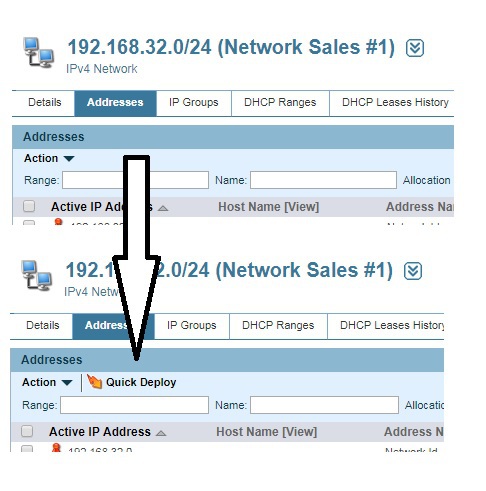
Here a picture worth a thousand words Here a picture worth a thousand words

With the latest version the deployment action (normally only available on the "Details" tab) is available on all subtabs of the Server page:
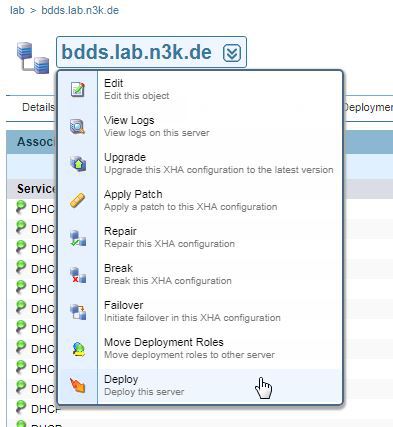
Here a picture worth a thousand words