
AnMe
通用多网站多账号切换器
AnMe 是一款基于 篡改猴 / 脚本猫 浏览器插件开发的多网站多账号管理切换脚本。它通过“快照”机制,一键保存并恢复网站的登录状态(Cookie、LocalStorage 和 SessionStorage),助您在同一个浏览器窗口中实现多账号无缝切换。
✨ 主要功能
- ⚡ 快速切换:为不同账号保存独立快照,点击即可瞬间切换。
- 📂 全面存储:支持同时备份 Cookie、LocalStorage (LS) 和 SessionStorage (SS)。
- 🌍 跨站管理:支持查看和管理非当前域名的其他网站账号记录。
- 📦 数据备份:支持导出当前网站或全部数据为 JSON 文件,方便跨设备迁移。
- 🎨 智能交互:
- 悬浮球设计:支持自由拖拽定位。
- 多种显示模式:智能显隐、常驻显示或完全隐藏(通过菜单唤起)。
- 拖拽排序:在管理面板中可通过拖拽调整账号顺序。
- 🌐 多语言支持:支持简体中文、英文、西班牙语。
🏠 运行截图

🚀 安装步骤
准备环境:确保您的浏览器已安装 篡改猴Tampermonkey 或 脚本猫ScriptCat 插件。
篡改猴设置权限 (重要):
- 为了脚本能正常读取和保存 Cookie,请进入 “篡改猴管理面板”。
- 点击 “设置”,将 “通用” -> “配置模式” 改为 “高级”。
- 找到 “安全” -> “允许脚本访问 Cookie”,将其设置为 “ALL”,在下方记得点击“保存”。
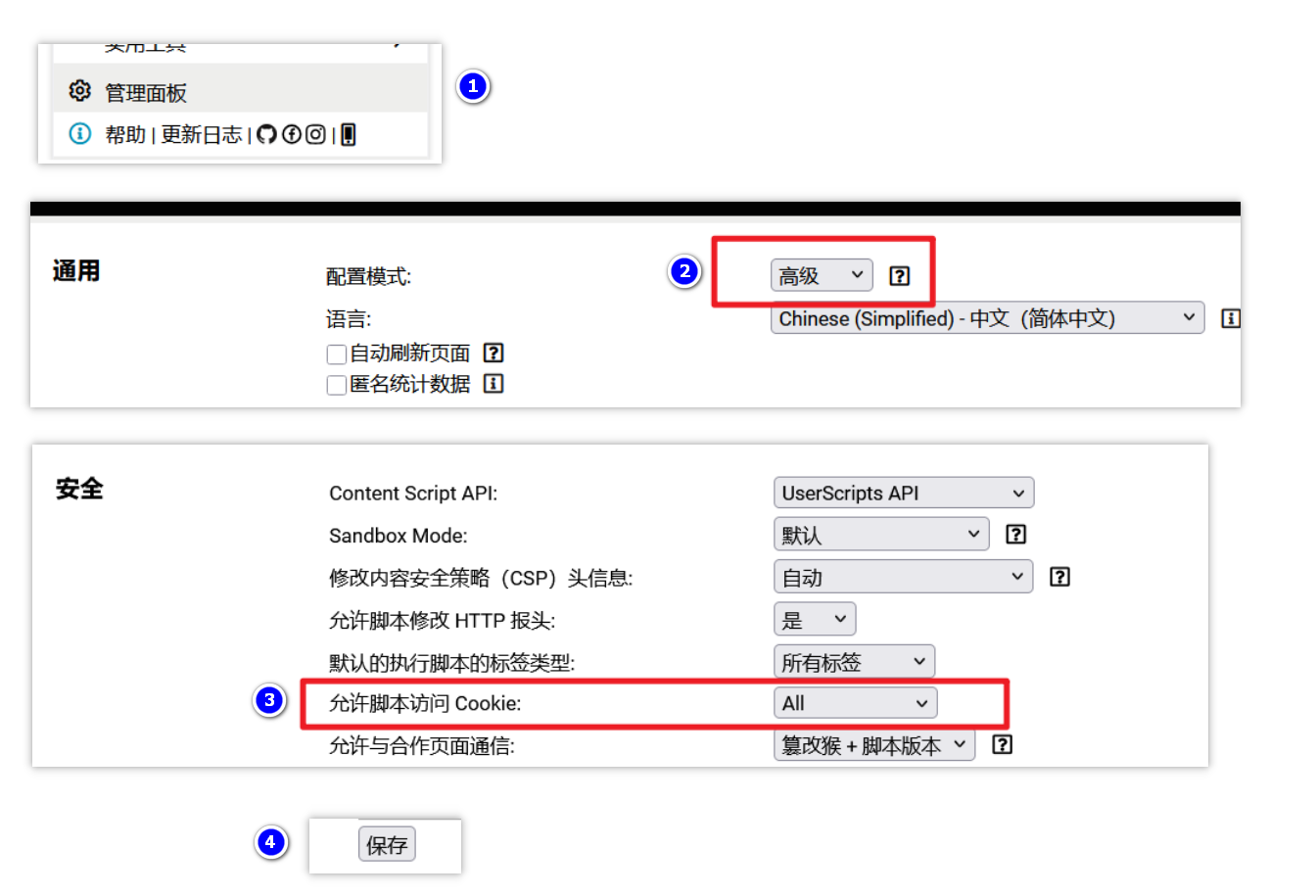
脚本猫ScriptCat 不需要额外的设置,当检测到需要权限时会提醒您进行选择。
- 安装脚本
- 可以选择在 Greasy Fork 中找到 AnMe 脚本来 安装,这里的代码和Github是同步更新的。
- 或在Github将 AnMe 仓库中的js代码复制到插件中保存。
🛠️ 使用指南
1. 保存账号
- 在需要保存账号的网页中(通常是网站的首页),找 篡改猴 / 脚本猫 插件中的AnMe脚本, 点击 🚀 开启账号管理 菜单打开账号管理面板。
- 进入 管理账号 标签页。
- 输入账号名称,勾选需要保存的数据类型(建议至少勾选 Cookie,如切换登录失败,尝试勾选 LocalStorage 和 SessionStorage后重新保存账号)。
- 点击 保存当前账号 后,账号会以“快照”的方式保留在脚本中。如需添加多个账号,点击旁边的“+” (切换新环境) 按钮登录新的账号保存即可。
账号保存后,不要使用原本网站的退出账号功能,这会让已经保存到脚本中的账号快照失效。可以使用脚本的 “+” (切换新环境) 来退出当前网站已经登录的账号。
2. 切换账号
- 在 账号切换 标签页中,点击对应的账号卡片后即可切换账号。
- 脚本会退出当前已经登录的账号,切换成你选择的账号进行登录并刷新网页。
- 在账号的下面你会看到
CK、LS、SS 这样的小按钮,这是脚本所保存的账号信息,点击后可以查看具体的内容。
添加的账号并不会一直生效,这取决网站自身给账号设置的登录过期时间。一个可行的方式是切换登录后尝试重新保存同名的账号,这会重新刷新账号快照状态,延长过期时间。
3. 导入导出
导出数据:
- 在 高级设置 标签页中,脚本提供了导出脚本中保存的 当前网站 和 所有网站 的账号数据,导出后是一个json格式的文件,你需要妥善保管这些备份数据。
导入数据:
- 有了导出数据,你可以选择在 任意电脑 / 浏览器 安装了 AnMe 脚本重新导入他们。如果尝试进行切换账号登录,你会发现依然好用,并且没有要求输入的账号密码。
切换新账号并不总是成功的,不同的网站对安全性要求也不一样。高级一点的网站会使用诸如 浏览器指纹 的技术来识别用户状态,这就要根据具体的网站来判断。
🔒 隐私与安全
- 本地存储:所有数据均通过
GM_setValue 存储在您的本地浏览器中,脚本没有任何联网权限,不会上传任何数据到服务器。
- 风险提示:由于脚本管理器环境的开放性,请勿在公共电脑或不可信的设备上保存敏感账号。
📄 免责声明
本脚本仅供学习交流使用。因使用本脚本导致的账号封禁、数据泄露或任何形式的损失,作者不承担任何法律责任。请在确保环境安全的前提下谨慎使用。
AnMe is a multi-account management and switching script developed for Tampermonkey and ScriptCat browser extensions. Using a "snapshot" mechanism, it saves and restores website login states (Cookies, LocalStorage, and SessionStorage) with one click, allowing you to switch between multiple accounts seamlessly within the same browser window.
✨ Key Features
- ⚡ Fast Switching: Save independent snapshots for different accounts and switch instantly with a single click.
- 📂 Full Data Storage: Supports simultaneous backup of Cookies, LocalStorage (LS), and SessionStorage (SS).
- 🌍 Cross-Site Management: View and manage account records for websites other than the one you are currently visiting.
- 📦 Data Backup: Export data for a specific site or all saved data as a JSON file for easy migration across devices.
- 🎨 Intuitive UI:
- Floating Ball: Draggable interface for flexible positioning.
- Multiple Display Modes: Smart auto-hide, always visible, or completely hidden (invoked via the extension menu).
- Drag-and-Drop Sorting: Adjust the order of your accounts in the management panel easily.
- 🌐 Multi-language Support: Supports Simplified Chinese, English, and Spanish.
🏠 Screenshots
🚀 Installation Steps
- Prepare Environment: Ensure your browser has the Tampermonkey or ScriptCat extension installed.
- Tampermonkey Permission Settings (Crucial):
- To allow the script to read and save Cookies, open the Tampermonkey Dashboard.
- Go to Settings, and change "General" -> "Config mode" to "Advanced".
- Locate "Security" -> "Allow scripts to access cookies", set it to "ALL", and remember to click Save at the bottom.
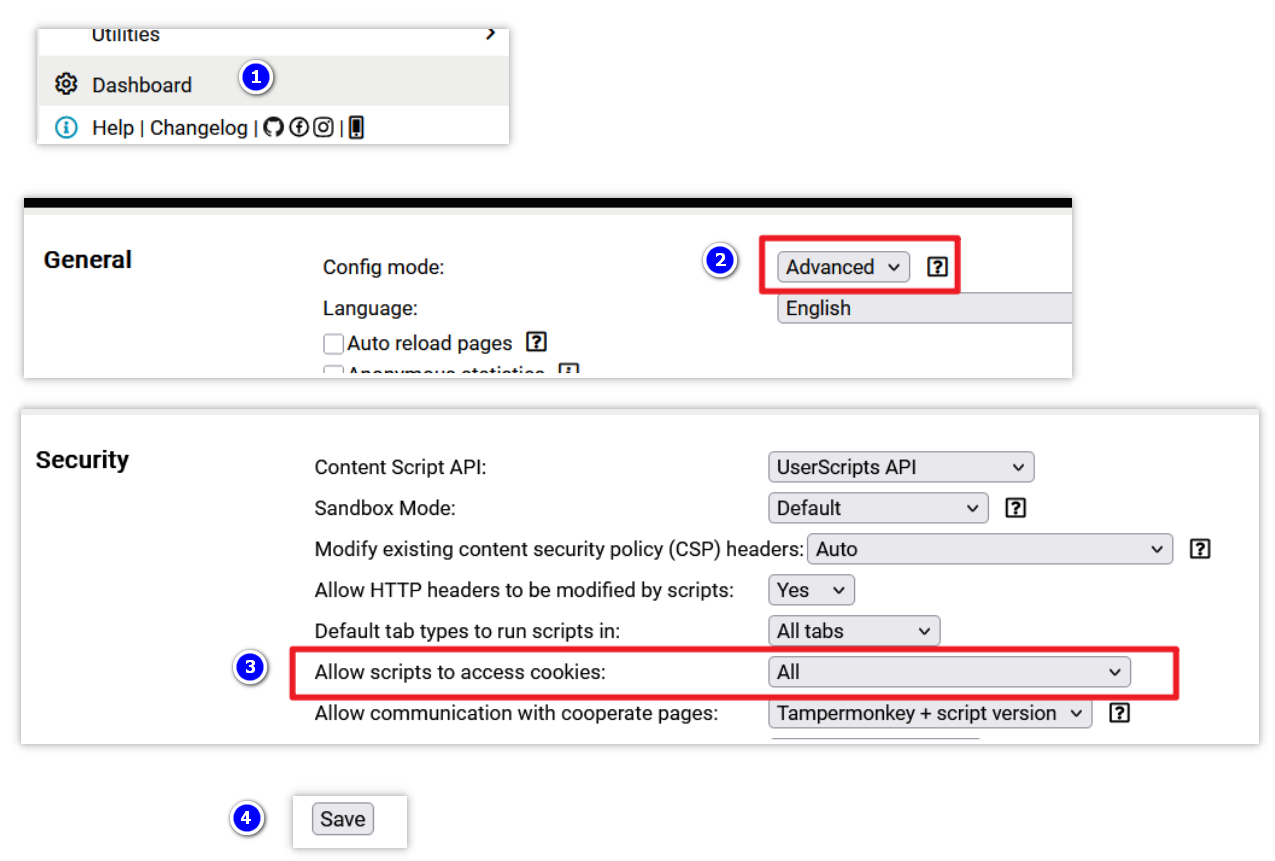
ScriptCat does not require extra settings; it will prompt you for permission when needed.
- Install the Script:
- Install via Greasy Fork. The code here stays synchronized with GitHub.
- Alternatively, copy the JS code from the AnMe GitHub repository and create a new script in your extension.
🛠️ Usage Guide
1. Saving an Account
- On the page where you want to save an account (usually the home page), find the AnMe script in the extension menu and click 🚀 Open Account Manager.
- Go to the Manage Accounts tab.
- Enter an account name and select the data types to save (it is recommended to select Cookies at minimum; if switching fails, try selecting LocalStorage and SessionStorage as well).
- Click Save Current Account. The account is now stored as a "snapshot." To add more accounts, click the "+" (Switch to New Environment) button to log into a new account and repeat the process.
Note: After saving an account, do not use the website's native "Logout" button, as this often invalidates the session stored in your snapshot. Instead, use the script's "+" (Switch to New Environment) feature to clear the current session.
2. Switching Accounts
- In the Account Switch tab, click on an account card to switch.
- The script will clear the current session, apply the selected snapshot, and refresh the page.
- Below the account name, you will see buttons like
CK, LS, and SS. These represent the saved data; click them to view specific content.
Account snapshots are subject to the website's own expiration policy. A good practice is to periodically "re-save" an existing account name while logged in to refresh the snapshot and extend the session.
3. Import & Export
Exporting Data:
- In the Advanced Settings tab, you can export data for the current site or all sites. This generates a JSON file. Please keep this file secure.
Importing Data:
- You can import your JSON backup into AnMe on any computer or browser. Once imported, you can switch to those accounts immediately without re-entering passwords.
Note: Switching accounts may not work on all websites. Some high-security sites use Browser Fingerprinting or hardware-bound sessions to verify users, which this script cannot bypass.
🔒 Privacy & Security
- Local Storage: All data is stored locally in your browser via
GM_setValue. The script has no network permissions and will never upload your data to any server.
- Risk Warning: Due to the open nature of browser script managers, do not use this script to save sensitive accounts on public computers or untrusted devices.
📄 Disclaimer
This script is for educational and exchange purposes only. The author is not responsible for account bans, data leaks, or any form of loss resulting from the use of this script. Please use it with caution in a secure environment.
