BSReader Book Downloader

Download unscrambled pages as ZIP or PDF from MediaDo bsreader (parallel fetch)

Bu betiği kurabilmeniz için Tampermonkey, Greasemonkey ya da Violentmonkey gibi bir kullanıcı betiği eklentisini kurmanız gerekmektedir.

Bu betiği yüklemek için Tampermonkey gibi bir uzantı yüklemeniz gerekir.

Bu betiği kurabilmeniz için Tampermonkey ya da Violentmonkey gibi bir kullanıcı betiği eklentisini kurmanız gerekmektedir.

Bu betiği kurabilmeniz için Tampermonkey ya da Userscripts gibi bir kullanıcı betiği eklentisini kurmanız gerekmektedir.

Bu betiği indirebilmeniz için ayrıca Tampermonkey gibi bir eklenti kurmanız gerekmektedir.

Bu komut dosyasını yüklemek için bir kullanıcı komut dosyası yöneticisi uzantısı yüklemeniz gerekecek.

(Zaten bir kullanıcı komut dosyası yöneticim var, kurmama izin verin!)

Bu stili yüklemek için Stylus gibi bir uzantı yüklemeniz gerekir.

Bu stili yüklemek için Stylus gibi bir uzantı kurmanız gerekir.

Bu stili yükleyebilmek için Stylus gibi bir uzantı yüklemeniz gerekir.

Bu stili yüklemek için bir kullanıcı stili yöneticisi uzantısı yüklemeniz gerekir.

Bu stili yüklemek için bir kullanıcı stili yöneticisi uzantısı kurmanız gerekir.

Bu stili yükleyebilmek için bir kullanıcı stili yöneticisi uzantısı yüklemeniz gerekir.

(Zateb bir user-style yöneticim var, yükleyeyim!)

Yazar
andylilfs0217
Günlük kurulumlar
0
Toplam kurulumlar
13
Değerlendirmeler
1 0 0
Versiyon
1.3.4
Oluşturulma
12.04.2026
Güncellenme
12.04.2026
Boyut
26,6 KB
Lisans
MIT
Geçerli

BSReader Book Downloader

Sponsor on GitHub License: MIT GreasyFork

GreasyFork script version GreasyFork total installs

Tampermonkey / Violentmonkey userscript for the MediaDo BSReader web reader (e.g. from Libby). It adds an Export panel so you can save book pages as ZIP (PNGs) or PDF, with progress shown in the panel.

Repository andylilfs0217/libby-media-do-downloader
Install (users) GreasyFork · OpenUserJS
Issues GitHub Issues

Works on: https://api.distribution.mediadotech.com/viewers/bsreader/v2/*

Demo

Short GIF preview (animates in your browser):
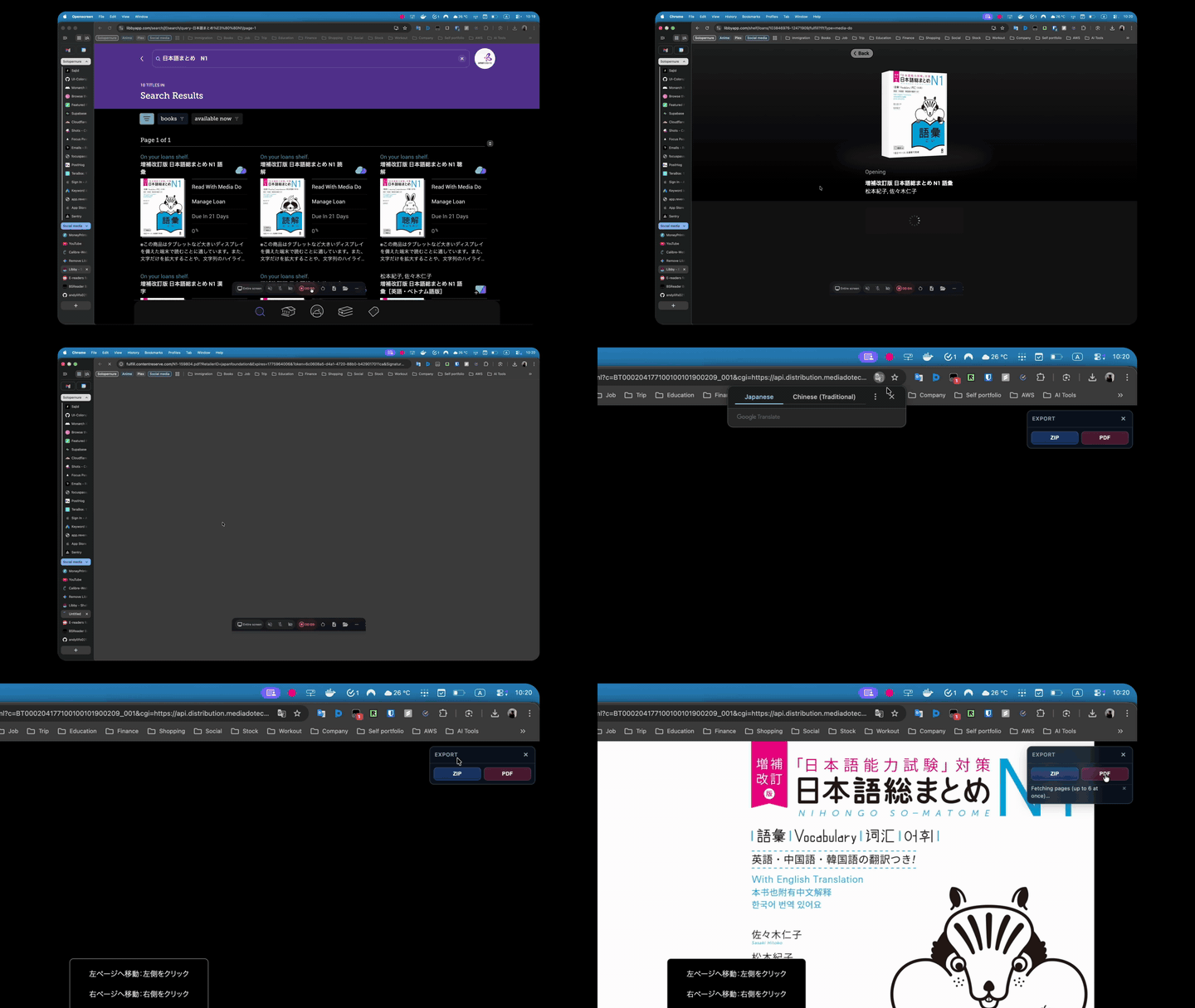
Screen recording — Export panel and download

Still frame (higher resolution than a GIF frame):
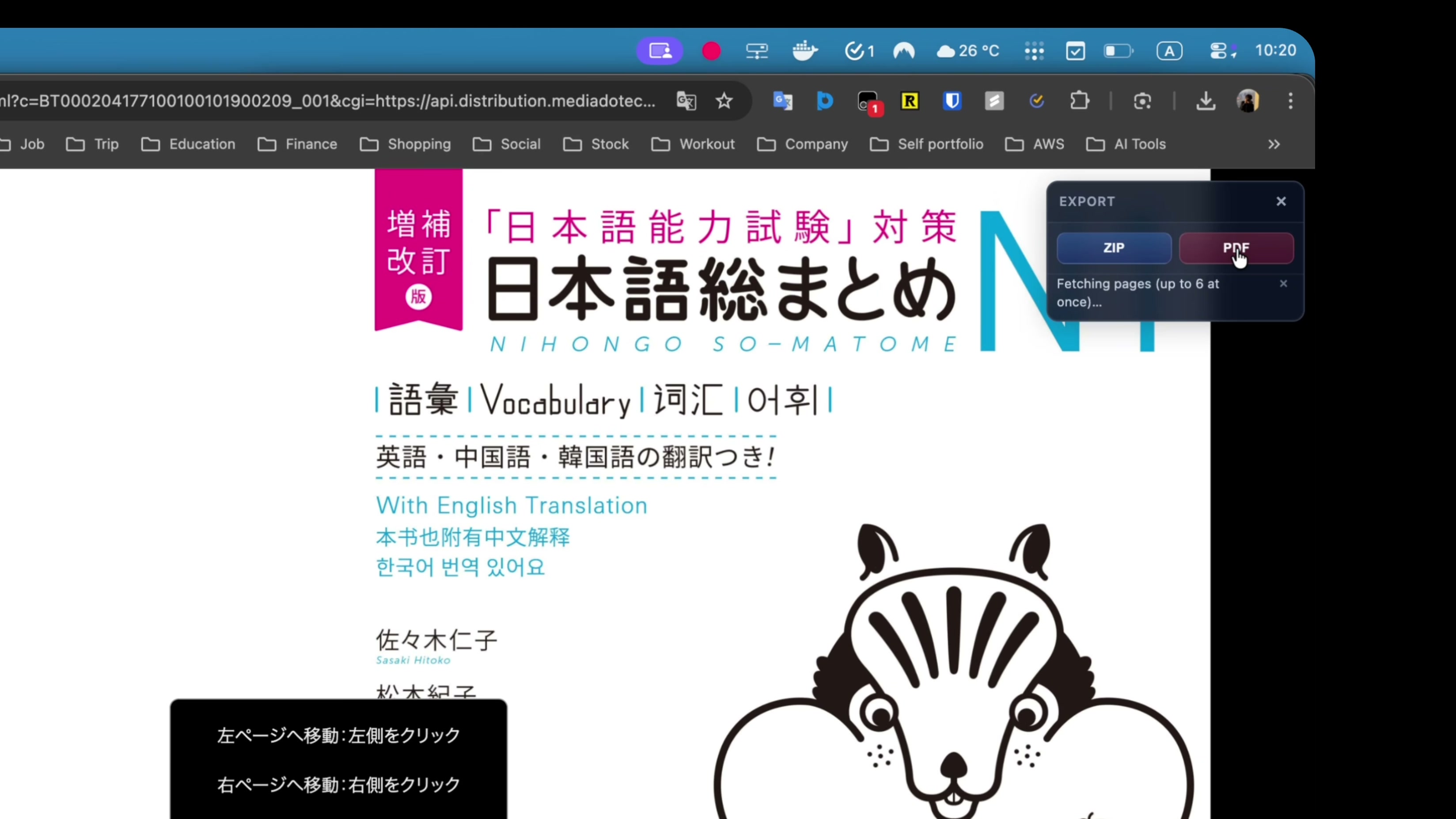
Export panel — still

Full-length screen capture (higher quality than the GIF): demo.mp4

Install

GreasyFork (simplest)

  1. Install Tampermonkey or Violentmonkey.
  2. On this page, click Install (or open the script page and click Install).

OpenUserJS

  1. Install Tampermonkey or Violentmonkey.
  2. Open OpenUserJS — author scripts, pick BSReader Book Downloader when listed, and use Install.

GitHub import + webhook sync for OUJS: openuserjs/README.md in the repository.

Install from GitHub (raw URL)

  1. Use this raw script URL (default branch):
   https://raw.githubusercontent.com/andylilfs0217/libby-media-do-downloader/main/user-script.js
  1. In Tampermonkey: Dashboard → Utilities → Install from URL (wording may vary), paste the URL, and confirm.

Install by pasting the file

In your userscript manager, create a new script, paste the contents of user-script.js, and save.

How to use

  1. Open a book in BSReader so the address bar includes cgi and param (use your library’s normal “open book” flow).
  2. Use the Export panel (top-right): ZIP or PDF. Wait for the status line to finish.
  3. Hide the large panel with × and use the small Export pill to open it again.

Requirements

  • A recent Chrome, Firefox, Edge, or Safari with Tampermonkey or Violentmonkey.
  • Network access to the reader and to CDNs used by the script (cdnjs, jsdelivr) for JSZip, FileSaver, and jsPDF.

Troubleshooting

Problem What to try
“Missing cgi or param in page URL” Open the book again from your library so the full reader URL loads.
ZIP/PDF errors or blank output Allow mediadotech.com, cdnjs.cloudflare.com, and cdn.jsdelivr.net in your blocker for that tab.
Other errors F12Console, look for lines starting with [BSReader DL].

Support

This script is maintained in my spare time—keeping up with BSReader changes, dependencies, and edge cases. If it saves you hassle and you’d like to say thanks, you can become a sponsor on GitHub. Sponsorship is optional; the script stays free and MIT-licensed either way.

Legal

You are responsible for following applicable law and your content provider’s terms. This tool is for legitimate personal use only (for example accessibility or backup where allowed).

License

Distributed under the MIT License — see LICENSE.

