OpenAI Playground (ChatGPT) - Continue Button
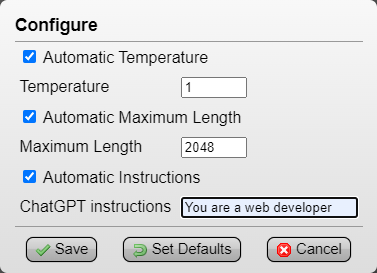
press the [Continue] button instead of 'Add message > type continue > Ctrl+Enter', configure panel optionally saves 'Temperature', 'Maximum Length' and 'Instructions'

Bu betiği kurabilmeniz için Tampermonkey, Greasemonkey ya da Violentmonkey gibi bir kullanıcı betiği eklentisini kurmanız gerekmektedir.

You will need to install an extension such as Tampermonkey to install this script.

Bu betiği kurabilmeniz için Tampermonkey ya da Violentmonkey gibi bir kullanıcı betiği eklentisini kurmanız gerekmektedir.

Bu betiği kurabilmeniz için Tampermonkey ya da Userscripts gibi bir kullanıcı betiği eklentisini kurmanız gerekmektedir.

You will need to install an extension such as Tampermonkey to install this script.

Bu komut dosyasını yüklemek için bir kullanıcı komut dosyası yöneticisi uzantısı yüklemeniz gerekecek.

(Zaten bir kullanıcı komut dosyası yöneticim var, kurmama izin verin!)

You will need to install an extension such as Stylus to install this style.

You will need to install an extension such as Stylus to install this style.

You will need to install an extension such as Stylus to install this style.

You will need to install a user style manager extension to install this style.

You will need to install a user style manager extension to install this style.

You will need to install a user style manager extension to install this style.

(Zateb bir user-style yöneticim var, yükleyeyim!)

Yazar
drhouse
Günlük kurulumlar
0
Toplam kurulumlar
118
Değerlendirmeler
0 0 0
Versiyon
3.0
Oluşturulma
05.05.2023
Güncellenme
09.09.2023
Boyut
4,88 KB
Lisans
CC-BY-NC-SA-4.0
Geçerli

OpenAI Playground (ChatGPT) - Continue Button


(Tampermonkey Menu > OpenAI Playground (ChatGPT) - Continue Button > Configure)
Automatic Temperature: set to '1', can be useful to save another Temperature (example, save as '0' for GPT output related to code script) (default: 1)
Automatic Maximum Length: set to '2048' (max), this way GPT will output text without needing to use 'Continue' nearly as much (default: 2048)
Automatic Instructions: optional, saves a prompt guide (example, 'You are a web developer') (default: empty)


press the single [Continue] button instead of having to repeatedly click and type 'Add message > continue > Ctrl+Enter' to continue GPT's output


I also wanted to bring attention to this OpenAI ChatGPT and Playground Redesign RazorGlass userstyle I found, I think it makes Playground look much better: