BlueCat Address Manager Direct Actions (Deploy)

Add direct buttons for Deploy Actions in BlueCat Address Manager

Bu betiği kurabilmeniz için Tampermonkey, Greasemonkey ya da Violentmonkey gibi bir kullanıcı betiği eklentisini kurmanız gerekmektedir.

You will need to install an extension such as Tampermonkey to install this script.

Bu betiği kurabilmeniz için Tampermonkey ya da Violentmonkey gibi bir kullanıcı betiği eklentisini kurmanız gerekmektedir.

Bu betiği kurabilmeniz için Tampermonkey ya da Userscripts gibi bir kullanıcı betiği eklentisini kurmanız gerekmektedir.

You will need to install an extension such as Tampermonkey to install this script.

Bu komut dosyasını yüklemek için bir kullanıcı komut dosyası yöneticisi uzantısı yüklemeniz gerekecek.

(Zaten bir kullanıcı komut dosyası yöneticim var, kurmama izin verin!)

You will need to install an extension such as Stylus to install this style.

You will need to install an extension such as Stylus to install this style.

You will need to install an extension such as Stylus to install this style.

You will need to install a user style manager extension to install this style.

You will need to install a user style manager extension to install this style.

You will need to install a user style manager extension to install this style.

(Zateb bir user-style yöneticim var, yükleyeyim!)

Yazar
Marius Galm
Günlük kurulumlar
0
Toplam kurulumlar
0
Değerlendirmeler
0 0 0
Versiyon
5
Oluşturulma
27.03.2018
Güncellenme
23.08.2018
Boyut
5,31 KB
Lisans
MIT
Geçerli

Hello to all BlueCat Administrators out there.

Doing stuff over and over again always costs time, why not save some clicks. This will add additional buttons next to the actions menu, where you can directly access the Deployment functions in the Server List:
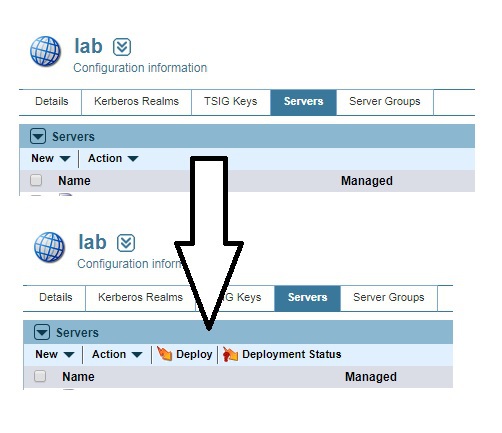
Here a picture worth a thousand words

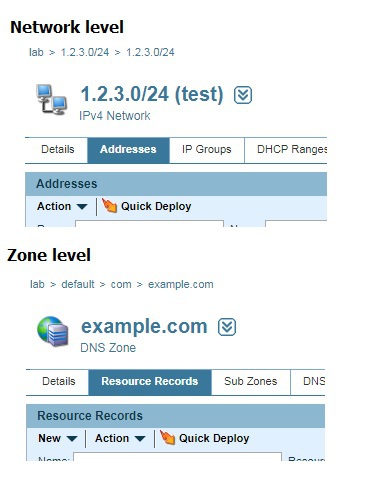
The Quick Deployment will also be more accessable in the Network Page and Zone Page:
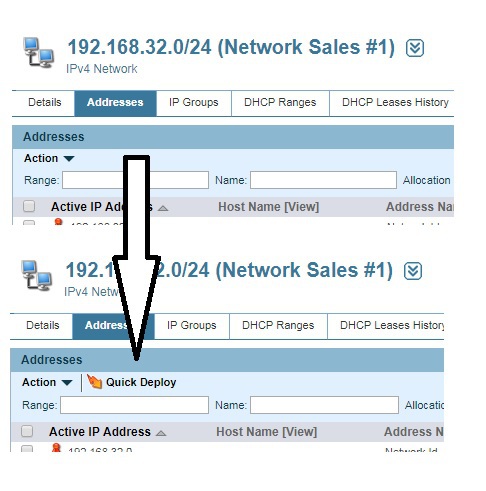
Here a picture worth a thousand words Here a picture worth a thousand words

With the latest version the deployment action (normally only available on the "Details" tab) is available on all subtabs of the Server page:
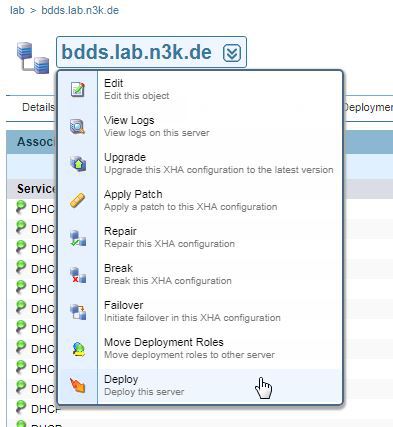
Here a picture worth a thousand words