Greasy Fork is available in English.

Batch Register Steam Keys

Allows you to redeem your Steam product keys with just one click

Bu betiği kurabilmeniz için Tampermonkey, Greasemonkey ya da Violentmonkey gibi bir kullanıcı betiği eklentisini kurmanız gerekmektedir.

You will need to install an extension such as Tampermonkey to install this script.

Bu betiği kurabilmeniz için Tampermonkey ya da Violentmonkey gibi bir kullanıcı betiği eklentisini kurmanız gerekmektedir.

Bu betiği kurabilmeniz için Tampermonkey ya da Userscripts gibi bir kullanıcı betiği eklentisini kurmanız gerekmektedir.

Bu betiği indirebilmeniz için ayrıca Tampermonkey gibi bir eklenti kurmanız gerekmektedir.

Bu komut dosyasını yüklemek için bir kullanıcı komut dosyası yöneticisi uzantısı yüklemeniz gerekecek.

(Zaten bir kullanıcı komut dosyası yöneticim var, kurmama izin verin!)

You will need to install an extension such as Stylus to install this style.

You will need to install an extension such as Stylus to install this style.

You will need to install an extension such as Stylus to install this style.

You will need to install a user style manager extension to install this style.

You will need to install a user style manager extension to install this style.

You will need to install a user style manager extension to install this style.

(Zateb bir user-style yöneticim var, yükleyeyim!)

Yazar
864907600cc
Günlük kurulumlar
1
Toplam kurulumlar
618
Değerlendirmeler
8 0 0
Versiyon
1.2
Oluşturulma
09.09.2017
Güncellenme
16.05.2018
Boyut
11,5 KB
Lisans
N/A
Geçerli

Batch Register Steam Keys

Allows you to activate your Steam product keys with only one click.
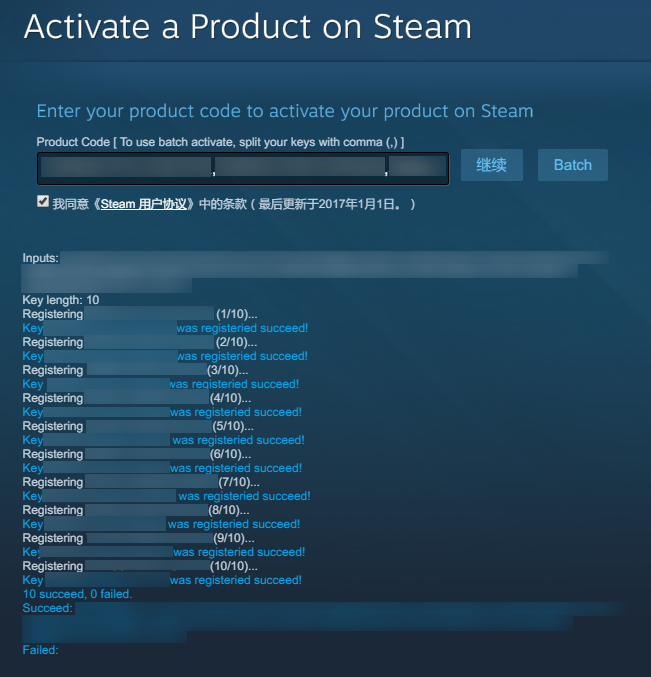
Screenshot

How to

  1. Install the script

  2. Make sure you have split your Steam keys with comma, like Key1,Key2,Key3
    You can paste your keys to Excel in one row, save it as a CSV file, then open the file with Notepad
    You can also split them with new line by switching to Multi-line Mode

  3. Go to https://store.steampowered.com/account/registerkey , if it's okay, you'll see a Batch button

  4. Paste your keys to the input field, then click Batch button (NOT Continue button)

  5. Wait until it finishes the work!

Note

  1. The script won't verify the syntax of your keys, you should make it sure by yourself (though Steam will also verify it)

  2. It'll delay about 5 seconds before verifying the next key, to try avoiding banning your request

  3. If it's hard to copy and paste keys one by one, you can try Filter Keys feature to get your keys (see screenshot 3)