GitHub Collapse In Comment

A userscript that adds a header that can toggle long code and quote blocks in comments

Bu betiği kurabilmeniz için Tampermonkey, Greasemonkey ya da Violentmonkey gibi bir kullanıcı betiği eklentisini kurmanız gerekmektedir.

You will need to install an extension such as Tampermonkey to install this script.

Bu betiği kurabilmeniz için Tampermonkey ya da Violentmonkey gibi bir kullanıcı betiği eklentisini kurmanız gerekmektedir.

Bu betiği kurabilmeniz için Tampermonkey ya da Userscripts gibi bir kullanıcı betiği eklentisini kurmanız gerekmektedir.

You will need to install an extension such as Tampermonkey to install this script.

Bu komut dosyasını yüklemek için bir kullanıcı komut dosyası yöneticisi uzantısı yüklemeniz gerekecek.

(Zaten bir kullanıcı komut dosyası yöneticim var, kurmama izin verin!)

You will need to install an extension such as Stylus to install this style.

You will need to install an extension such as Stylus to install this style.

You will need to install an extension such as Stylus to install this style.

You will need to install a user style manager extension to install this style.

You will need to install a user style manager extension to install this style.

You will need to install a user style manager extension to install this style.

(Zateb bir user-style yöneticim var, yükleyeyim!)

Yazar
Mottie
Günlük kurulumlar
0
Toplam kurulumlar
115
Değerlendirmeler
6 0 0
Versiyon
1.0.23
Oluşturulma
27.06.2016
Güncellenme
17.02.2024
Boyut
6,85 KB
Lisans
MIT
Geçerli

A userscript that adds a header that can toggle long code and quote blocks in comments

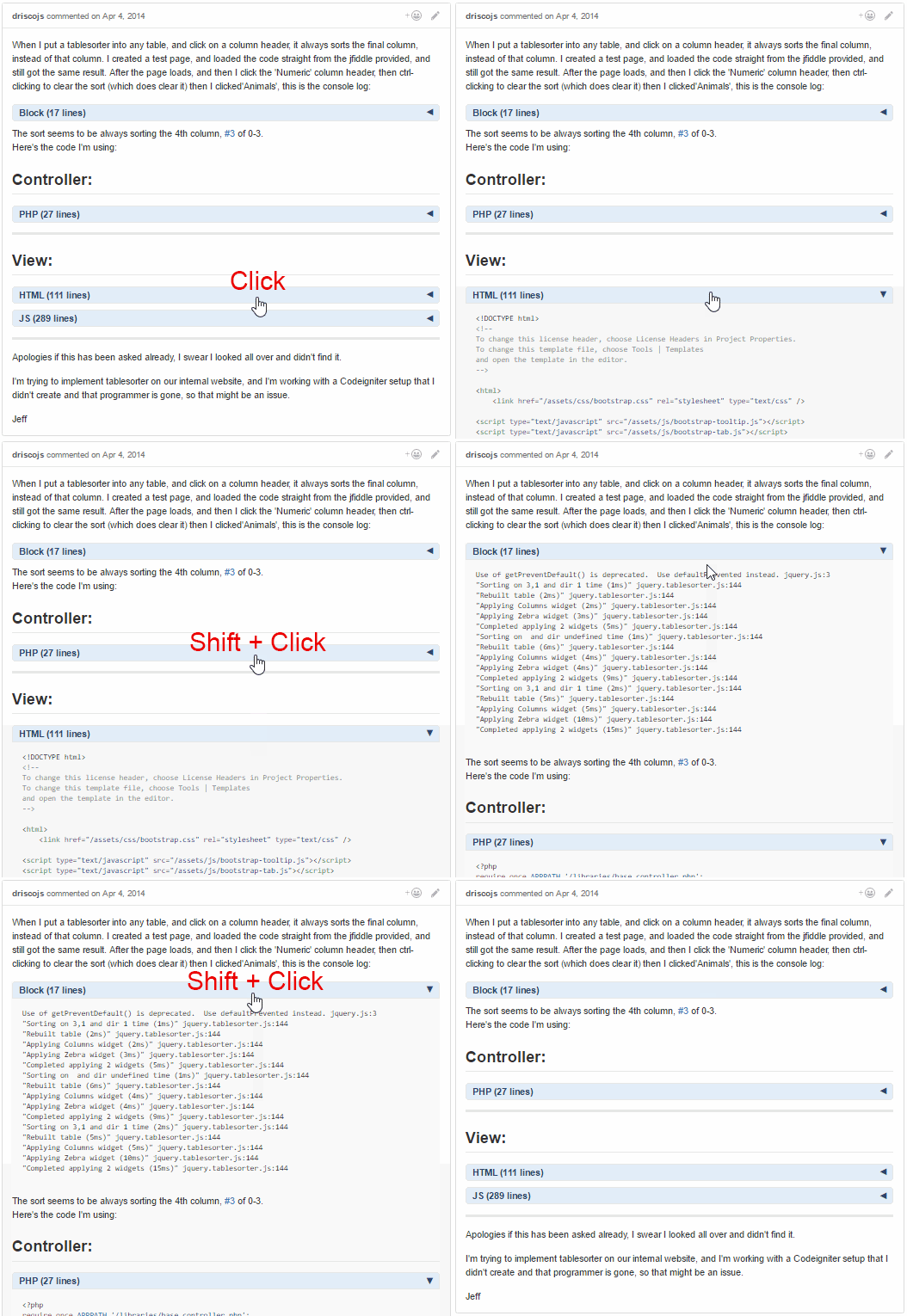
  • The block header:
    • Allows the toggling of the long code & quote block views.
    • Includes the code language based on the syntax highlighting class name; if highlighting is not applied, "Block" is used as the default name.
    • Includes the number of lines within the block.
    • Click the header to toggle the view of the content immediately below the header.
    • Use Shift + Click to toggle all the view of all blocks within the same issue comment.
  • Can be used along with the [[GitHub-collapse-markdown]] userscript.
  • Use the userscript addon to change these settings (see screenshot below):
    • "Set GitHub Collapse in Comment Max Lines" to the number of lines within a block needed to add a header (set to 10 by default).
    • "Set GitHub Collapse in Comment Initial State" to expanded to not have the blocks initially collapsed (collapsed by default).
    • After changing either option, make sure to reload the page (Shift + F5) to have the updated setting take effect.

Hosted with ♥ at GitHub