Bad Google

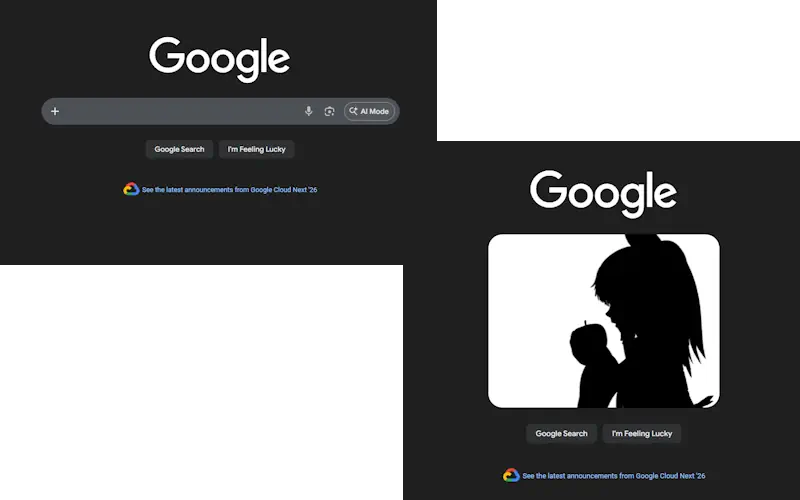
Play Bad Apple on google.com
คุณจะต้องติดตั้งส่วนขยาย เช่น Tampermonkey, Greasemonkey หรือ Violentmonkey เพื่อติดตั้งสคริปต์นี้

You will need to install an extension such as Tampermonkey to install this script.

คุณจะต้องติดตั้งส่วนขยาย เช่น Tampermonkey หรือ Violentmonkey เพื่อติดตั้งสคริปต์นี้

You will need to install an extension such as Tampermonkey or Userscripts to install this script.

You will need to install an extension such as Tampermonkey to install this script.

You will need to install a user script manager extension to install this script.

(I already have a user script manager, let me install it!)

Advertisement:

You will need to install an extension such as Stylus to install this style.

You will need to install an extension such as Stylus to install this style.

You will need to install an extension such as Stylus to install this style.

You will need to install a user style manager extension to install this style.

You will need to install a user style manager extension to install this style.

You will need to install a user style manager extension to install this style.

(I already have a user style manager, let me install it!)

Advertisement:

ผู้เขียน
PongonPolygon
จำนวนติดตั้งประจำวัน
1
จำนวนติดตั้งทั้งหมด
6
คะแนน
0 0 0
เวอร์ชัน
1.2
สร้างเมื่อ
24-04-2026
อัปเดตเมื่อ
24-04-2026
Size
3.66 กิโลไบต์
สัญญาอนุญาต
MIT
ปรับใช้กับ

Play Bad Apple on google.com!

or any site with the google search bar...


go to google.com, or just google something, and then hit ctrl + b. You'll then see Bad Apple playing on the google search bar.

oh and hit it again to close

WARNING!
There is a chance that it wont work without the correct settings. make sure that in your script runner, Allow access to file URLs is enabled. Sometimes google is a built in file for your browser.