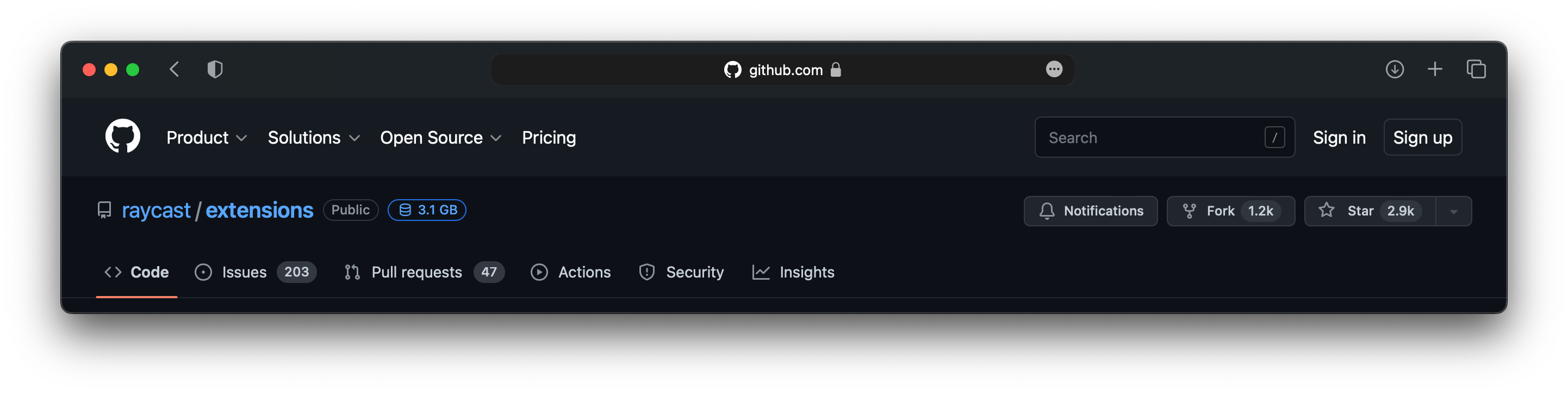
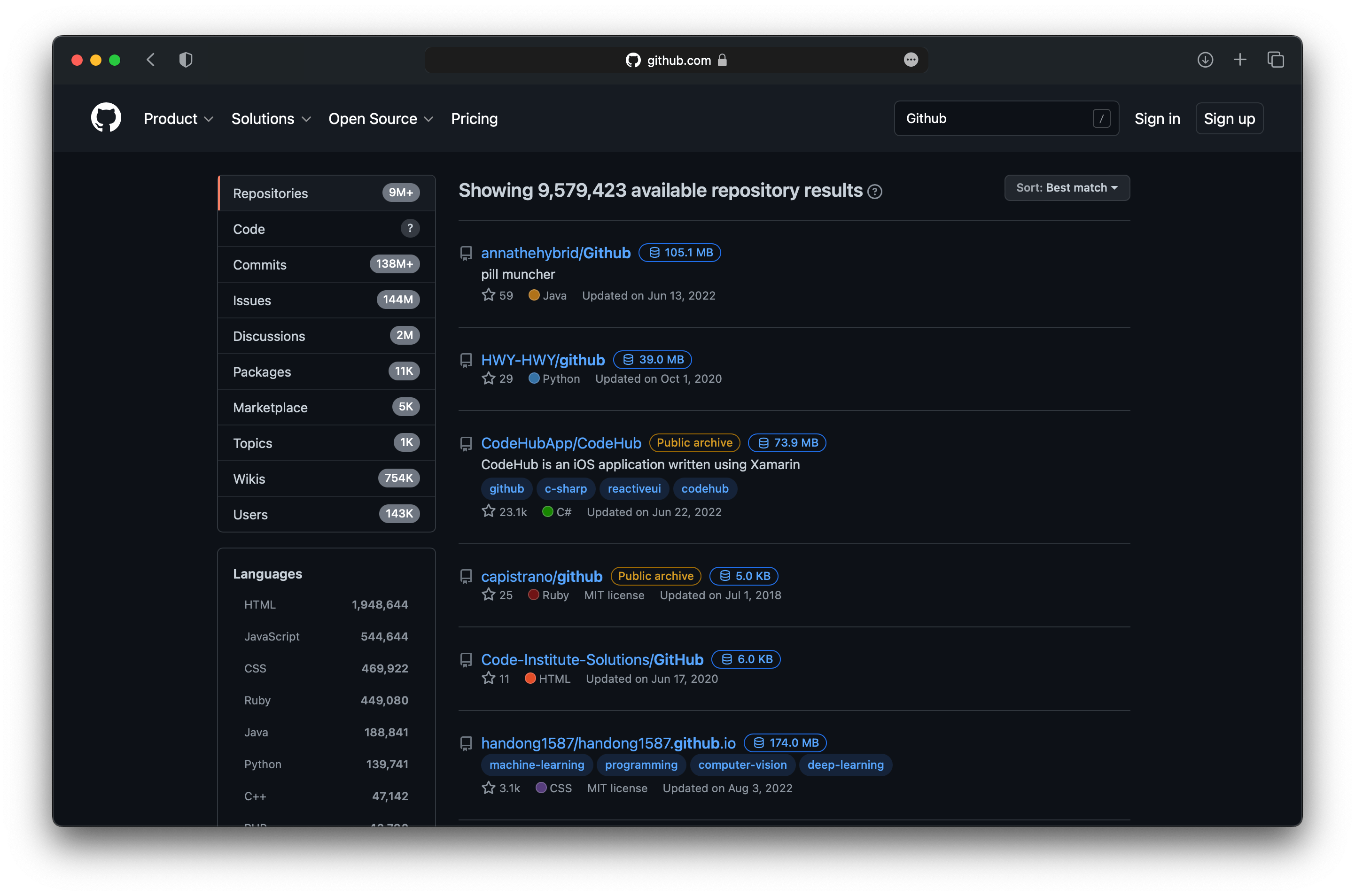
🤠 ขนาดการแสดงผลคลังสินค้า: ในการค้นหาโค้ดของ GitHub การค้นหาคลังสินค้า หน้าปัญหา รายชื่อคลังสินค้าของผู้ใช้ และหน้าพื้นที่เก็บข้อมูล ขนาดของคลังสินค้าจะแสดงถัดจากชื่อคลังสินค้า ทำให้ผู้ใช้สามารถเข้าใจขนาดของคลังสินค้าได้อย่างรวดเร็วและเพิ่มประสิทธิภาพของพวกเขา การเลือก คำเตือนการพัฒนาที่ไม่ใช้งาน: หากพื้นที่เก็บข้อมูลไม่ได้รับการอัพเดตในช่วงหกเดือนที่ผ่านมา ระบบจะเพิ่มข้อความเตือนที่ด้านบนของพื้นที่เก็บข้อมูลเพื่อเตือนผู้ใช้ว่าพื้นที่เก็บข้อมูลไม่ได้ใช้งานและแสดงเวลาของการอัปเดตครั้งล่าสุด ซึ่งจ
 简体中文 |
English |
한국어 |
Tiếng Việt |
繁體中文
简体中文 |
English |
한국어 |
Tiếng Việt |
繁體中文





「 🤠 Warehouse display size: On GitHub’s code search, warehouse search, issue page, user warehouse list and repository page, the size of the warehouse will be displayed next to the warehouse name, allowing users to quickly understand the scale of the warehouse and optimize their selection. Inactive development warning: If a repository has not been updated in the past six months, the system will add a prompt at the top of the repository to remind users that the repository is inactive and display the time of the last update. This helps users determine the activity and maintenance status of the warehouse. Quick jump within the warehouse: When browsing the warehouse, the user can easily view the list of all warehouses of the user, providing an entrance to quickly jump to different warehouses. Users can quickly find and access other projects of interest, improving work efficiency. Usage scenarios: Developers: By displaying the warehouse size and active warnings, you can quickly filter out suitable libraries for development and avoid using projects that are no longer maintained. Project Manager: Through the quick jump function, it is easy to manage and coordinate multiple projects and improve work efficiency. Learners: When learning new technologies, they can more easily find relevant open source projects and quickly check the activity and scale of the projects. 🤠 」


Download:Github | ⭐Greasy Fork

Fix: Fixed the issue where the quick jump button was not displayed on the repository page#137,Other scripts cause page elements to change
Fix: Fixed the issue where the quick jump button was not displayed on the repository page
Fixed a minor issue in the previous version:Quick jump>When customizing the number of user repositories is enabled,Only the first page is obtained by default
New:Quick jump:Customize the number of user repositories and displays per page
New:Fixed head navigation bar:Custom Enable
New:Local cache:Allow custom refresh time to refresh the cache
New:Notification pageSupport systemLight-colored modeandDark Mode
screenshot: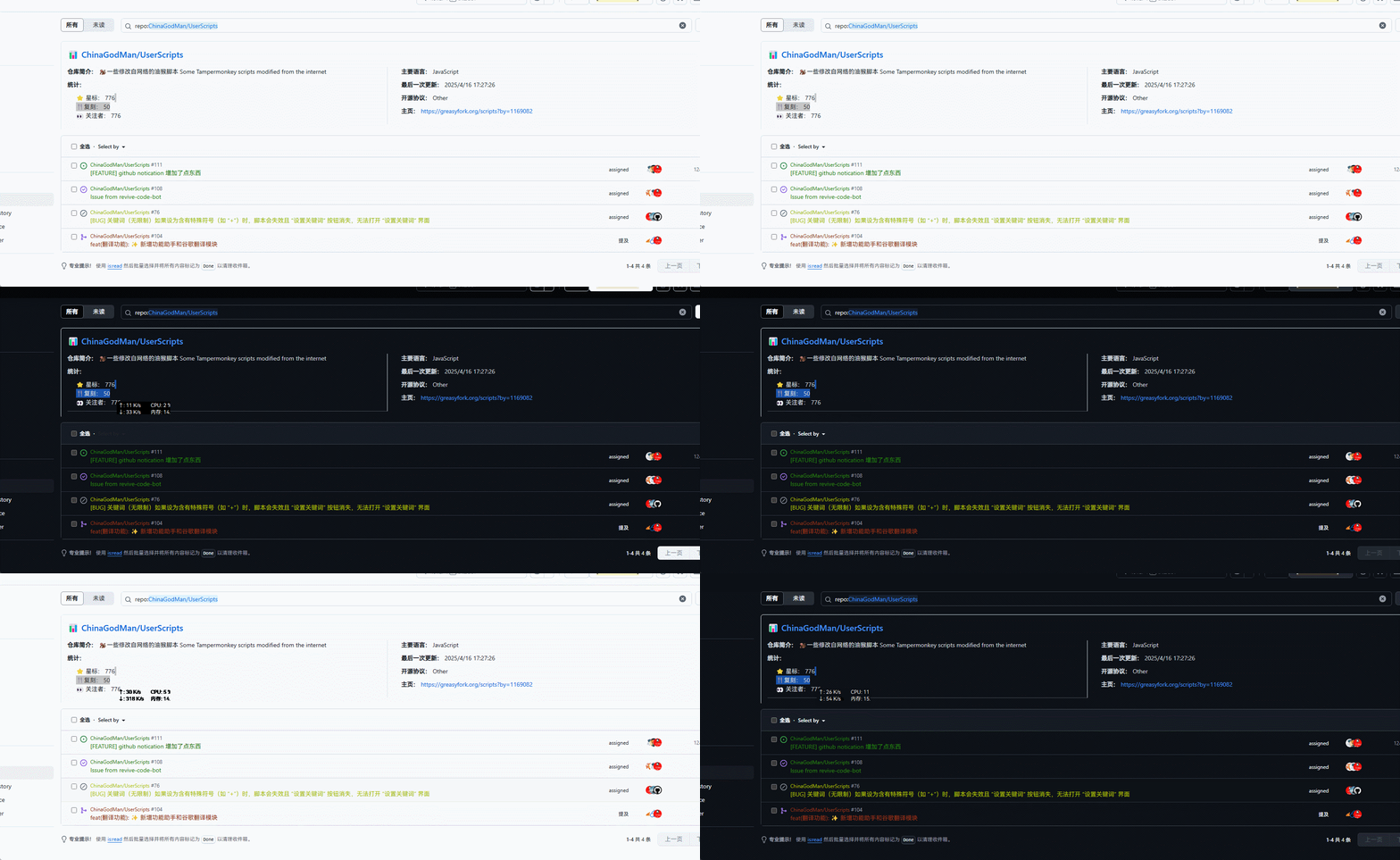
New:Notification pageClick on the warehouse on the left,Directly display information of the specified warehouse
compatible2025.04.15Versions of the function suspended on all notification information.
grateful:qbmiller script code,github_enhance
Issue:#111
screenshot:!
New:Notification pageDisplay warehouse information
grateful:qbmiller script code,github_enhance
Issue:#111
screenshot: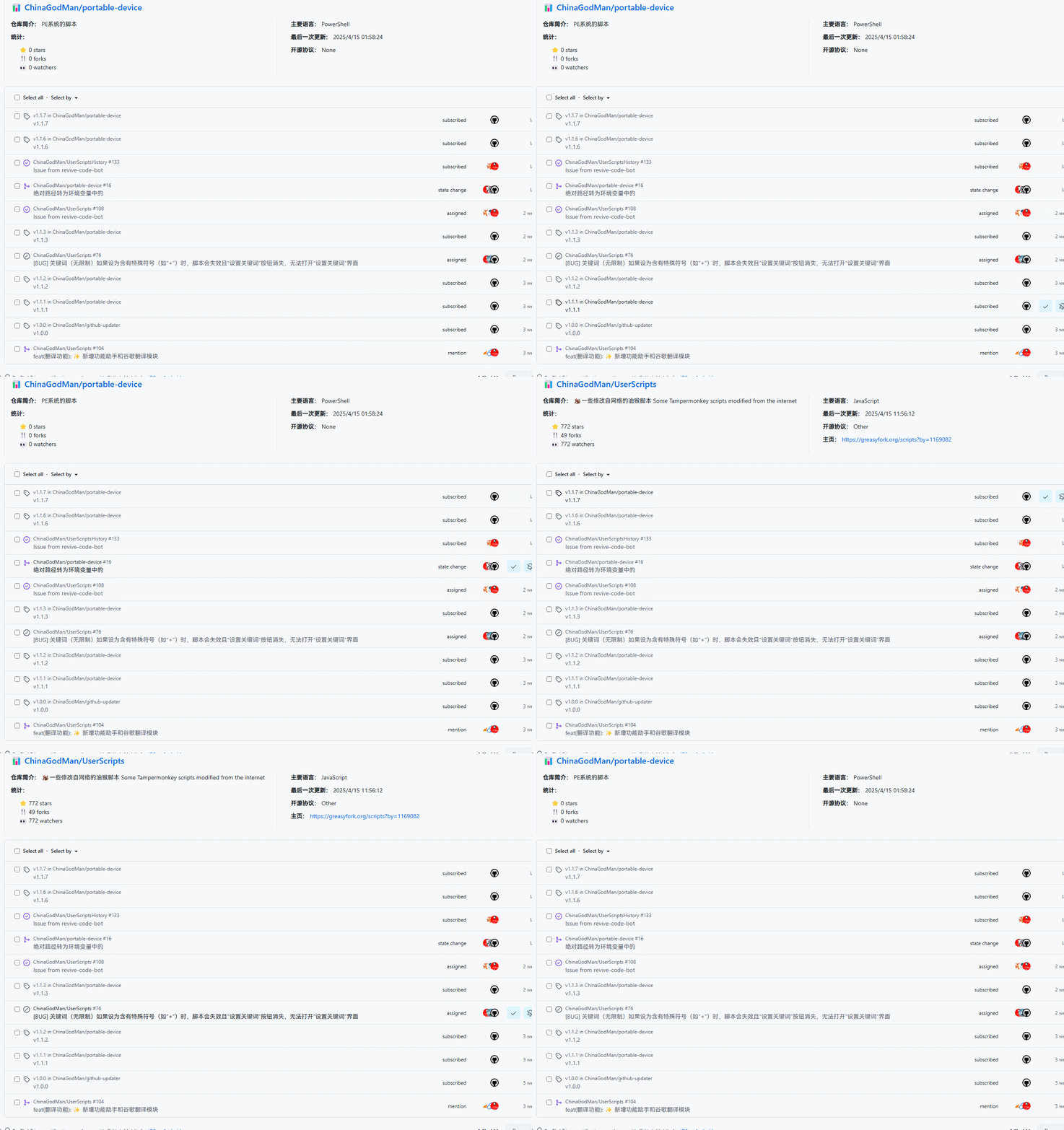
New:GitHub Global navigation bar fixed Code fromGitHub Enhancement Kit
screenshot:
New:Two-factor verification code automatic filling functionTwo-factor authentication Convenient and quick filling,Continuous monitoring,Until verification is triggered....
New:The starred warehouse on the user profile page also adds the display warehouse size,?tab=starsExecute below
repair:Different user topics,The elements are different,Change the selector todocument.querySelector('.jxTzTd')
repair:Logged in user ifTOKENNot empty,Use your own list APIhttps://api.github.com/user/repos.Prevent error codes from being returned401
repair:repairCode Search and Repository Code SearchThe size of a warehouse will be retrieved twice.
New:The user repository list has been saved locally,24hRefresh once
New: mergegithub-ossinsight Scripting functions ,And support mobile devices,Set as dynamic monitoring
New: mergeGithub Quickly find active Forks List Scripting functions And support mobile devices,Set as dynamic monitoring
New: mergeGitHub Delete Repositories Scripting Functions In personal warehouses and?tab=repositoriesQuick page deletion And support mobile devices,Set as dynamic monitoring
optimization: The detector cannot find the element in ten seconds and stops running
repair:CSS Small partition bars are hidden by errors on mobile:d-none d-md-block border-top→border-top
New: Quick jump list to add mouse levitationTitleDisplay basic warehouse information
optimization: All repositories of users can now be displayed,But it is not recommended to do this,Influence experience。
In the script 343 Line usage codegetUserAllRepos(reposApi, headers, true, 1)
Recursively obtain user list when parameter three is true
Parameter 4 limits parameter 3 is true maximum recursive page count
repair:Repeated list addition questions
repair:if (maxPage !== 0 && page > maxPage) break → if (maxPage !== 0 && page == maxPage) break
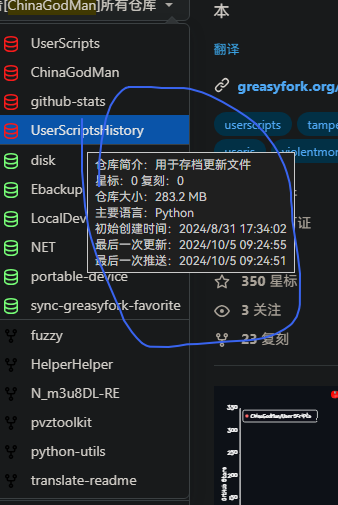
New: GitHub Sidebar jump to warehouse is complicated,Add another warehouse to quickly jump users in the warehouse
red For the open warehouse green For private warehouses Forks Replica warehouse (Logged in user,Must be typed TOKEN) |
Added a demo ~~Show only the first page 30 A warehouse,Exceed will not display,It’s enough for me to use myself now~~ 0.1.3.4All supported |
|---|---|
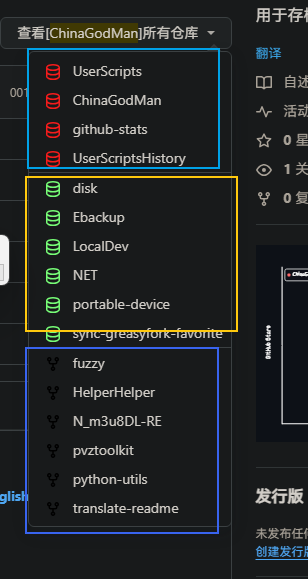 |
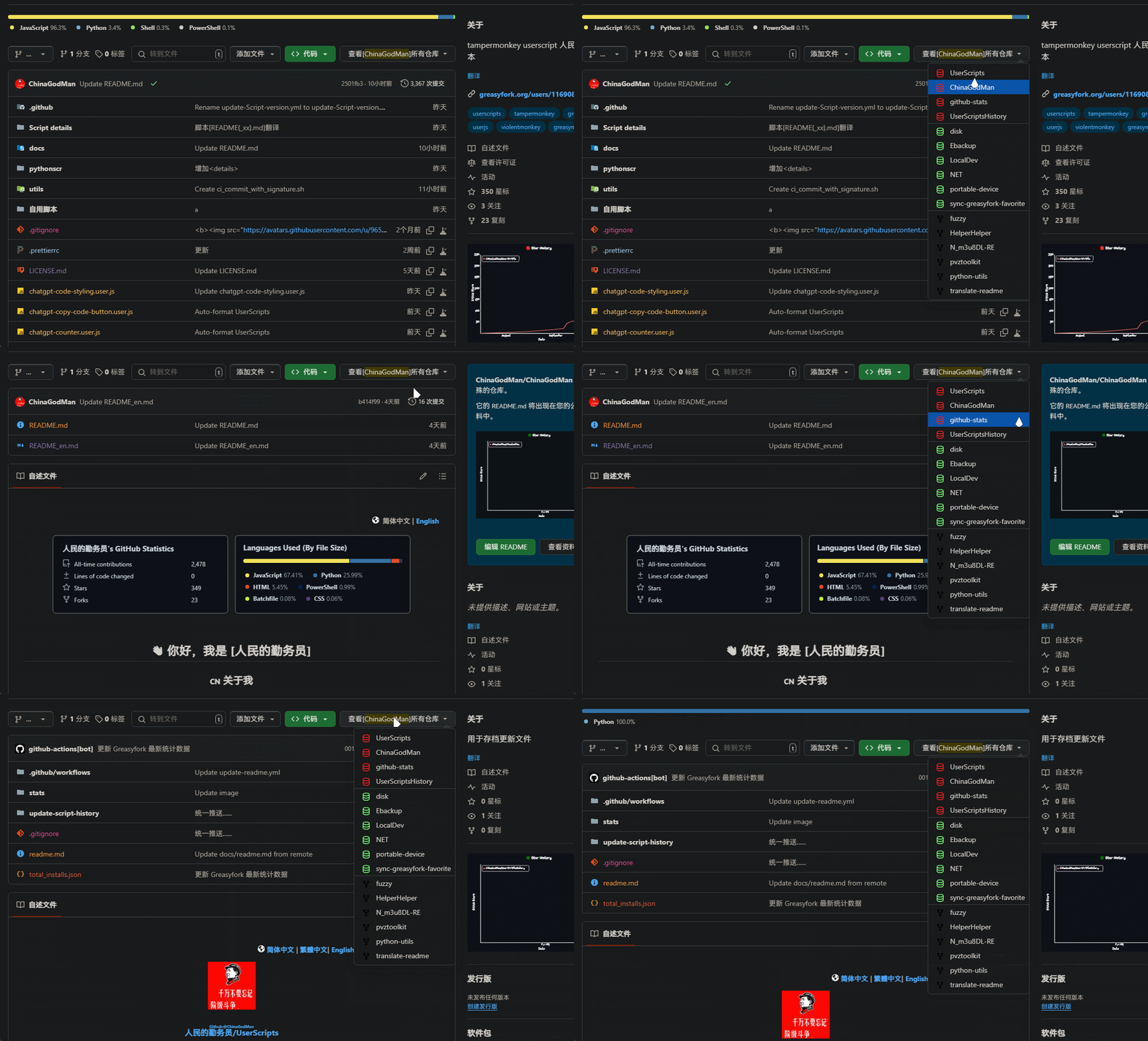 |
optimization: Optimize small tags
New: Inactive development banner last time is displayed in the lower right cornerPushHow long has it been now
optimization: Optimize execution efficiency,Improve loading speed
i18n: zh,zh-HK,zh-MO,zh-SG
New: Github - Inactive Development Warning Display inactive development reminder on the warehouse page。
i18n: zh-CN,zh-TW,ja,ko,vi,en
| No updates for more than one year | No updates within half a year |
|---|---|
 |
 |
New: GitHub Repo Size Display Use the setup interface of this script。
New: Add script menu → set up GitHub Token interface,No need to modify it in the code。
New: #254059 Add the display warehouse size in the user profile warehouse list and organization list。
repair: #254059 The original author token fails to access the public repository。How to fix it:Delete the original author token,GitHub The generated public token is always cleared,Therefore no more。
repair: Fixed the issue of invalidating the search page。 repair: Fixed the issue that did not display when viewing other repositories(Increase delay)。

🧑💻 @mshll ⇒ 📜 Github Repo Size
🧑💻 @a1pha ⇒ 📜 Github Quickly find activeForksList
🧑💻 @codeRookieyutaoliu ⇒ 📜 GitHub Enhancement Kit
🧑💻 [qbmiller](https://github.com/qbmiller) ⇒📜 github_enhance
Show warehouse size:
Quick jump in the warehouse:
Inactive development warning:
Warehouse convenient function:

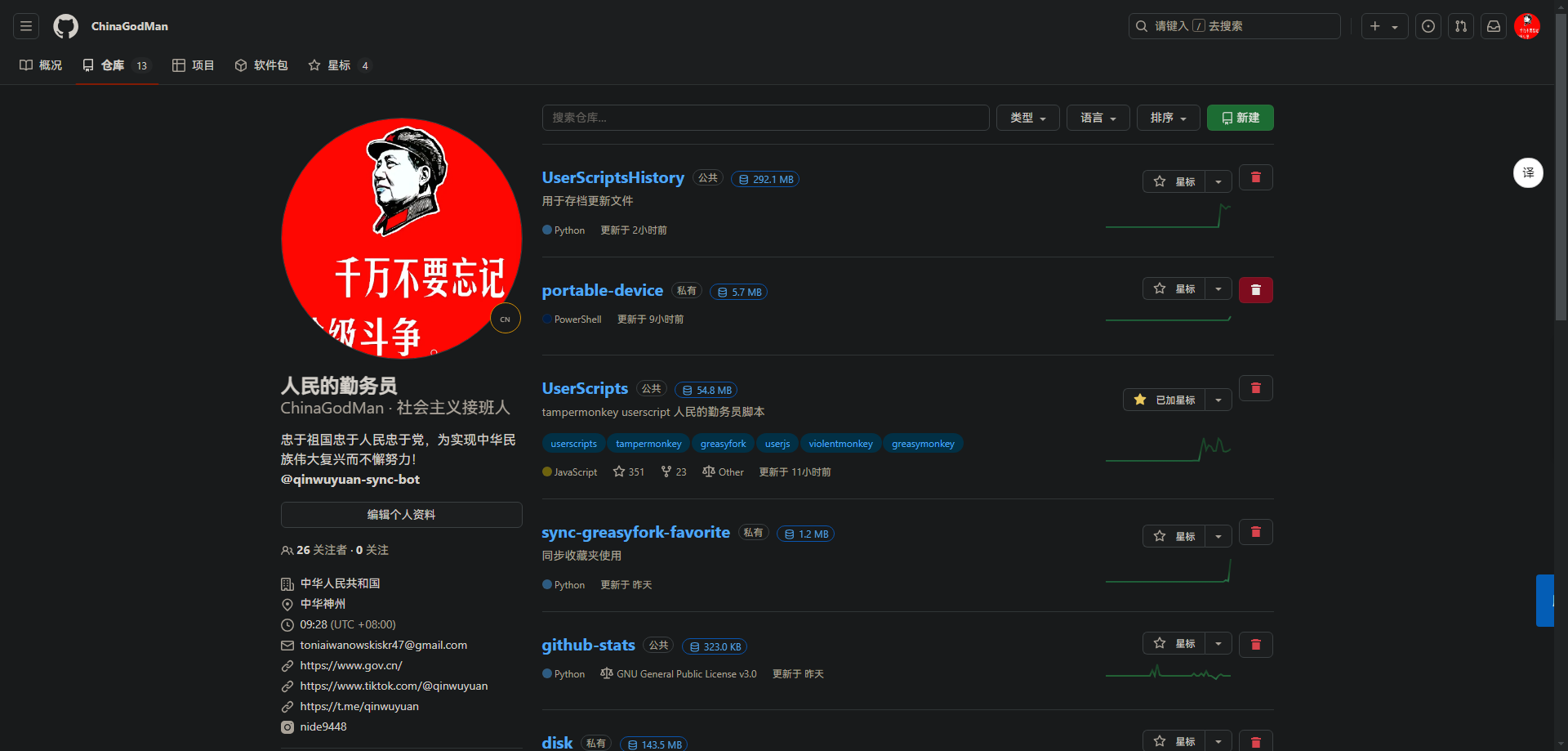
Quickly delete your own repository:
Notification pageClick to display project information,grateful:qbmiller Scriptsgithub_enhance Code #111
!
Notification pageSuspended display project information,grateful:qbmiller Scriptsgithub_enhance Code #111
Github Enhance assistant is a tool designed to improve users’ GitHub Tools for user experience。The following are the main functions and features of this tool:
Warehouse display size
exist GitHub code search、Warehouse search、issue page、On the user repository list and repository pages,The size of the warehouse is displayed next to the warehouse name,Convenient for users to quickly understand the size of the warehouse,Optimize selection。
Inactive development warning
If a repository has not been updated in the past six months,The system will add a prompt at the top of the repository,Remind users that the repository is inactive,and displays the time of the last update。This helps users determine the activity and maintenance status of the warehouse。
Quick jump within the warehouse
While browsing the repository,Users can easily view the list of all warehouses of this user,Provide a quick jump to different warehouses。Users can quickly find and access other items of interest,Improve work efficiency。
Warehouse convenience functions:
5.Quickly delete your own warehouse:
project manager:via quick jump function,Easily manage and coordinate multiple projects,Improve work efficiency。
learner:When learning new technologies,Make it easier to find relevant open source projects,Quickly view project activity and size。
By default,This script will only display the size of public repositories。 To display the size of a private repository,You need to generate a“repo”A new personal access token for the scope。 This token will be used to pass Github API Authenticate。
reposcope。Generate token button and copy the token。Set GitHub Token,Fill in the token you just generated。
🔍You may be looking forGitHubRelated scripts
- 🤠 Github enhanced assistant warehouse display size: 🤠 Warehouse display size: On GitHub’s code search, warehouse search, issue page, user warehouse list and repository page, the size of the warehouse will be displayed next to the warehouse name, allowing users to quickly understand the scale of the warehouse and optimize their selection. Inactive development warning: If a repository has not been updated in the past six months, the system will add a prompt at the top of the repository to remind users that the repository is inactive and display the time of the last update. This helps users determine the activity and maintenance status of the warehouse. Quick jump within the warehouse: When browsing the warehouse, the user can easily view the list of all warehouses of the user, providing an entrance to quickly jump to different warehouses. Users can quickly find and access other projects of interest, improving work efficiency. Usage scenarios: Developers: By displaying the warehouse size and active warnings, you can quickly filter out suitable libraries for development and avoid using projects that are no longer maintained. Project Manager: Through the quick jump function, it is easy to manage and coordinate multiple projects and improve work efficiency. Learners: When learning new technologies, they can more easily find relevant open source projects and quickly check the activity and scale of the projects. 🤠
- GitHub Sort by date: Change file sorting to descending by date,Conveniently view the latest updated files。
- GitHub folder downloader: Add a download button,Allows easy downloading of specific GitHub folder。
- Github Copy original file URL with download files: Add button at the end of each file line,to copy the original file URL and download files
- GitHub Submit information display web view: This script will GitHub The submission information on HTML view,to see submission details more clearly。It will automatically submit the information list、The commit header and latest commit information are converted to HTML Format,Provide better visual effects and user experience。
- GitHub File list beautifier: GitHub File List Beautifier is a user script,used to enhance GitHub Display effect of files in warehouse。It can add colors to files and folders,and replace the file type icons with small images,Makes the code base easier to browse and manage。Add colors and icons to files by type,Display small images in place of file type icons in repository source tree
- GitHub Automatically confirm device authorization: existGitHubThe authorization page automatically enters the authorization code and automatically confirms it.。
- Github List of code languages show all: Expand Github List of languages on the repository,Show each language,Instead of hiding small parts in“other”Down
- GitHub warehouse quick jump assistant: 🤠 GitHub warehouse quick jump assistant, specially designed to help users quickly access their own warehouses on GitHub. It generates a button at the top of the navigation bar. Click to expand all your repositories and easily jump to your own GitHub repository page without using GitHub’s secondary menu.
- Open jsDelivr link on Github: Open the GitHub link on jsDelivr to quickly download files
- GitHub Gist code snippet copy and downloader: Add a copy button to the Gist file to make the code easily copied. | Add a download button to the Gist file to easily download the code.
- GitHub shortcut key translation assistant: Listen to keyboard shortcut Ctrl + Q, which implements the function of translating text and replacing the translation results with the original text box. Supports Issue and pull request pages.
- GitHub Star Warehouse Notes Assistant: Have you forgotten the purpose of Star repositories? This is a script that can add notes to your favorite repositories, and the information you comments can be uploaded and downloaded to GitHub Gist
- GitHub jump to DeepWiKi: GitHub repository jumps to DeepWiKi, supports desktop and mobile
- GitHub Hide Copilot: Hide stupid Copilot on GitHub
GitHub: Author zvizvi Chrome extension GitHub-Web-IDE
Author mshll Published Script Github Repo Size
Author a1pha Published Script Github Quickly find active Forks list
Author lly-ke Published Script github-ossinsight
Author Zach Hardesty Published Script Github - Inactive Development Warning
Author chen gang Published Script GitHub Delete Repositories
Recommended browser and script manager:
If you need to learn more about how to install user scripts,Click meView the teaching of pictures and texts!
🔍You may be looking forChatGPTRelated scripts
- ChatGPT Collapse self message and max width: foldChatGPTmedium and long“you”information,and set the maximum width
- ChatGPTCode font size reduced: ChatGPT Make code font smaller and automatically wrap
- ChatGPT Character counter limit (CCCL): Add a character counter to the input box,limited to 32732 characters。(ChatGPT The limit is 32732 characters。)
- ChatGPT Chat copy code and export code buttons: exist chatgpt.com Add an animation in the lower right corner of the upper code block“Copy code”button and a for ChatGPT Code block in response adds export button,Prompts the user to save code to a file based on the programming language detected by the code block’s class name。
- ChatGPT code highlighted: Add all language code highlighting for ChatGPT (using highlight.js)
🔍You may be looking for web-related scripts
- scroll button: Generate two buttons on the right side of the page for scrolling the page
- Web page writing clip version authorization manager: Manage the writing behavior of web pages to the clipboard to prevent unauthorized automatic copying and disable audio and video content preloading and automatic playback.
- Remove link underline: Remove link underlines on all sites,and handle new links dynamically
- Highlight web keywords: Custom keyword highlighting on web pages including dynamic loading when scrolling
- Highlight keywords on the web: Highlight the text on the web page. If it is helpful to you, you can modify it as you like.
- Pin to top and bottom buttons: Generate two buttons on all pages,One for smoothing back to the top,One for continuous scrolling to the bottom,Click again to cancel scroll to bottom
- Small window preview: Open link in popup window when dragging link,and provide a preview before opening,use Edge pre-reading technology。At the same time, add an acrylic effect behind the small window when it is opened.。
- Unrestricted CSDN login: Go to your fucking CSDN login and copy, you can copy without logging in
- Beautify web forms with gorgeous gradients: Automatically apply color gradients to all columns of the table to beautify it
- MarkDown Cloud Cut Notes: A tool that converts web content to Markdown format, supports features such as copying, downloading, and sending to GitHub and Obsidian.
🔍You may be looking forGitHubRelated scripts
- 🤠 Github enhanced assistant warehouse display size: 🤠 Warehouse display size: On GitHub’s code search, warehouse search, issue page, user warehouse list and repository page, the size of the warehouse will be displayed next to the warehouse name, allowing users to quickly understand the scale of the warehouse and optimize their selection. Inactive development warning: If a repository has not been updated in the past six months, the system will add a prompt at the top of the repository to remind users that the repository is inactive and display the time of the last update. This helps users determine the activity and maintenance status of the warehouse. Quick jump within the warehouse: When browsing the warehouse, the user can easily view the list of all warehouses of the user, providing an entrance to quickly jump to different warehouses. Users can quickly find and access other projects of interest, improving work efficiency. Usage scenarios: Developers: By displaying the warehouse size and active warnings, you can quickly filter out suitable libraries for development and avoid using projects that are no longer maintained. Project Manager: Through the quick jump function, it is easy to manage and coordinate multiple projects and improve work efficiency. Learners: When learning new technologies, they can more easily find relevant open source projects and quickly check the activity and scale of the projects. 🤠
- GitHub Sort by date: Change file sorting to descending by date,Conveniently view the latest updated files。
- GitHub folder downloader: Add a download button,Allows easy downloading of specific GitHub folder。
- Github Copy original file URL with download files: Add button at the end of each file line,to copy the original file URL and download files
- GitHub Submit information display web view: This script will GitHub The submission information on HTML view,to see submission details more clearly。It will automatically submit the information list、The commit header and latest commit information are converted to HTML Format,Provide better visual effects and user experience。
- GitHub File list beautifier: GitHub File List Beautifier is a user script,used to enhance GitHub Display effect of files in warehouse。It can add colors to files and folders,and replace the file type icons with small images,Makes the code base easier to browse and manage。Add colors and icons to files by type,Display small images in place of file type icons in repository source tree
- GitHub Automatically confirm device authorization: existGitHubThe authorization page automatically enters the authorization code and automatically confirms it.。
- Github List of code languages show all: Expand Github List of languages on the repository,Show each language,Instead of hiding small parts in“other”Down
- GitHub warehouse quick jump assistant: 🤠 GitHub warehouse quick jump assistant, specially designed to help users quickly access their own warehouses on GitHub. It generates a button at the top of the navigation bar. Click to expand all your repositories and easily jump to your own GitHub repository page without using GitHub’s secondary menu.
- Open jsDelivr link on Github: Open the GitHub link on jsDelivr to quickly download files
- GitHub Gist code snippet copy and downloader: Add a copy button to the Gist file to make the code easily copied. | Add a download button to the Gist file to easily download the code.
- GitHub shortcut key translation assistant: Listen to keyboard shortcut Ctrl + Q, which implements the function of translating text and replacing the translation results with the original text box. Supports Issue and pull request pages.
- GitHub Star Warehouse Notes Assistant: Have you forgotten the purpose of Star repositories? This is a script that can add notes to your favorite repositories, and the information you comments can be uploaded and downloaded to GitHub Gist
- GitHub jump to DeepWiKi: GitHub repository jumps to DeepWiKi, supports desktop and mobile
- GitHub Hide Copilot: Hide stupid Copilot on GitHub
🔍You may be looking forGoogleRelated scripts
- Block Google search sites: Search for a Google Blocking a specified site
- Google Advanced search assistant: Add an advanced search form to the top of your Google search page
🔍You may be looking forGreasyForkRelated scripts
- Greasy fork script pages for URL enhancement: The script details page is suitable for searching without default URLs. Turn to clickable text links and pop up prompts
- Greasyfork Glue craftsman: for Greasyfork Provide various usage functions,absolute time,Web widescreen,Script page enhancements,Download extension,Panel repair and a series of operations
- Script Finder GreasyFork Script Lookup: Script Finder Find on any website that applies to that website GreasyFork Script。
- Greasyfork Script to display ratings: Add script rating after script name when browsing script list
- GreasyFork: Navigation bar enhancement: Add user list on navigation bar,console,Collection etc...
- GreasyFork markdown: The default format used in the forum isMarkdown,Add format help link and publish new script,Reply time toolbar with quick editing enabled
- GreasyFork Search: Search using GoogleGreasyForkandSleazyForkupper script
- GreasyFork Notification Assistant: When there’s a new reply to your script or to a discussion you’re participating in,The script will display the latest discussion content in a modal window on the web page。
- GreaysFork EnhanceWebHookSync settings: GreaysFork Quickly enter script synchronization information,And add language codes for multiple countries in batches,Instead of clicking the selection boxes one by one and going to the corresponding URL。
- GreasyFork User-published script data visualization: useChart.jsObtaining and visualizing user script data,And generate a chart on the user’s personal homepage to display the detailed installation status below.
- Greasyfork Display registration time: If your script interferes with the interests of some people, it is not surprising to receive malicious negative reviews. There are two characteristics of malicious negative reviews: one is that the account is usually newly registered, and the other is that the negative reviews will be given shortly after registration, and there will be basically no follow-up activities. This script gets the registration time of the greasyfork user and is displayed next to the user name. If the time displayed next to the user name is the future time, then the user is likely to be a malicious account registered.
🔍You might be looking for adult scripts
- MissAv batch backup collection videos: Get picture files and video information from the current missav page, and provide the downloaded web page file after merging the results.
- MissAV Automatic login: Detection MissAV state,and automatically log in when not logged in
- ThisAV Automatic login: Detection ThisAV state,and automatically log in when not logged in
- JableTV Automatic login: Detection JableTV state,and automatically log in when not logged in
- MissAV video download tool: Sniff the real download address of the video from the current missav playback page and download it
- xvideos push download: 1. Automatic playback 2. Automatic widescreen 3. High-quality playback 4. Click to push the next movie 5. Download thumbnails
- Pornhub video download with one click: Pornhub video download with one click | pornhub.com | Download directly without login | Download free to watch paid videos | Download videos that are prohibited | Download all viewable resolutions
- xhamster video one-click download assistant: xhamster video download with one click | xhamster.com | Download directly without login | All viewable resolutions can be downloaded
- XnxxVideos Video One-click Download Assistant: XnxxVideos Video download with one click | xnxx.com | Download directly without login | All viewable resolutions can be downloaded
- MissAV Enhanced Assistant: Remove ads | Backstage play | Autoplay | Custom fast forward time | Full title | More features...
🔍You may be looking for automatic translation
- Foreign Language Terminator: Recognize non-Chinese characters,If the length is greater than5And the translated text does not contain Chinese,Then translate and replace the original text to Chinese
- Web Translation——Automatic translation into Chinese: Give each non-Chinese web page the bottom right corner(Can be adjusted to the lower left corner)Add onegoogleTranslation icon,This version is a Chinese translation,Translate only foreign languages to Chinese,Add automatic translation
- Translation widget | Translate any language: Translation of any language and shortcut one-click translation of the language you want | Page Translation | Select text (press Ctrl) | Provide shortcuts, just press one key to quickly translate the language you want | English learning | Translation can be set and supports most common languages around the world | Feedback if you have any questions
🔍You might be looking for social media scripts
- Twitter/X Hide retweeted posts: Automatically hide forwarded content and hide forwarded content on first loading to remove annoying ads
- Twitter Media Downloader (2025.04.28 Fixed): Download videos/pictures with one click, and support automatic packaging as a ZIP file to download when batch downloads. Support new API interface
- YouTube Assistant: YouTube 1. Video loop playback 2. Screenshot download 3. Theme progress bar


