Exportă căutarea SteamDB

Adaugă un buton pentru a exporta căutarea curentă în SteamDB ca TSV

You will need to install an extension such as Tampermonkey, Greasemonkey or Violentmonkey to install this script.

You will need to install an extension such as Tampermonkey to install this script.

You will need to install an extension such as Tampermonkey or Violentmonkey to install this script.

You will need to install an extension such as Tampermonkey or Userscripts to install this script.

You will need to install an extension such as Tampermonkey to install this script.

You will need to install a user script manager extension to install this script.

(I already have a user script manager, let me install it!)

You will need to install an extension such as Stylus to install this style.

You will need to install an extension such as Stylus to install this style.

You will need to install an extension such as Stylus to install this style.

You will need to install a user style manager extension to install this style.

You will need to install a user style manager extension to install this style.

You will need to install a user style manager extension to install this style.

(I already have a user style manager, let me install it!)

Autor
JLCareglio
Instalări zilnice
0
Total instalări
46
Rating-uri
0 0 0
Versiune
2.3.9
Creat
07-08-2023
Actualizat
04-02-2025
Size
8,34 KB
Compatibilitate
Compatibil cu Firefox Compatibil cu Chrome Compatibil cu Opera Compatibil cu Safari Compatibil cu Edge
Licență
MIT
Se aplică pe

Export SteamDB Search

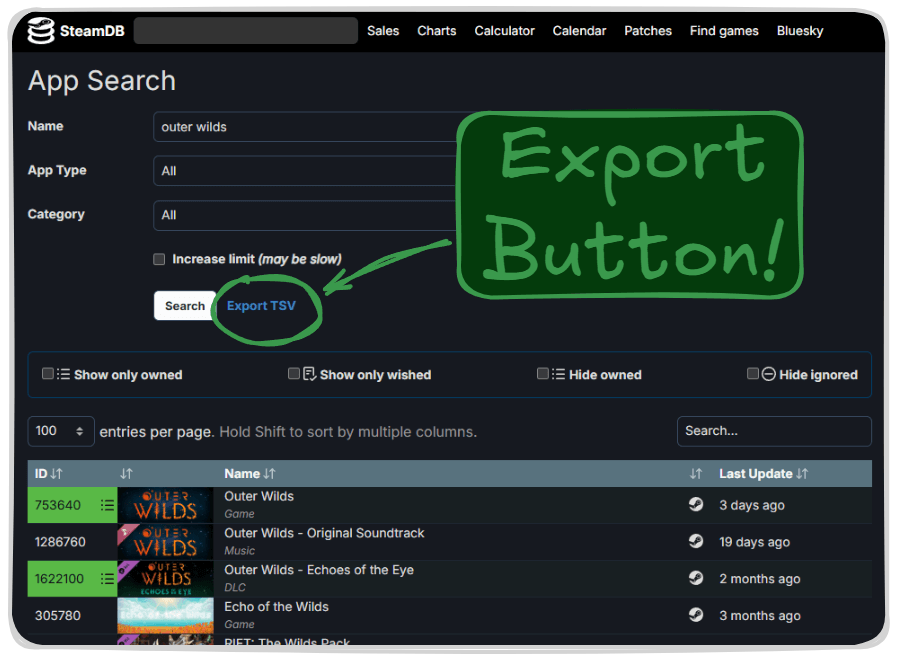
This script or UserScript adds a button to export current search results in SteamDB as TSV format.

image

License: MIT Tampermonkey SteamDB

Firefox Chrome Opera Safari Edge Brave

✨ Features

  • Adds "Export TSV" button next to the search filters
  • Exports detailed information of all search results in TSV format
  • Includes:
    • App ID
    • Game name
    • Last Update (UTC)
  • Compatible with multiple browsers

🚀 Installation

  1. Install Tampermonkey or other userscript manager
  2. Click here to install the script
  3. Visit SteamDB Search to try it

💡 Usage

  1. Go to SteamDB Search page
  2. Perform your search
  3. You'll find a new "Export TSV" button in the filters section
  4. Click "Export TSV" to start the export and wait
  5. The TSV file will download automatically