GitHub Show Stars

Show star counts after every GitHub repo link on all webpages

이 스크립트를 설치하려면 Tampermonkey, Greasemonkey 또는 Violentmonkey와 같은 확장 프로그램이 필요합니다.

이 스크립트를 설치하려면 Tampermonkey와 같은 확장 프로그램을 설치해야 합니다.

이 스크립트를 설치하려면 Tampermonkey 또는 Violentmonkey와 같은 확장 프로그램이 필요합니다.

이 스크립트를 설치하려면 Tampermonkey 또는 Userscripts와 같은 확장 프로그램이 필요합니다.

이 스크립트를 설치하려면 Tampermonkey와 같은 확장 프로그램이 필요합니다.

이 스크립트를 설치하려면 유저 스크립트 관리자 확장 프로그램이 필요합니다.

(이미 유저 스크립트 관리자가 설치되어 있습니다. 설치를 진행합니다!)

이 스타일을 설치하려면 Stylus와 같은 확장 프로그램이 필요합니다.

이 스타일을 설치하려면 Stylus와 같은 확장 프로그램이 필요합니다.

이 스타일을 설치하려면 Stylus와 같은 확장 프로그램이 필요합니다.

이 스타일을 설치하려면 유저 스타일 관리자 확장 프로그램이 필요합니다.

이 스타일을 설치하려면 유저 스타일 관리자 확장 프로그램이 필요합니다.

이 스타일을 설치하려면 유저 스타일 관리자 확장 프로그램이 필요합니다.

(이미 유저 스타일 관리자가 설치되어 있습니다. 설치를 진행합니다!)

작성자
h4rvey-g
일일 설치 수
0
총 설치 수
0
평점
0 0 0
버전
1.0.0
생성일
2026-03-21
갱신일
2026-03-21
크기
16.7KB
라이선스
해당 없음
적용 사이트
모든 사이트

github-show-stars

A Tampermonkey userscript that automatically shows ⭐ star counts next to every GitHub repository link on any webpage you visit.
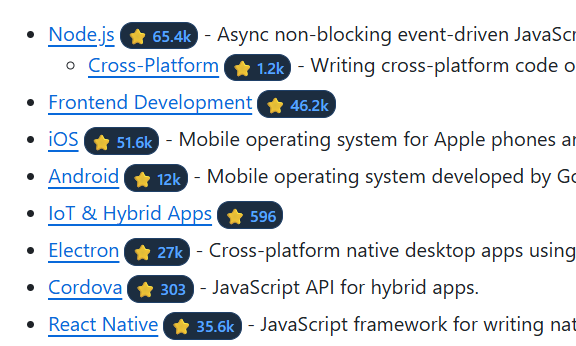
Screenshot showing star badges next to GitHub links


Features

  • 🌐 Works everywhere – runs on every webpage, not just GitHub itself.
  • Fast – results are cached for 15 minutes so the same repo is only fetched once per browsing session window.
  • 🔄 SPA / dynamic content aware – uses a MutationObserver to pick up links added after the initial page load (Reddit, Twitter/X, Hacker News, etc.).
  • 🔒 Optional authentication – set a personal access token to raise the GitHub API rate limit from 60 to 5,000 requests/hour.
  • 🎨 Clean badge UI – small, unobtrusive inline badges that match the style of GitHub itself.

Installation

  1. Install the Tampermonkey browser extension.
  2. Click the link below (or open the raw file) to install the script:

➕ Install github-show-stars.user.js

Tampermonkey will open an installation dialog – click Install.


Optional: GitHub Personal Access Token

The unauthenticated GitHub API allows only 60 requests per hour per IP address. If you visit pages with many GitHub links you may hit this limit quickly.

To raise the limit to 5,000 requests/hour, create a fine-grained (or classic) Personal Access Token with no extra scopes (read-only public data is sufficient), then store it using one of the methods below.

Method 1 – Tampermonkey script menu (recommended)

  1. Click the Tampermonkey icon in your browser toolbar.
  2. Hover over GitHub Show Stars in the script list.
  3. Click Set GitHub Token.
  4. Paste your token in the prompt and click OK.
  5. Reload the page for the new token to take effect.

Method 2 – Browser DevTools console

// Run this in the browser DevTools console on any page where the script is active
GM_setValue('github_token', 'ghp_yourTokenHere');

The token is stored securely in Tampermonkey's own storage and is never exposed to the visited page.


How it works

  1. After the page loads the script scans all <a> tags whose href contains github.com.
  2. For each link that matches the pattern github.com/<owner>/<repo> a small badge is inserted immediately after the link.
  3. The badge shows ⭐ … while the request is in-flight, then updates to the real star count (e.g. ⭐ 4.2k).
  4. If the request fails (private repo, rate limit, network error) the badge shows ⭐ ? with a tooltip describing the error.
  5. A MutationObserver watches the page for newly added links and processes them on the fly.

Development

The script is a single self-contained file (github-show-stars.user.js). No build step is required.

To iterate locally:

  1. Enable "Allow access to file URLs" in Tampermonkey's settings.
  2. Edit github-show-stars.user.js in your editor.
  3. In Tampermonkey's dashboard, add the script by pointing it at the local file path (file:///path/to/github-show-stars.user.js).
  4. Reload the browser tab to pick up changes.

License

MIT