Setup road properties with templates
Userscript for Waze Map Editor — quick road property templates. One-click buttons and keyboard shortcuts (Alt+1 through Alt+0) to apply speed limits, road types, lock ranks, and flags to selected road segments.
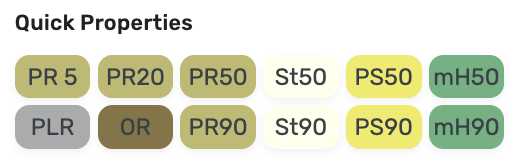
Ukrainian manual: https://wazeopedia.waze.com/wiki/Ukraine/Scripts/WME_E95
npm install
npm run build       # build dist/WME-E95.user.js
npm run watch       # rebuild on changes
npm test            # run tests
Source is written in TypeScript under src/, built with Rollup into a single IIFE at dist/WME-E95.user.js.
src/
  meta.ts              # userscript header (comment block)
  style.css            # plain CSS
  globals.d.ts         # WME runtime globals
  name.ts              # script name constant
  types.ts             # TYPES (SDK ROAD_TYPE), COLORS, TS interfaces
  translations.ts      # i18n (en, uk, ru)
  layers.ts            # speed limit / headlights layers
  buttons/
    index.ts           # default buttons (A-L), country registry
    countries/         # per-country overrides
  e95.ts               # E95 class
  index.ts             # bootstrap entry point
tests/
  types.test.ts        # TYPES, COLORS, TYPE_NAMES
  buttons.test.ts      # default buttons, COUNTRIES, CONFIGS
  countries.test.ts    # country configs validation
  layers.test.ts       # layer callbacks
  translations.test.ts # translations structure
Find the country's numeric ID in the Waze Map Editor.
Create src/buttons/countries/<country>.ts:
import { CountryConfig, TYPES } from '../../types'

const example: CountryConfig = {
  id: 123,
  name: 'example',
  buttons: {
    // Override existing buttons — partial overrides are OK,
    // missing fields inherited from defaults via deep merge
    D: {
      title: 'St60',
      attributes: {
        fwdSpeedLimit: 60,
        revSpeedLimit: 60,
        roadType: TYPES.STREET,
        lockRank: 1,
      },
    },
    // Set to false to disable
    G: false,
    // Add extra buttons beyond A-L
    M: {
      title: 'FW120',
      attributes: {
        fwdSpeedLimit: 120,
        revSpeedLimit: 120,
        roadType: TYPES.FREEWAY,
        lockRank: 4,
      },
    },
  },
}

export default example
src/buttons/index.ts:import example from './countries/example'
const countries: CountryConfig[] = [
albania, greece, honduras, hungary, portugal, ukraine, example,
]
npm run build && npm test
| Field | Type | Description |
|---|---|---|
title |
string |
Button label (e.g. 'St50') |
shortcut |
`string \ | null` |
options.detectCity |
boolean |
Auto-detect city from neighboring segments |
options.clearCity |
boolean |
Clear city and street |
attributes.fwdSpeedLimit |
number |
Forward speed limit (km/h) |
attributes.revSpeedLimit |
number |
Reverse speed limit (km/h) |
attributes.roadType |
number |
Use TYPES.* constants |
attributes.lockRank |
number |
Lock level 0-4 (capped to user's rank at runtime) |
attributes.flagAttributes |
object |
Flags like { headlights: true, unpaved: true }
|
Road types follow SDK ROAD_TYPE: STREET, PRIMARY_STREET, FREEWAY, RAMP, WALKING_TRAIL, MAJOR_HIGHWAY, MINOR_HIGHWAY, OFF_ROAD, WALKWAY, PEDESTRIAN_BOARDWALK, FERRY, STAIRWAY, PRIVATE_ROAD, RAILROAD, RUNWAY_TAXIWAY, PARKING_LOT_ROAD, ALLEY.
| Button | Shortcut | Type | Speed | City | Lock |
|---|---|---|---|---|---|
| PR 5 | Alt+1 |
private road | 5 km/h | auto | 1 |
| PR20 | Alt+2 |
private road | 20 km/h | auto | 1 |
| PR50 | Alt+3 |
private road | 50 km/h | auto | 1 |
| St50 | Alt+4 |
street | 50 km/h | auto | 1 |
| PS50 | Alt+5 |
primary street | 50 km/h | auto | 2 |
| mH50 | — | minor highway | 50 km/h | auto | 3 |
| PLR | Alt+6 |
parking lot road | 5 km/h | auto | 1 |
| OR | Alt+7 |
off-road | 90 km/h | — | 1 |
| PR90 | Alt+8 |
private road | 90 km/h | — | 1 |
| St90 | Alt+9 |
street | 90 km/h | — | 1 |
| PS90 | Alt+0 |
primary street | 90 km/h | — | 2 |
| mH90 | — | minor highway | 90 km/h | — | 3 |
The script detects the country from the map and applies country-specific button overrides. Unspecified buttons inherit default settings via deep merge.
Full button layout replacement with local speed limits:
| A | B | C | D | E | F | |
|---|---|---|---|---|---|---|
| Button | PLR | Pr40 | St40 | PS40 | mH40 | MH40 |
| Type | parking | private | street | primary | minor | major |
| Speed | 5 | 40 | 40 | 40 | 40 | 40 |
| G | H | I | J | K | L | |
|---|---|---|---|---|---|---|
| Button | FW90 | Pr80 | St80 | PS80 | mH80 | MH80 |
| Type | freeway | private | street | primary | minor | major |
| Speed | 90 | 80 | 80 | 80 | 80 | 80 |
Overrides D-F and J-L, adds extra buttons M-P:
| D | E | F | J | K | L | |
|---|---|---|---|---|---|---|
| Button | ST30 | ST50 | ST90 | PR30 | PR50 | PR90 |
| Type | street | street | street | primary | primary | primary |
| Speed | 30 | 50 | 90 | 30 | 50 | 90 |
Extra buttons: M (private), N (unpaved street), O (unpaved street 40), P (street)
Uses only 6 buttons (G-L disabled), all with auto city detection:
| A | B | C | D | E | F | |
|---|---|---|---|---|---|---|
| Button | PR | PLR | StU | StP | PSU | PSP |
| Type | private | parking | street | street | primary | primary |
| Speed | 20 | 20 | 40 | 40 | 40 | 40 |
| Flags | unpaved | unpaved |
Minimal overrides — adjusts speed limits on buttons A, B, G:
| A | B | G | |
|---|---|---|---|
| Button | PR20 | PR30 | PLR |
| Speed | 20 | 30 | 20 |
Minimal overrides — adjusts speed limits on buttons G, H:
| G | H | |
|---|---|---|
| Button | PLR | OR |
| Speed | 30 | 30 |
Adds the headlights flag for roads outside cities:
| H | I | J | K | L | |
|---|---|---|---|---|---|
| Button | OR | PR90 | St90 | PS90 | mH90 |
| Headlights | yes | yes | yes | yes | yes |
| Clear city | yes | — | — | — | — |
// @require      https://update.greasyfork.org/scripts/389765/1793258/CommonUtils.js
// @require      https://update.greasyfork.org/scripts/450160/1792042/WME-Bootstrap.js
// @require      https://update.greasyfork.org/scripts/450221/1793261/WME-Base.js
// @require      https://update.greasyfork.org/scripts/450320/1793862/WME-UI.js
Author homepage: https://anton.shevchuk.name/
Author pet projects: https://hohli.com/
Support author: https://donate.hohli.com/
Script homepage: https://github.com/AntonShevchuk/wme-e95/
GreasyFork: https://greasyfork.org/uk/scripts/382614-wme-e95

