5etools Clean Spell Layout

Makes the spells page of 5e.tools clean, and only show pinned list, with customizable UI.

Dovrai installare un'estensione come Tampermonkey, Greasemonkey o Violentmonkey per installare questo script.

You will need to install an extension such as Tampermonkey to install this script.

Dovrai installare un'estensione come Tampermonkey o Violentmonkey per installare questo script.

Dovrai installare un'estensione come Tampermonkey o Userscripts per installare questo script.

Dovrai installare un'estensione come ad esempio Tampermonkey per installare questo script.

Dovrai installare un gestore di script utente per installare questo script.

(Ho già un gestore di script utente, lasciamelo installare!)

Dovrai installare un'estensione come ad esempio Stylus per installare questo stile.

Dovrai installare un'estensione come ad esempio Stylus per installare questo stile.

Dovrai installare un'estensione come ad esempio Stylus per installare questo stile.

Dovrai installare un'estensione per la gestione degli stili utente per installare questo stile.

Dovrai installare un'estensione per la gestione degli stili utente per installare questo stile.

Dovrai installare un'estensione per la gestione degli stili utente per installare questo stile.

(Ho già un gestore di stile utente, lasciamelo installare!)

Autore
ThunderE75
Installazioni giornaliere
0
Installazioni totali
1
Valutazione
0 0 0
Versione
1.3
Creato il
22/04/2026
Aggiornato il
22/04/2026
Dimensione
21 KB
Licenza
AGPL-3.0
Applica a


5eTools Spell List Userscript

Fixes the awkward layout of the spell view on 5etools by creating a clean, split-screen interface.
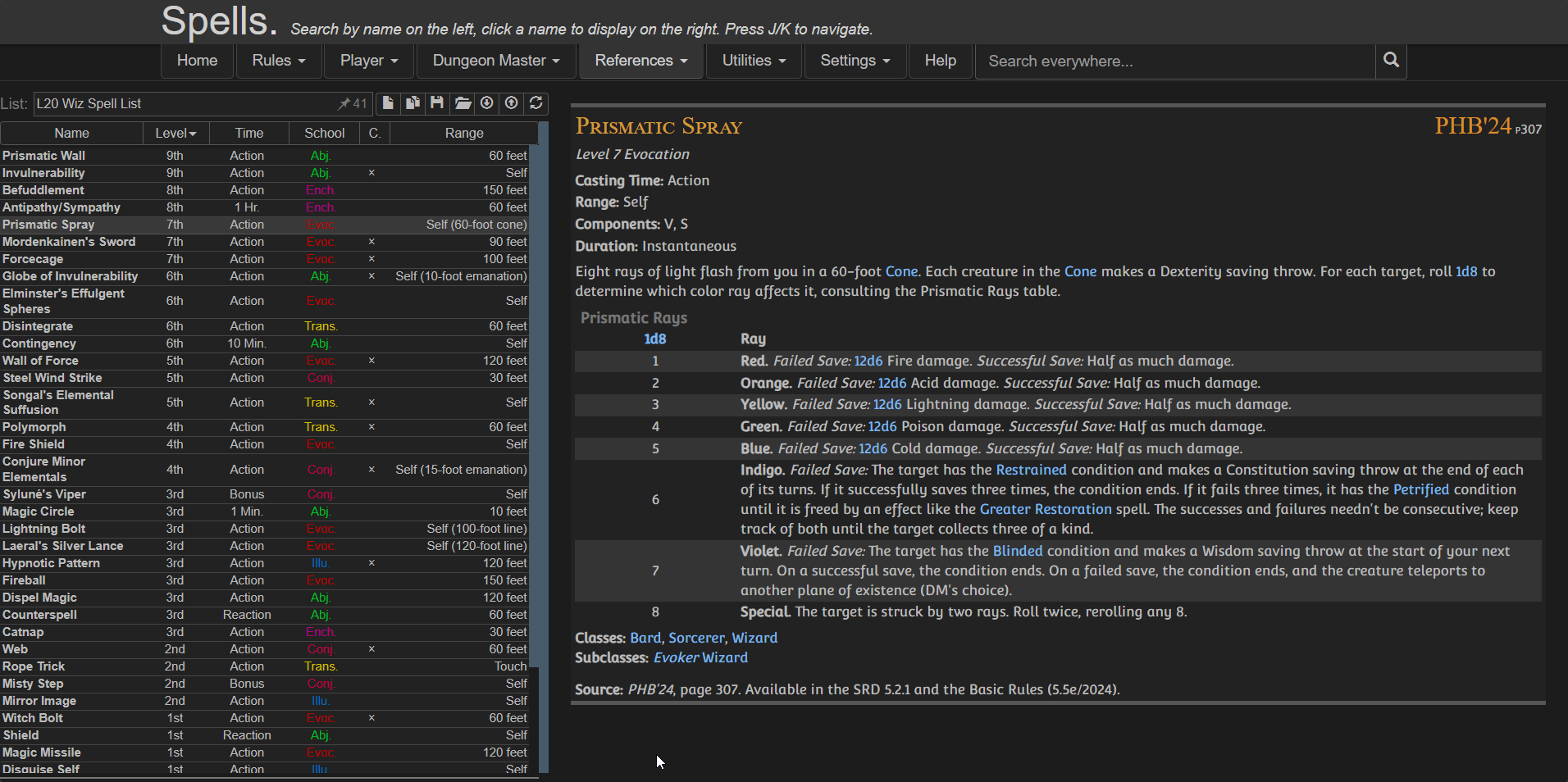
Preview

Features

  • Moving the Pinned Spell List to the left
  • Keeping spell details on the right
  • Using full screen width efficiently
  • Providing a clean, consistent reading experience
  • Optional toggles via userscript settings:
    • Show/Hide Header
    • Show/Hide Navigation
    • Show/Hide Extra panel

⚠️ IMPORTANT
Create your spell list BEFORE enabling the script because once the script is active:
  • The original UI is replaced
  • You won’t have access to the main spell browser anymore

Installation

Configuration

You can customize the layout using your userscript manager:

Violentmonkey dashboard > Edit the script > Go to Values / Script Settings


{
  "showExtra": true,
  "showHeader": true,
  "showNav": false
}

Credits