Quick Access Vault

Adds buttons to withdraw/deposit preset values in property vault

Dovrai installare un'estensione come Tampermonkey, Greasemonkey o Violentmonkey per installare questo script.

You will need to install an extension such as Tampermonkey to install this script.

Dovrai installare un'estensione come Tampermonkey o Violentmonkey per installare questo script.

Dovrai installare un'estensione come Tampermonkey o Userscripts per installare questo script.

Dovrai installare un'estensione come ad esempio Tampermonkey per installare questo script.

Dovrai installare un gestore di script utente per installare questo script.

(Ho già un gestore di script utente, lasciamelo installare!)

Dovrai installare un'estensione come ad esempio Stylus per installare questo stile.

Dovrai installare un'estensione come ad esempio Stylus per installare questo stile.

Dovrai installare un'estensione come ad esempio Stylus per installare questo stile.

Dovrai installare un'estensione per la gestione degli stili utente per installare questo stile.

Dovrai installare un'estensione per la gestione degli stili utente per installare questo stile.

Dovrai installare un'estensione per la gestione degli stili utente per installare questo stile.

(Ho già un gestore di stile utente, lasciamelo installare!)

Autore
TornScythe
Installazioni giornaliere
0
Installazioni totali
1
Valutazione
0 0 0
Versione
1.20
Creato il
07/02/2026
Aggiornato il
07/02/2026
Dimensione
9,89 KB
Licenza
MIT
Applica a

Brief Overview

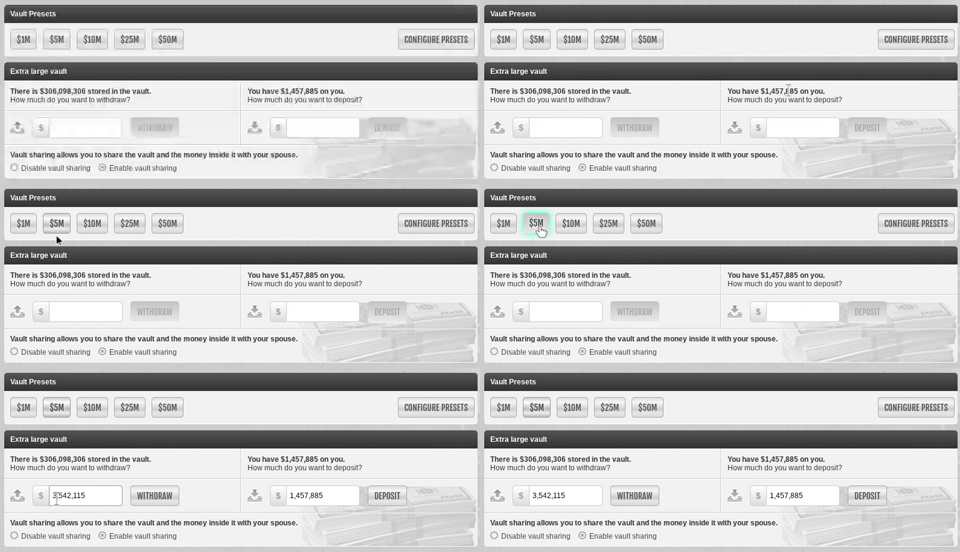
This script adds a row of customizable preset buttons to your property vault page. It's designed to save you from manually typing out amounts, making depositing and withdrawing cash much faster.

Features

  • Customizable Presets: Use the Configure Presets button to set your most-used values (e.g., 1m, 10m, 50m).
  • Standard Click: Clicking a button normally will simply fill the input field with that exact amount.
  • Smart Fill (Shift + Click): This is a secondary mode used to hit a specific total. It calculates the difference between the preset and your current cash on hand and fills that amount instead.
    • Example: If you have $2m on hand and want to reach $10m, Shift+Clicking the $10m button puts $8m in the input field.

Vault Presets Demo

  • Hotkeys: Keys 1-9 (and 0 for the 10th slot) trigger the buttons. Holding Shift while using a hotkey also triggers the Smart Fill.
  • Safety: The script only fills the text box for you. You still have to click Deposit or Withdraw yourself.

Configuration

  1. Open your property vault.
  2. Click the Configure Presets button on the right side of the preset bar.
  3. Type your amounts separated by commas.
  4. It understands k, m, and b shorthand (e.g., 500k, 5m, 10m).
  5. Hit Save.