VOD Highlight Analyzer

Analyzes chat activity of YouTube, Twitch and Kick VODs and displays a clickable density chart to jump to highlights.
Vous devrez installer une extension telle que Tampermonkey, Greasemonkey ou Violentmonkey pour installer ce script.

Vous devrez installer une extension telle que Tampermonkey pour installer ce script.

Vous devrez installer une extension telle que Tampermonkey ou Violentmonkey pour installer ce script.

Vous devrez installer une extension telle que Tampermonkey ou Userscripts pour installer ce script.

Vous devrez installer une extension telle que Tampermonkey pour installer ce script.

Vous devrez installer une extension de gestionnaire de script utilisateur pour installer ce script.

(J'ai déjà un gestionnaire de scripts utilisateur, laissez-moi l'installer !)

Vous devrez installer une extension telle que Stylus pour installer ce style.

Vous devrez installer une extension telle que Stylus pour installer ce style.

Vous devrez installer une extension telle que Stylus pour installer ce style.

Vous devrez installer une extension du gestionnaire de style pour utilisateur pour installer ce style.

Vous devrez installer une extension du gestionnaire de style pour utilisateur pour installer ce style.

Vous devrez installer une extension du gestionnaire de style pour utilisateur pour installer ce style.

(J'ai déjà un gestionnaire de style utilisateur, laissez-moi l'installer!)

Auteur
SkAnon
Installations quotidiennes
4
Installations (total)
138
Notes
1 0 0
Version
2.1
Créé
07/06/2026
Mis à jour
16/06/2026
Taille
146 ko
Licence
MIT
S'applique à

📊 YouTube, Twitch & Kick VOD Highlight Analyzer

Image

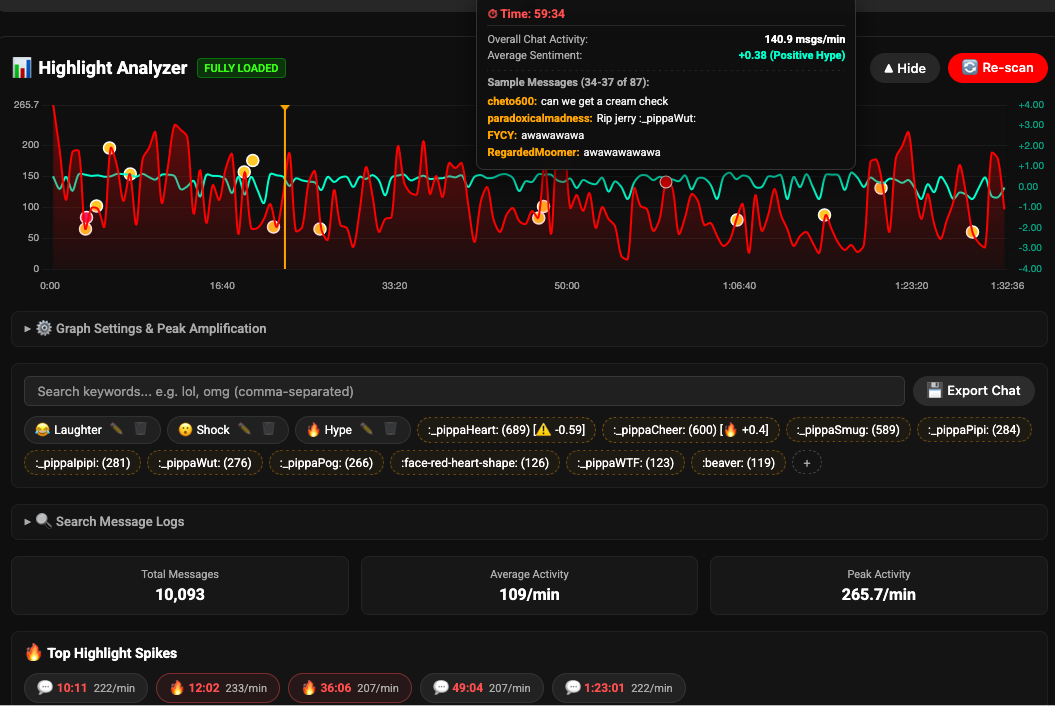
An advanced chat activity analyzer for YouTube, Twitch, and Kick VODs. It scans live chat replays in the background and renders a highly interactive, responsive density chart directly below the video player. Click anywhere on the chart to instantly jump to highlights, view rotating message tooltips, filter out spam keywords with a togglable blacklist, track chat sentiment, and search/seek through the chat logs.


🚀 Key Features

  • ⚡ Click-to-Seek Density Chart: Renders a beautiful line chart representing chat message frequency (Messages per Minute). Clicking any point on the chart seeks the player directly to that time.
  • 💚 Full YouTube, Twitch & Kick Support: Works seamlessly across all three major platforms, handling client-side single-page app redirects, navigation updates, and custom player styles.
  • 🧠 Dynamic Chat Sentiment Analysis: Plots a secondary sentiment trajectory line (from -1.0 for fail/rage to +1.0 for extreme hype). The graph, overall stats, and tooltips reflect the emotional baseline of the stream in real-time. Includes a Sentiment Gain slider in settings to dynamically scale the visual curves on the chart.
  • 🥾 Emote Sentiment Bootstrapping: Dynamically calculates and bootstraps sentiment scores for custom, unrecognized stream emotes by analyzing standard sentiment words and emojis sent in proximity to them.
  • ⛰️ Smart Auto-Seek (Valley-Seek): Automatically analyzes the activity curve up to 60 seconds prior to a peak. Rather than jumping back by a static lead-in buffer, it locates the local activity "valley" (the quiet build-up before the hype) and seeks there.
  • 🔍 Search Message Logs: A dedicated search panel lets you query loaded logs by author name or message text. Includes an option to filter and display only Super Chats (YouTube only) styled with tier colors and amount badges. Click the ⏱ HH:MM:SS button on any search result to jump directly to that message's time.
  • 🚫 Togglable Keyword Blacklist: Filter out bot messages, spam, or spoilers. Supports toggling the blacklist on/off and case-sensitive/insensitive matching. The chart, stats, and spikes update instantly.
  • 🏷️ Expanded Filter System with Emoji Support: Track activity using predefined sentiment tags (Laughter, Hype, Shock), custom search tags, or the top 10 most frequently used emotes. Includes a toggle to include/exclude standard pictorial emojis in the auto-detected list.
  • 💾 IndexedDB VOD Cache: Automatically caches scanned chat logs in the browser. Returning to a previously analyzed VOD loads the data instantly with zero load time.
  • ⚙️ Configurable Cache Limit: Customize how many VODs the script will cache (default: 5) per domain. Lowering the limit immediately prunes older entries.
  • 📈 Peak Amplification Sliders: Scale and amplify graph peaks dynamically using Peak Gain controls to easily distinguish smaller spikes in quiet streams.
  • 💬 YouTube Super Chats Visualization: Logs YouTube Super Chats, plotting them as color-coded scatter dots (Teal, Yellow, Pink, Red) on the chart. Features color subtoggles to filter visible tiers, a visual stacking algorithm to prevent overlapping clutter, and custom rich HTML tooltips. Click a dot to seek the player directly to that time.
  • 🍊 Real-Time Playback Position Playhead: Draws a vertical line on the chart canvas representing the current playing time, topped with a triangular indicator that slides smoothly as the VOD plays.
  • 💬 HTML Tooltips with Comment Rotation: Hover over any point on the graph to see a rich HTML tooltip displaying overall activity, filtered keyword activity, color-coded sentiment level (Neutral, Positive Hype, Mild Positive, Negative/Fail/Rage, Mild Negative), and rotating sample comments (refreshed every 500ms).
  • 🔥 Automated Highlight Spikes: Automatically identifies the top highlight moments based on message density spikes, spacing constraints, and average activity thresholds. Hovering a spike pill highlights the corresponding point on the chart and triggers the detailed HTML tooltip. Right-clicking a spike pill removes it and dynamically populates the next qualifying peak, with removals cached per-VOD in localStorage to persist across page refreshes.
  • ⚙️ Configurable Max Spikes: Adjust the number of auto-detected highlight spikes displayed from 1 to 20 (default: 5).
  • 🔒 Third-Party Embed Isolation: Restricts script execution to top-level pages only, preventing the changelog popup and analyzer panel from appearing inside YouTube, Twitch, or Kick embeds on external websites.
  • 📤 CSV Export: Download the entire parsed chat log with timestamps, offsets, author names, and text runs in a clean CSV file.
  • 🙈 Space-Saving Collapsible UI: The control panel initializes in a collapsed state to preserve native page aesthetics and avoid watch-page clutter, restoring layout state seamlessly.

⚙️ How it works / Settings

All controls are hidden inside collapsible details blocks to keep your YouTube, Twitch, and Kick watch pages clean and clutter-free:

  1. 🚀 Load Chat / Re-scan: Triggers the platform-specific background fetcher (YouTube chat scraper, Twitch API GraphQL fetcher, or Kick API chat fetcher with live block retries) to scan chat history.
  2. ⚙️ Graph Settings:
    • Main Peak Gain / Filter Peak Gain: Slider controls to amplify or reduce peak visualization.
    • Seek Mode: Radio buttons to choose between Manual mode (uses a fixed lead-in buffer offset) or Auto (Valley-seek) mode.
    • Seek Lead-in Buffer: Sets how many seconds before a highlight you want the player to seek to (default: 10 seconds, only active in Manual mode).
    • Enable Blacklist / Case Sensitive / Blacklist words: Checkboxes and input field to exclude specific words or phrases from the graph.
    • Sentiment Graph: Toggle checkbox to show or hide the secondary sentiment trajectory line, plus a Sentiment Gain slider (visible when enabled) to scale visual curves.
    • Show Super Chats on Graph: Toggle checkbox to show/hide YouTube Super Chats on the graph, plus color-coded subtoggles (Teal, Yellow, Pink, Red) to filter visible tiers (YouTube only).
    • Include Emojis: Toggle checkbox to include/exclude standard pictorial emojis in the auto-detected filters.
    • Cache Limit (VODs): Controls the maximum number of cached streams stored in IndexedDB.
  3. 🔍 Search Message Logs: Input box to find quotes, clips, or authors, displaying seekable results. Toggle "Super Chats Only" to display only premium Super Chats (YouTube only).
  4. 🏷️ Keyword Filters: Predefined laughter, hype, and shock tags, plus the top 10 most frequently used emotes or emojis during the stream.
  5. 🔥 Top Highlight Spikes: Displays configurable pill buttons (1–20, default 5) corresponding to the largest chat spikes. Click any pill to jump to that spike. Hover a pill to highlight its point on the chart with a tooltip. Right-click a pill to dismiss it and surface the next peak (persists per-VOD via localStorage).
  6. ⚙️ Max Spikes: Slider to set the number of highlight spike pills displayed.

🔒 Security & Performance

  • No Elevated Privileges (@grant none): Runs fully sandboxed in the client context with no elevated extension capabilities required.
  • Origin Isolation: Adheres to browser same-origin policies. Caches are stored locally on their respective domains (youtube.com, twitch.tv, and kick.com) via IndexedDB.