Quick-Text-Buttons

Adds customizable text buttons to paste frequently used prompts into [ChatGPT/Gemini/Claude] inputs.

Tendrás que instalar una extensión para tu navegador como Tampermonkey, Greasemonkey o Violentmonkey si quieres utilizar este script.

You will need to install an extension such as Tampermonkey to install this script.

Tendrás que instalar una extensión como Tampermonkey o Violentmonkey para instalar este script.

Necesitarás instalar una extensión como Tampermonkey o Userscripts para instalar este script.

Tendrás que instalar una extensión como Tampermonkey antes de poder instalar este script.

Necesitarás instalar una extensión para administrar scripts de usuario si quieres instalar este script.

(Ya tengo un administrador de scripts de usuario, déjame instalarlo)

Advertisement:

Tendrás que instalar una extensión como Stylus antes de poder instalar este script.

Tendrás que instalar una extensión como Stylus antes de poder instalar este script.

Tendrás que instalar una extensión como Stylus antes de poder instalar este script.

Para poder instalar esto tendrás que instalar primero una extensión de estilos de usuario.

Para poder instalar esto tendrás que instalar primero una extensión de estilos de usuario.

Para poder instalar esto tendrás que instalar primero una extensión de estilos de usuario.

(Ya tengo un administrador de estilos de usuario, déjame instalarlo)

Advertisement:

Autor
p65536
Instalaciones diarias
0
Instalaciones totales
60
Calificaciones
0 0 0
Versión
3.3.10
Creado
5/8/2025
Actualizado
30/6/2026
Tamaño
291 KB
Licencia
MIT
Funciona en

Overview

Quick-Text-Buttons (QTB) is a Prompt Manager script designed for AI power users. It adds a customizable text button directly to the input fields of supported AI chat services, allowing you to insert frequently used prompts, snippets, and templates with a single click.

Stop typing the same instructions repeatedly. Efficiently manage and utilize your text assets by organizing them into "Profiles" and "Categories" to boost your productivity.

It supports the following AI services:

  • ChatGPT
  • Gemini
  • Claude

Cross-Script Compatibility

If you are using this script alongside my other tools, please ensure they meet the following minimum version requirements to ensure seamless integration and prevent conflicts:
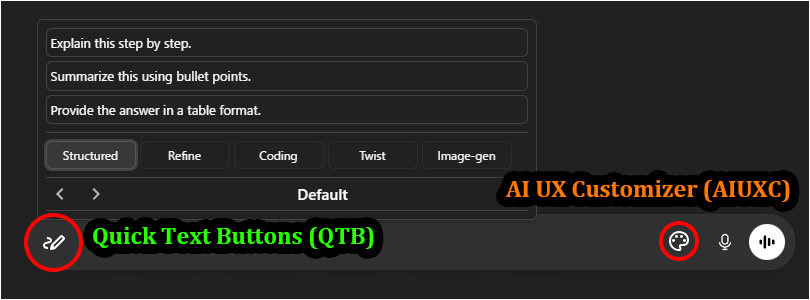
  • AI UX Customizer (AIUXC): v1.4.3+
  • Quick Text Buttons (QTB): v3.3.3+
  • Gemini Default Model Setter (GDMS): v1.2.3+

Key Features

  • Seamless Input Integration: A non-intrusive button placed directly inside the chat input area.
  • Prompt Management: Easily create, edit, and organize prompts via an intuitive GUI.
  • Profiles & Categories: Switch context instantly (e.g., "Coding", "Writing", "Image Gen") using profile switching.
  • Flexible Insertion: Choose to insert prompts at the cursor, start, or end of the text.
  • Smart Handling: Option to automatically insert a newline before or after the text.
  • Quick Access: Open your prompt library via Hover or Click.
  • Import/Export: Settings export/import functionality (in JSON format). Includes a sample prompt set to get you started.

Screenshots (Images are for ChatGPT)

Quick Text Buttons Showcase Image

  • Perfect Match: Works seamlessly with AI UX Customizer to enhance the visual interface and navigation.

Getting Started

  • Insert Text: Hovering (or Clicking, depending on settings) over the Quick Text button (pen icon) at the bottom-left of the chat input field will display the list of registered texts. Clicking one will insert the text into the input field.
  • Settings: Right-clicking the button opens the Settings Panel to edit texts, manage profiles, and change options.
  • The easiest way to get started is to import the sample file and modify its contents to your liking.
    Please import the sample JSON from the link above via the script's settings screen (JSON modal).

More info

Full Guide & Details on GitHub:


This script is open-source and licensed under the MIT License.