Adds some extra functions to AzLyrics, changes theme and removes adds
GitHub Page
This script changes theme of AzLyrics and lets you customize this theme. It also adds autoslide feature. Autoslide feature simply simulates mouse scroll. Script counts lines of lyrics and calculate an estimated time for scroll duration. It does not guarantees perfect timing for a song. So If you are not happy with calculated scroll duration time, you could use custom duration time. The page will scroll automatically when you click 'start' button. It also adds a link of artists other songs page to artist name at top of page (for easy navigation). Script uses JQuery for scrolling feature.
Usage: This is the start button. Click it to start scrolling.
 This is the stop button. Click it to stop scrolling.
 This is the setting button. Click it to open settings. You can adjust scroll duration or customize theme from settings.
This is settings menu: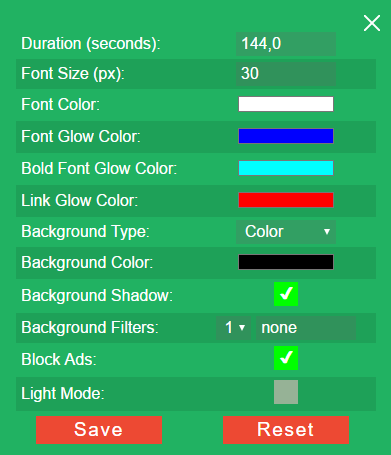
Duration: It is automatically calculated duration for scroll. You can adjust it if you want.
Font Size: You can change font size from here.
Font Color: You can select font glow color from here. This is used in lyrics.
Font Glow Color: Şarkı sözlerinin etrafındaki parlama efektinin rengidir.
Bold Font Glow Color: You can select bold font glow color from here. This is used in song name.
Link Glow Color: You can select ling font glow color from here. This changes all links on main page but not on footer or header
Background Type: It's type of background. If you change this, background color will be changed too.
Background Color: To make this option visible, you must select "Color" from background type.
Background Video: Direct link of background image. To make this option visible, you must select "Image" from background type. You can use predefined image or add yours.
Background Video: Direct link of background video. To make this option visible, you must select "Video" from background type. You can use predefined videos or add yours.
Background Shadow: Adds smooth background shadow to the lyrics. Its useful especially when you are using image or video as background.
Background Filters: If you are using image or video as background this option adds CSS3 filters to them. You can use predefined filters or write yours. For more information about CSS3 filters, you can check THIS website.
Block Ads: Hides ads on page. Does not blocks them.
Light Mode: Disables some functions of script. If script is running slowly, you can check this option. When you activate light mode, your old settings will be saved. When you deactivate it, your old settings will be loaded.
Note: If you made any changes to this settings, you must click save button.
WARNING! Reset button resets color settings for all pages and scroll duration for current song only. It does not resets other songs custom duration time that you set
If you have any issue please post it to GitHub page.


