TP-Link Table: Sort, Search & Filter

Add sorting, searching and filtering to the TP-Link connected clients table. Works with standard TP-Link web interfaces (not Omada).

Du musst eine Erweiterung wie Tampermonkey, Greasemonkey oder Violentmonkey installieren, um dieses Skript zu installieren.

You will need to install an extension such as Tampermonkey or Violentmonkey to install this script.

You will need to install an extension such as Tampermonkey or Violentmonkey to install this script.

You will need to install an extension such as Tampermonkey or Userscripts to install this script.

You will need to install an extension such as Tampermonkey to install this script.

Sie müssten eine Skript Manager Erweiterung installieren damit sie dieses Skript installieren können

(Ich habe schon ein Skript Manager, Lass mich es installieren!)

You will need to install an extension such as Stylus to install this style.

You will need to install an extension such as Stylus to install this style.

You will need to install an extension such as Stylus to install this style.

You will need to install a user style manager extension to install this style.

You will need to install a user style manager extension to install this style.

You will need to install a user style manager extension to install this style.

(I already have a user style manager, let me install it!)

Autor
shashankKeshava
Installationen heute
0
Installationen gesamt
5
Bewertungen
0 0 0
Version
1.0.0
Erstellt am
25.09.2025
Letzte Aktualisierung
25.09.2025
Größe
23,5 KB
Lizenz
MIT
Wird angewandt auf

TP-Link Table Tools UserScript

Enhances TP-Link router web interface with sorting, searching, and filtering for the connected clients table.

Features

  • Search: Filter by device name, MAC address, or IP address
  • Filter: Show all, online only, or offline only devices
  • Sort: By connection duration or download speed (supports KB/s and Kbps formats)
  • Responsive: Works on mobile and desktop
  • Real-time: Auto-updates when devices connect/disconnect

Installation

  1. Install Tampermonkey browser extension
  2. Install from GreasyFork or copy tpLink-table-tools.js content into a new Tampermonkey userscript
  3. Save and navigate to your TP-Link router (http://192.168.0.1)
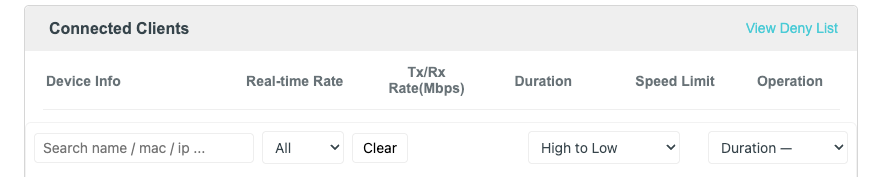
  4. Enhanced toolbar appears above the connected clients table

Usage

TP-Link Table Tools Preview

  • Search box: Type to filter devices
  • Status dropdown: Filter by online/offline status
  • Duration sort: Ascending/descending by connection time
  • Download sort: Low to high or high to low by current speed
  • Clear button: Reset all filters

Compatibility

Supported:

  • TP-Link Archer series routers
  • Standard TP-Link web interface
  • Chrome, Firefox, Safari, Edge (with userscript manager)

Not Supported:

  • TP-Link Omada devices (different interface structure)
  • TP-Link business/enterprise controllers

Source

License

MIT