Confluence: copy link buttons

Adds buttons to copy a link to the current page directly into clipboard. Two buttons are supported: Markdown and Jira syntax. Both buttons support HTML for rich text editors.

Du musst eine Erweiterung wie Tampermonkey, Greasemonkey oder Violentmonkey installieren, um dieses Skript zu installieren.

You will need to install an extension such as Tampermonkey or Violentmonkey to install this script.

You will need to install an extension such as Tampermonkey or Violentmonkey to install this script.

You will need to install an extension such as Tampermonkey or Userscripts to install this script.

You will need to install an extension such as Tampermonkey to install this script.

Sie müssten eine Skript Manager Erweiterung installieren damit sie dieses Skript installieren können

(Ich habe schon ein Skript Manager, Lass mich es installieren!)

You will need to install an extension such as Stylus to install this style.

You will need to install an extension such as Stylus to install this style.

You will need to install an extension such as Stylus to install this style.

You will need to install a user style manager extension to install this style.

You will need to install a user style manager extension to install this style.

You will need to install a user style manager extension to install this style.

(I already have a user style manager, let me install it!)

Autor
andrybak
Installationen heute
0
Installationen gesamt
19
Bewertungen
0 0 0
Version
8
Erstellt am
07.07.2023
Letzte Aktualisierung
16.11.2025
Größe
10,1 KB
Lizenz
MIT
Wird angewandt auf

Adds buttons to copy a link to the current page directly into clipboard. Two buttons are supported: Markdown and Jira syntax. Both buttons support HTML for rich text editors.

This script supports both Confluence Server and Confluence Cloud.
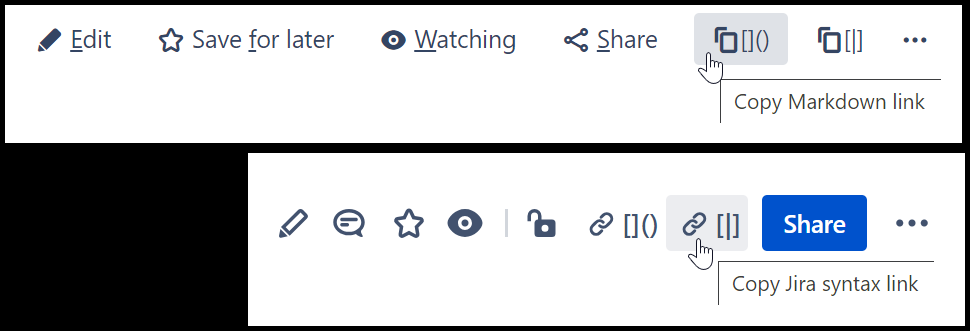
Screenshot of buttons in Confluence Server and Confluence Cloud

Instructions

The script uses @include rules to work on any domain that includes the word confluence. If your browser doesn't support @include (which might happen in the future when Chrome switches to Manifest V3 browser extensions) or your Confluence server uses a domain which doesn't include the word confluence, you'll have to manually add your domain. Up-to-date instructions are at https://github.com/rybak/atlassian-tweaks#custom-domains

Source code

Source code and full history can be seen on GitHub: https://github.com/rybak/atlassian-tweaks/blob/main/confluence-copy-link-buttons.user.js

See also

More user scripts and user styles for Jira, Bitbucket, and Confluence in set Atlassian Tweaks.