atcoder-difficulty-display

AtCoder Problemsの難易度を表示します。

Version vom 09.07.2023. Aktuellste Version

Du musst eine Erweiterung wie Tampermonkey, Greasemonkey oder Violentmonkey installieren, um dieses Skript zu installieren.

You will need to install an extension such as Tampermonkey to install this script.

You will need to install an extension such as Tampermonkey or Violentmonkey to install this script.

You will need to install an extension such as Tampermonkey or Userscripts to install this script.

You will need to install an extension such as Tampermonkey to install this script.

Sie müssten eine Skript Manager Erweiterung installieren damit sie dieses Skript installieren können

(Ich habe schon ein Skript Manager, Lass mich es installieren!)

You will need to install an extension such as Stylus to install this style.

You will need to install an extension such as Stylus to install this style.

You will need to install an extension such as Stylus to install this style.

You will need to install a user style manager extension to install this style.

You will need to install a user style manager extension to install this style.

You will need to install a user style manager extension to install this style.

(I already have a user style manager, let me install it!)

Autor
hotarunw
Bewertungen
0 0 0
Version
2.0.0
Erstellt am
02.03.2020
Letzte Aktualisierung
09.07.2023
Größe
35 KB
Lizenz
MIT
Wird angewandt auf

README

atcoder-difficulty-display

GreasyFork GitHub

atcoder-difficulty-display atcoder-difficulty-display

AtCoder のページに AtCoder Problems の難易度を表示するユーザースクリプトです。

Description

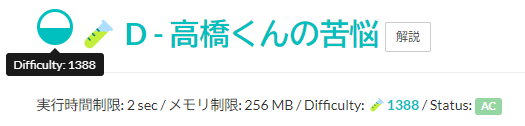
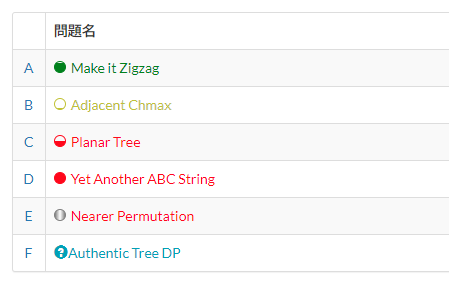
AtCoder のページに AtCoder Problems が推定した難易度を表示します。

難易度が表示されて色付けされます。 推定不可能な問題の場合はUnavailableと表示します。 実験的手法で推定された難易度には、AtCoder Problems と同様に「🧪」をつけます。

現在あるバグ

まれにDifficultyが何も表示されなくなるバグがあります。 開発者ツールのアプリケーションタブから ATCODER-PROBLEMS-API- という名前のIndexedDBデータベースを削除すると解消します。

バグの原因が分からなくて困っています。心当たりあればIssuehttps://github.com/hotaru-n/atcoder-difficulty-display/issues/18に投稿してほしいです。バグ発生時のデータベースのデータもほしいです。

Install

  1. Tampermonkey などのユーザースクリプトマネージャをインストールします。
  2. GreasyFork からユーザースクリプトをインストールします。

ネタバレ防止機能

atcoder-difficulty-display atcoder-difficulty-display

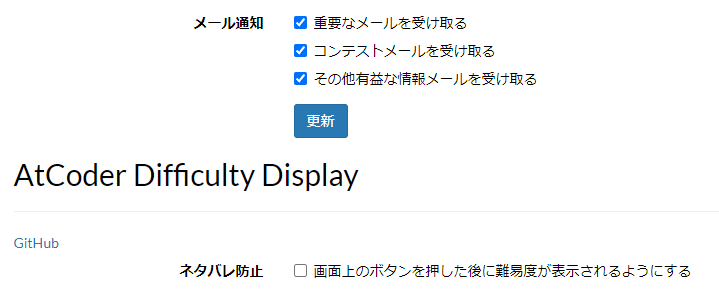
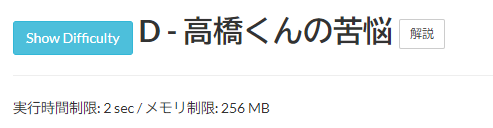
difficulty のネタバレ防止目的で最初は difficulty を表示せず、ボタンを押すことで difficulty を表示できます。

基本設定 - AtCoder の下部にあるネタバレ防止のチェックボックスを ON にすることで有効になります。

Note

このユーザースクリプトはAtCoder Problemsの API を使っているのみで、AtCoder Problemsとは関わりはありません。

意見があれば GitHub リポジトリ に Issue を立ててください。

難易度については AtCoder Problems の難易度推定について を見てください。

License

License: MIT

Copyright (c) 2020 hotaru-n

This software is released under the MIT License, see LICENSE.

使用したOSSソフトウェアのライセンス表示

NOTICE