Mint.com tags display

Show tags in the transactions listing on Mint.com.

K instalaci tototo skriptu si budete muset nainstalovat rozšíření jako Tampermonkey, Greasemonkey nebo Violentmonkey.

You will need to install an extension such as Tampermonkey to install this script.

K instalaci tohoto skriptu si budete muset nainstalovat rozšíření jako Tampermonkey nebo Violentmonkey.

K instalaci tohoto skriptu si budete muset nainstalovat rozšíření jako Tampermonkey nebo Userscripts.

You will need to install an extension such as Tampermonkey to install this script.

K instalaci tohoto skriptu si budete muset nainstalovat manažer uživatelských skriptů.

(Už mám manažer uživatelských skriptů, nechte mě ho nainstalovat!)

You will need to install an extension such as Stylus to install this style.

You will need to install an extension such as Stylus to install this style.

You will need to install an extension such as Stylus to install this style.

You will need to install a user style manager extension to install this style.

You will need to install a user style manager extension to install this style.

You will need to install a user style manager extension to install this style.

(Už mám manažer uživatelských stylů, nechte mě ho nainstalovat!)

Autor
mddub
Denně instalací
0
Celkem instalací
111
Hodnocení
2 0 2
Verze
2.0.1
Vytvořeno
18. 09. 2015
Aktualizováno
08. 10. 2023
Size
5,6 KB
Licence
neuvedeno
Spustit na

Mint.com tags display

Ever been annoyed that Mint lets you add tags while editing transactions, and then you never see them again? This user script makes the tags visible:
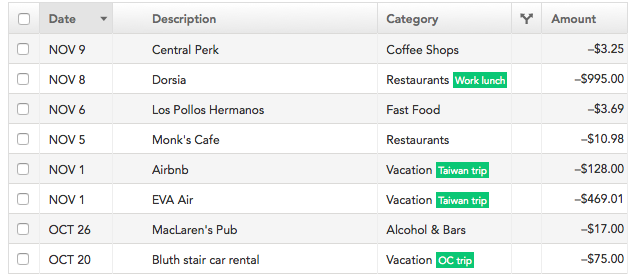
Screenshot

Installation

First, install a browser extension which lets you add user scripts: GreaseMonkey if you're on Firefox, or TamperMonkey if you're on Chrome, Safari, or Opera. (You can also follow more detailed instructions for your particular browser.)

Next, click here and you will be prompted to install Mint.com tags display.

More information

This blog post discusses the motivation behind this user script and how it works.

Questions? Issues? Improvements? File an issue or submit a pull request!