IconfontR

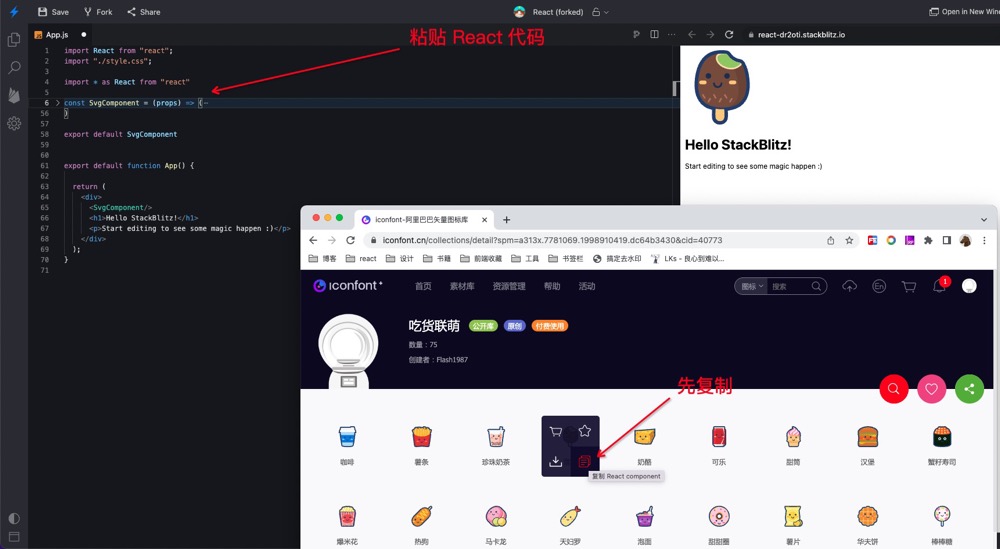
在 Iconfont 可以直接复制 React component

You will need to install an extension such as Tampermonkey, Greasemonkey or Violentmonkey to install this script.

You will need to install an extension such as Tampermonkey to install this script.

You will need to install an extension such as Tampermonkey or Violentmonkey to install this script.

You will need to install an extension such as Tampermonkey or Userscripts to install this script.

You will need to install an extension such as Tampermonkey to install this script.

You will need to install a user script manager extension to install this script.

(У мене вже є менеджер скриптів, дайте мені встановити його!)

You will need to install an extension such as Stylus to install this style.

You will need to install an extension such as Stylus to install this style.

You will need to install an extension such as Stylus to install this style.

You will need to install a user style manager extension to install this style.

You will need to install a user style manager extension to install this style.

You will need to install a user style manager extension to install this style.

(I already have a user style manager, let me install it!)
Автор
狂奔滴小马
Щоденних встановлень
0
Всього встановлень
435
Рейтинги
0 0 0
Версія
0.3
Створено
01.07.2022
Оновлено
06.07.2022
Size
4,8 кБ
Ліцензія
MIT
Відноситься до

Iconfont 可直接复制为 React component

请先安装 Tampermonkey 扩展

使用 svg 的优势

  • 完全离线化使用,不需要从 CDN 下载字体文件,图标不会因为网络问题呈现方块,也无需字体文件本地部署。

  • 没有 unicode,不会因为抽离组件而造成图标冲突

  • 在低端设备上 SVG 有更好的清晰度。

  • 支持多色图标。

  • 不会因为网络问题,字体变为方块

  • svg 可以支持动画

掘金:https://juejin.cn/post/7114589614186168350

原先是 3 步骤

  1. 下载 svg
  2. 拷贝svg 到项目目录
  3. 配置 webpack svgr

现在可以直接拷贝

实例

欢迎关注微信公众号 JS酷