Twitter image viewing enhancement

Make Twitter photo viewing more humane

You will need to install an extension such as Tampermonkey, Greasemonkey or Violentmonkey to install this script.

You will need to install an extension such as Tampermonkey to install this script.

You will need to install an extension such as Tampermonkey or Violentmonkey to install this script.

You will need to install an extension such as Tampermonkey or Userscripts to install this script.

You will need to install an extension such as Tampermonkey to install this script.

You will need to install a user script manager extension to install this script.

(I already have a user script manager, let me install it!)

You will need to install an extension such as Stylus to install this style.

You will need to install an extension such as Stylus to install this style.

You will need to install an extension such as Stylus to install this style.

You will need to install a user style manager extension to install this style.

You will need to install a user style manager extension to install this style.

You will need to install a user style manager extension to install this style.

(I already have a user style manager, let me install it!)

ئاپتورى
神代綺凛
بۈگۈن قاچىلانغىنى
3
جەمئىي قاچىلانغىنى
15,854
باھا نومۇرى
101 4 3
نەشرى
1.4.0
قۇرۇلغان ۋاقتى
2019-07-27
يېڭىلانغان ۋاقتى
2024-06-14
Size
4.5 KB
ئىجازەتنامىسى
MIT
قوللايدىغىنى

Features

Let you able to close an image view by clicking it, and use your mouse wheel or mouse drag to switch between the previous image or the next one.

About drag to switch images

You can enable it in script menu.

Due to some complex reasons, drag to switch images only support for webkit-based browser.

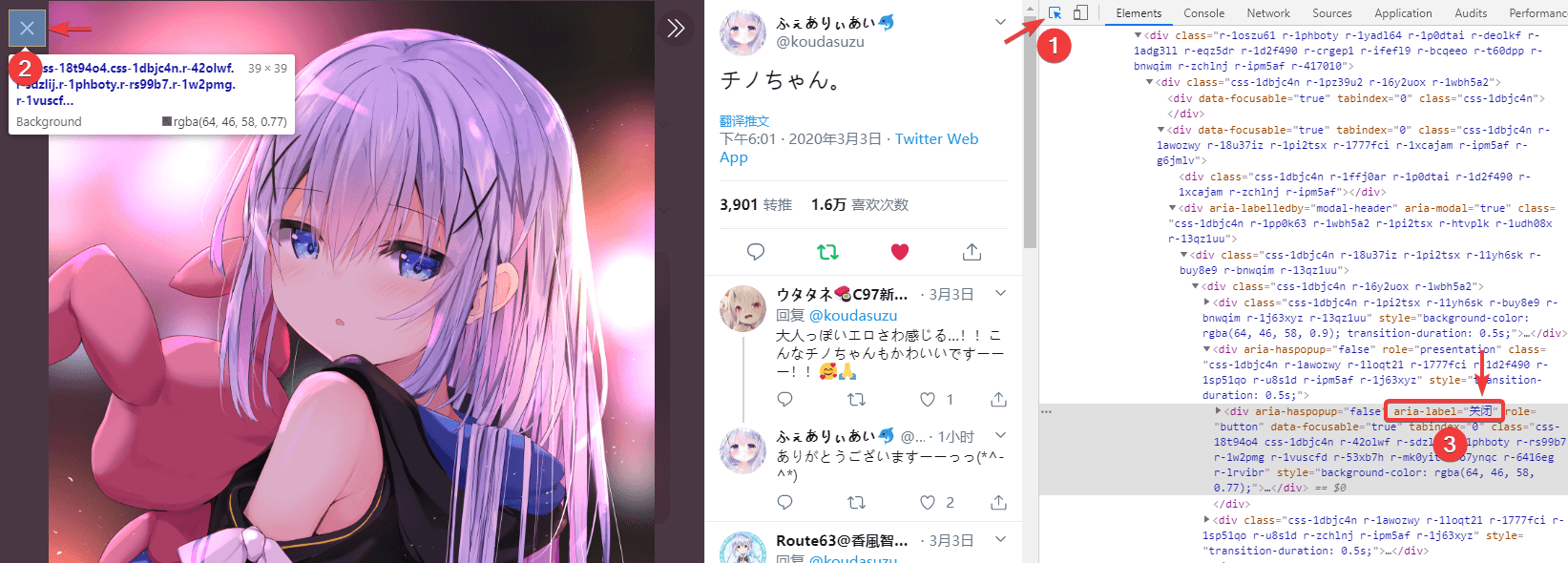
About "Set aria-label"

v1.0.0 is an major update, usually you will no longer need to set up aria-label and it support all languages.

But if you are using Firefox, you still need to manually set aria-label for special reasons.

Press F12 to open the DevTools, and follow the steps below to get the aria-label values ​​of the Close, Previous, Next buttons.

Then click "Set aria-label" from the script menu, concatenate the three aria-label values with commas(,), fill them into the input box and submit.

If you need to disable the aria-label setting, leave the input box empty and submit directly.