OmniDown

An all-in-one, fast, and free HD video downloader. Supports video downloads from YouTube, TikTok, Douyin, Instagram, Threads, XiaoHongShu, TED, Facebook, X (formerly Twitter), and more. Enjoy seamless, high-quality downloads with no watermarks.

Antes de instalar, Greasy Fork quer que saiba que este script contém antifuncionalidades, ou seja, funcionalidades que existem em benefício do autor do script e não do utilizador.

Este script irá injetar anúncios nos sites que visita. O autor deste script explica: This script uses external services as fallback when direct download is blocked.

Terá de instalar uma extensão como Tampermonkey, Greasemonkey ou Violentmonkey para instalar este script.

Terá de instalar uma extensão como Tampermonkey para instalar este script.

Terá de instalar uma extensão como Tampermonkey ou Violentmonkey para instalar este script.

Terá de instalar uma extensão como Tampermonkey ou Userscripts para instalar este script.

Terá de instalar uma extensão como Tampermonkey para instalar este script.

Terá de instalar uma extensão de gestão de scripts de utilizador para instalar este script.

(Já tenho um gestor de scripts de utilizador, deixe-me instalá-lo!)

Terá de instalar uma extensão como Stylus para instalar este estilo.

Terá de instalar uma extensão como Stylus para instalar este estilo.

Terá de instalar uma extensão como Stylus para instalar este estilo.

Terá de instalar uma extensão de gestão de estilos de utilizador para instalar este estilo.

Terá de instalar uma extensão de gestão de estilos de utilizador para instalar este estilo.

Terá de instalar uma extensão de gestão de estilos de utilizador para instalar este estilo.

(Já tenho um gestor de estilos de utilizador, deixe-me instalá-lo!)

Autor
ksmo
Instalações diárias
0
Total de instalações
162
Classificações
0 0 1
Versão
3.2.5
Criado
11/07/2026
Atualizado
13/07/2026
Tamanho
300 KB
Licença
MIT
Antifuncionalidades
Anúncios
Aplica-se a

📥 OmniDown — HD Video Downloader (YouTube, TikTok, Instagram, X & More)

OmniDown is a powerful, lightweight, and modern userscript designed to extract and download online videos, audios, and images directly from your browser. It prioritizes direct high-definition local streams and offers seamless one-click fallbacks to Cobalt.tools or dedicated converters when streams are locked by DRM, CORS, or HLS limits.

Version License Aesthetics


🚀 What's New in Version 3.2.1?

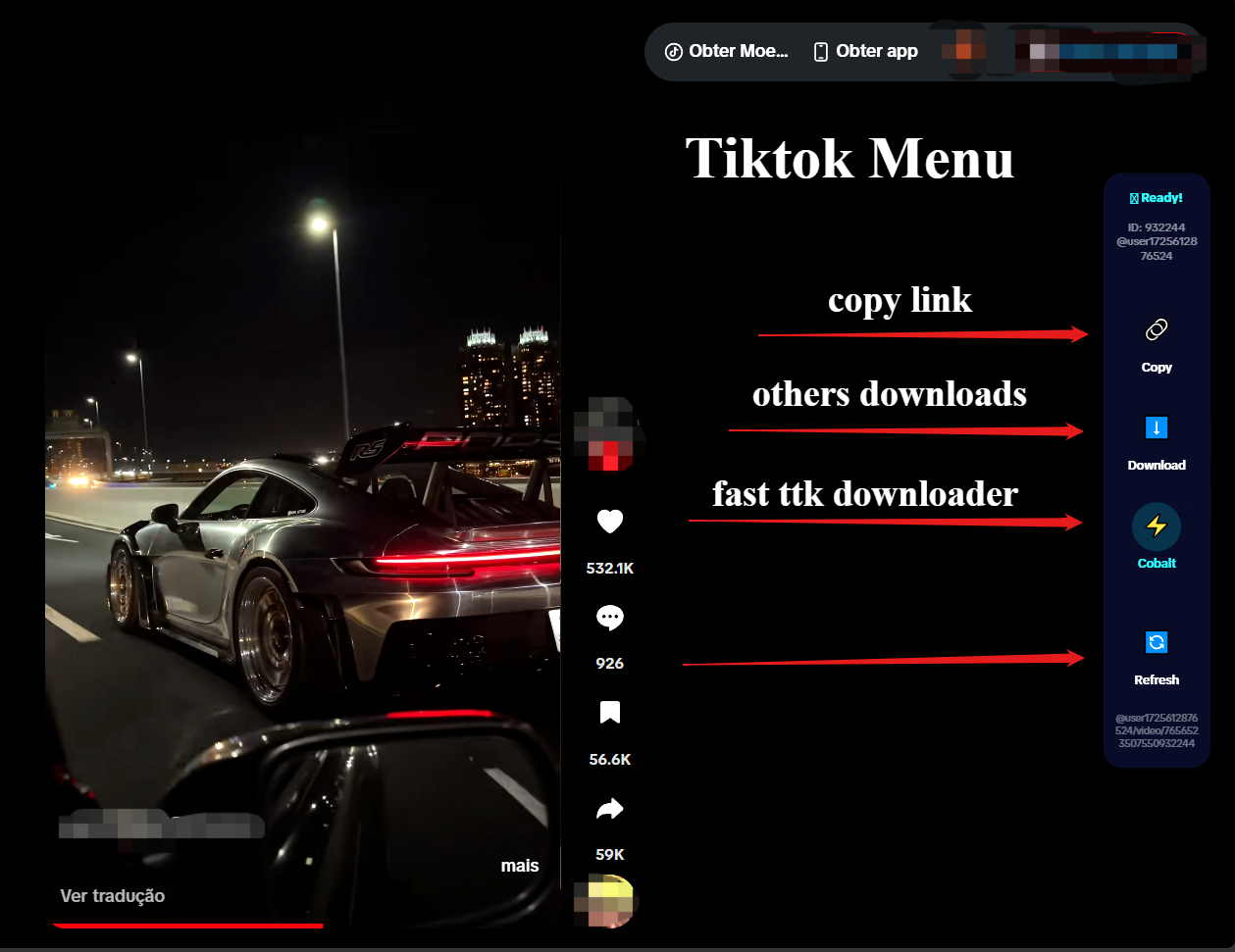
  • TikTok Drawer Panel: The download menu on TikTok is now docked directly next to the control sidebar. It features a smooth, slide-out transition from behind the sidebar, straight right borders, and matches the exact height and frosted-glass style of the main controls.
  • TikTok ID Polling Sync: Intercepts console player logs with a 4-second protection lock to prevent rapid scroll events from overwriting the correct active video ID.
  • TikTok SPA Navigation: General URL polling keeps the sidebar, username, and video details perfectly synchronized across client-side (SPA) page changes without requiring reloads.
  • Cobalt Hash Prefill Fix: Updated Cobalt redirects to pass target URLs via hash fragments (#), enabling automated link pre-filling and download initiation on the Cobalt frontend.
  • Clean Link Copying (Instagram & YouTube): The "Copy Link" buttons now fetch clean post/reels page URLs (stripped of tracking metadata like ?igsh= or ?utm_source=) instead of temporary, expiring CDN server links.
  • Minimalist YouTube View: Disabled the redundant floating action button (FAB) on YouTube, keeping the player control bar clean and focused.

📸 Interface & Layout Guide

🎵 TikTok Feed Sidebar Integration

The live sidebar automatically binds to the active video in the viewport. Clicking "Download" slides out the quality selection menu from behind the sidebar. TikTok Sidebar Drawer
📺 YouTube Integrated Control Menu

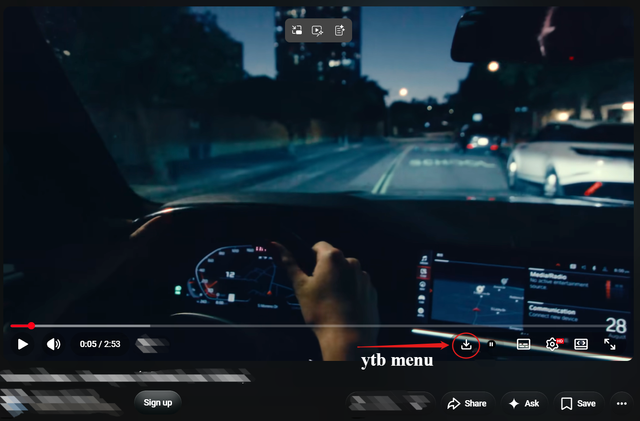
A native vector SVG download button is injected directly inside YouTube's player control bar (ytp-right-controls). YouTube Control Integration
🌐 Floating Downloader for Other Websites

On all other supported sites, a clean floating action button (FAB) appears in the bottom right corner to quickly access download options. Floating Downloader on Other Sites


🌟 Supported Platforms & Features

📺 YouTube & YouTube Shorts

  • Player Bar Integration: Injects a minimalist download button next to settings and captions.
  • Signature Deciphering: Built-in dynamic deciphering algorithm for YouTube's base.js protected streams.
  • n-Parameter Bypass: Resolves speed throttling automatically to download at full connection speed.
  • Playlist Export: Export entire YouTube playlist URLs to a clean .txt file in one click.
  • Subtitles: Convert XML subtitles to SRT format and download them natively.

🎵 TikTok & Douyin

  • Viewport Tracking: Automatically maps to the active video card using IntersectionObserver.
  • API Sniffing: Hooked network requests (XHR/Fetch) capture usernames and watermark-free metadata on the fly.
  • Seamless Share Link Copying: Copy clean shareable links without tracking garbage.

📸 Instagram (Reels, Posts, Stories & Carousels)

  • Active Slide Detector: Scans carousel posts to identify and download the specific slide currently visible on screen.
  • No-CORS Link Cleaner: Extracts and cleans the permanent Reels/Post page URL.
  • HLS Stream Fallback: Detects blob streams and routes them to dedicated converters.

🐦 X (Twitter), Facebook & Threads

  • Local parser extracts direct MP4 media links from page structures.

🎵 Spotify

  • Quick redirect search button to fetch tracks from external audio converters.

🛠️ Download Workflows

  1. Direct Download (Local-First): Fetches and saves the media file directly inside your browser. It handles chunked downloading, signature solving, and shows a beautiful glassmorphic progress bar.
  2. Cobalt Redirection: Pre-fills and opens Cobalt's clean interface using # parameters. Defaults to cobalt.tools but can be configured to any custom self-hosted instance.
  3. External Fallback Resolver: Prompts redirection to trusted external conversion tools (like SnapTik, SSSTik, SaveFrom, FASTDL) when local streams are CORS-blocked or HLS-encoded.

🎮 Shortcuts & Customization

  • Ctrl + Alt + Shift + D: Open/close the download menu overlay.
  • Esc: Close open overlays or cancel active downloads.
  • Tampermonkey Menu Command options:
    • 🌐 Change language (English, Portuguese, Spanish, Simplified/Traditional Chinese, Vietnamese).
    • ⚙️ Configure custom Cobalt API URL or custom CORS Proxy.
    • 🔘 Toggle Floating Action Button visibility.
    • 🔘 Toggle Auto-Redirect (instantly go to fallbacks without confirmation prompts).

🔒 Security & Privacy

  • Zero Tracking: Processing runs 100% locally in your browser. No telemetry, no analytics, no third-party data tracking.
  • Trusted Types Compliant: Safe from XSS injection risks, using secure DOM generation APIs (createElement) instead of dangerous HTML parser APIs.
  • LRU Memory Guard: Automatic cleanup of cache maps ensures zero memory leaks when scrolling infinite feeds.
