Gemini Default Model Setter

Automatically selects a specific model and its additional settings for Gemini upon page load, URL change, or tab return. The target patterns and script state can be easily configured via the extension menu.

Terá de instalar uma extensão como Tampermonkey, Greasemonkey ou Violentmonkey para instalar este script.

You will need to install an extension such as Tampermonkey or Violentmonkey to install this script.

Terá de instalar uma extensão como Tampermonkey ou Violentmonkey para instalar este script.

Terá de instalar uma extensão como Tampermonkey ou Userscripts para instalar este script.

Terá de instalar uma extensão como Tampermonkey para instalar este script.

Terá de instalar uma extensão de gestão de scripts de utilizador para instalar este script.

(Já tenho um gestor de scripts de utilizador, deixe-me instalá-lo!)

Terá de instalar uma extensão como Stylus para instalar este estilo.

Terá de instalar uma extensão como Stylus para instalar este estilo.

Terá de instalar uma extensão como Stylus para instalar este estilo.

Terá de instalar uma extensão de gestão de estilos de utilizador para instalar este estilo.

Terá de instalar uma extensão de gestão de estilos de utilizador para instalar este estilo.

Terá de instalar uma extensão de gestão de estilos de utilizador para instalar este estilo.

(Já tenho um gestor de estilos de utilizador, deixe-me instalá-lo!)

Autor
p65536
Instalações diárias
0
Total de instalações
50
Classificações
2 0 0
Versão
1.5.0
Criado
14/05/2026
Atualizado
09/07/2026
Tamanho
70 KB
Licença
MIT
Aplica-se a

Overview

Gemini Default Model Setter (GDMS) is a helper script designed for AI power users. It automatically forces Google Gemini to use your preferred specific model (e.g., "Flash" or "Pro") upon page load, URL change, or tab return.

Stop manually selecting your preferred model every time you start a new conversation. This script ensures you always start with your target model, while still preserving your freedom to manually switch to a different model (like "Flash" for quicker tasks) during the chat.


Cross-Script Compatibility

If you are using this script alongside my other tools, please ensure they meet the following minimum version requirements to ensure seamless integration and prevent conflicts:

  • AI UX Customizer (AIUXC): v1.4.3+
  • Quick Text Buttons (QTB): v3.3.3+
  • Gemini Default Model Setter (GDMS): v1.2.3+

Recent Updates

  • (2026-07-09) Adapted to Gemini model selector updates: Extended Thinking configuration is now completely streamlined into a direct menu toggle, eliminating text entries.

Key Features

  • Automatic Selection: Instantly selects your specified target model and sets your preferred Extended Thinking state when starting a new chat or opening an existing history thread.
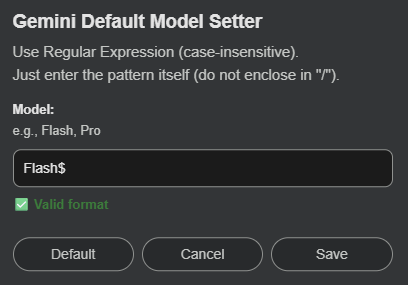
  • Regex Targeting: Easily configure your target model name using case-insensitive Regular Expressions (e.g., Pro or Flash$) via an intuitive settings modal. * Multilingual Support: Model names are captured via user-defined Regular Expressions, and the Extended Thinking state is controlled via language-agnostic structural element tracking. The script works flawlessly across all Gemini interface languages (e.g., English and Japanese) with zero extra setup.
  • Preserves Manual Control: Sets the initial state but allows you to seamlessly switch models or toggle Extended Thinking manually if you need a different setup mid-task.
  • Lightweight & Resource-Efficient: Designed to minimize CPU and memory overhead. Instead of running heavy, continuous background loops, the script utilizes a transient DOM observer that activates only when necessary (such as initial load or SPA navigation) and immediately disconnects once the state is settled.
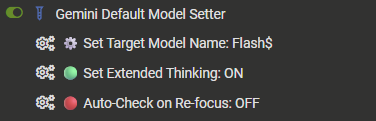
  • Auto-Check on Re-focus: An optional fail-safe feature that re-verifies and sets your target configurations when returning to the Gemini tab (useful for background loads or idle sessions).

Screenshots & Integration

Extension Menu

Settings Modal

  • Perfect Match: Works seamlessly with AI UX Customizer to enhance the overall visual interface and navigation of your AI chats.

Getting Started & Usage Guide

  • Initial Setup: Click your userscript manager extension icon (e.g., Tampermonkey) while on the Gemini page. Click "⚙️ Set Target Model Name" to open the settings modal and input your desired model pattern (e.g., Pro). To enable or disable the advanced reasoning feature, simply click "Set Extended Thinking: ON/OFF" directly within the manager menu for an instant, frictionless configuration.
  • Past Chat History: When you click a past chat thread from the sidebar, the script will automatically switch it to your target model, allowing you to seamlessly continue past brainstorming with your highest-tier model.
  • About "Auto-Check on Re-focus":
    • Default is OFF.
    • When turned ON, the script checks the model and Extended Thinking state every time you switch back to the Gemini tab. This is great for idle tabs, but note: if you manually changed the model or toggled Extended Thinking and then switched browser tabs, returning to Gemini will automatically reset them back to your target configurations. Keep this OFF if you frequently use manual switching alongside heavy tab-switching.

Tested Environment

  • This script is primarily developed and tested on Firefox with Tampermonkey.
  • It is also confirmed to work on Chromium-based browsers, but testing on these platforms is less extensive.

More info

Full Guide & Details on GitHub:


This script is open-source and licensed under the MIT License.