github-nickname

Add nicknames for users on GitHub feed and profile pages, configured based on JSON content or remote URL.

Terá de instalar uma extensão como Tampermonkey, Greasemonkey ou Violentmonkey para instalar este script.

You will need to install an extension such as Tampermonkey or Violentmonkey to install this script.

Terá de instalar uma extensão como Tampermonkey ou Violentmonkey para instalar este script.

Terá de instalar uma extensão como Tampermonkey ou Userscripts para instalar este script.

Terá de instalar uma extensão como Tampermonkey para instalar este script.

Terá de instalar uma extensão de gestão de scripts de utilizador para instalar este script.

(Já tenho um gestor de scripts de utilizador, deixe-me instalá-lo!)

Terá de instalar uma extensão como Stylus para instalar este estilo.

Terá de instalar uma extensão como Stylus para instalar este estilo.

Terá de instalar uma extensão como Stylus para instalar este estilo.

Terá de instalar uma extensão de gestão de estilos de utilizador para instalar este estilo.

Terá de instalar uma extensão de gestão de estilos de utilizador para instalar este estilo.

Terá de instalar uma extensão de gestão de estilos de utilizador para instalar este estilo.

(Já tenho um gestor de estilos de utilizador, deixe-me instalá-lo!)

Autor
fantasticmao
Instalações diárias
0
Total de instalações
0
Classificações
0 0 0
Versão
1.3
Criado
12/05/2026
Atualizado
12/05/2026
Tamanho
6 KB
Licença
MIT
Aplica-se a

github nickname

Add nicknames for users on GitHub feed and profile pages
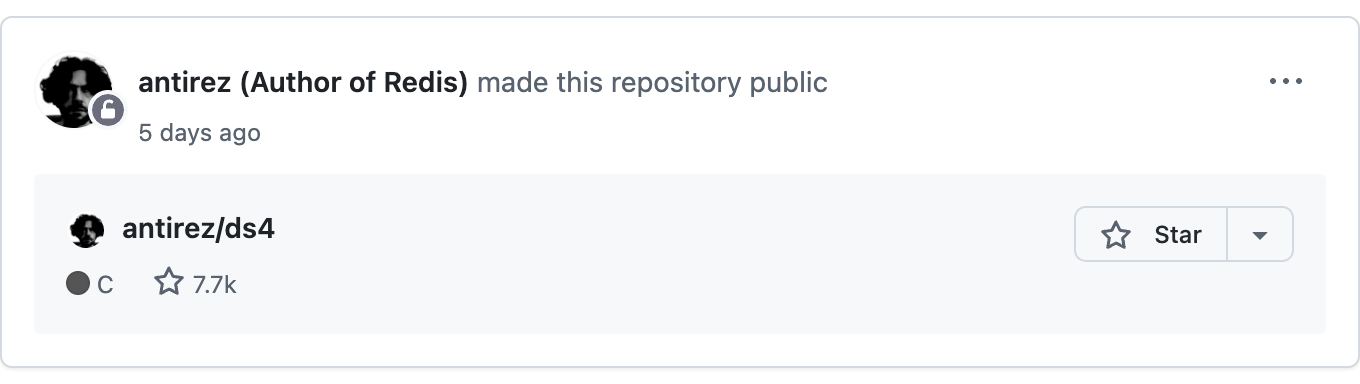
Preview

github-nickname preview

Configuration

Mode Description Config Entry Example
JSON Mode Enter a JSON string, suitable for a small number of user nicknames Tampermonkey menu -> Config nickname {"torvalds": "Father of Linux"}
URL Mode Enter a URL to a remote JSON file, suitable for many nicknames or teams Tampermonkey menu -> Config nickname https://example.com/nicknames.json

Configuration Steps

Click the Tampermonkey icon in the browser toolbar and select the "Config nickname" menu item
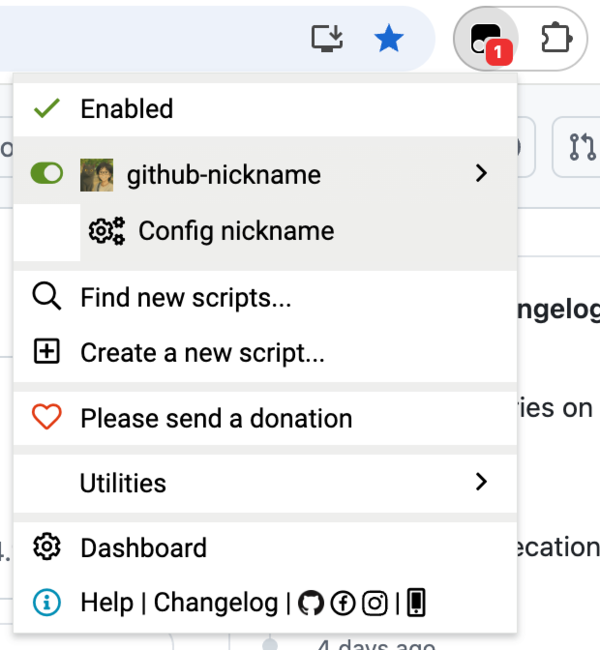
github-nickname usage

In the dialog that appears, enter a JSON string or URL and click OK to save the configuration
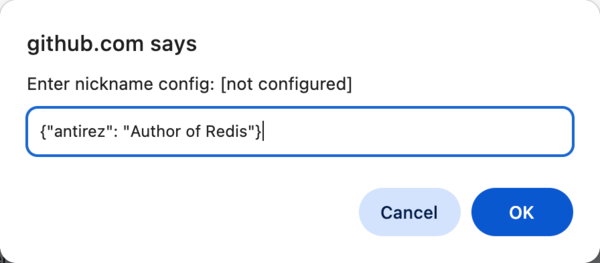
github-nickname usage

JSON Format

{
  "username": "nickname",
  "another-username": "another nickname"
}

FAQ

Q: How do I update the nickname configuration?

A: Repeat the configuration steps above to update. JSON mode takes effect immediately, while URL mode fetches the latest configuration on the next page load.

Q: Which GitHub pages are supported?

A: Currently supports the GitHub homepage (feed page) and user profile page (profile page).

Q: Can I use JSON mode and URL mode at the same time?

A: No, you can only choose one mode. Configuring a new mode will automatically clear the previous configuration.