YouTube-UI-Customizer

Customize your YouTube grid layout (thumbnails per row) and declutter your feed by hiding Shorts, Game Room, and 'Explore' sections. Includes an automatic Shorts-to-standard-player redirect.

Terá de instalar uma extensão como Tampermonkey, Greasemonkey ou Violentmonkey para instalar este script.

Terá de instalar uma extensão como Tampermonkey para instalar este script.

Terá de instalar uma extensão como Tampermonkey ou Violentmonkey para instalar este script.

Terá de instalar uma extensão como Tampermonkey ou Userscripts para instalar este script.

Terá de instalar uma extensão como Tampermonkey para instalar este script.

Terá de instalar uma extensão de gestão de scripts de utilizador para instalar este script.

(Já tenho um gestor de scripts de utilizador, deixe-me instalá-lo!)

Terá de instalar uma extensão como Stylus para instalar este estilo.

Terá de instalar uma extensão como Stylus para instalar este estilo.

Terá de instalar uma extensão como Stylus para instalar este estilo.

Terá de instalar uma extensão de gestão de estilos de utilizador para instalar este estilo.

Terá de instalar uma extensão de gestão de estilos de utilizador para instalar este estilo.

Terá de instalar uma extensão de gestão de estilos de utilizador para instalar este estilo.

(Já tenho um gestor de estilos de utilizador, deixe-me instalá-lo!)

Autor
p65536
Instalações diárias
0
Total de instalações
129
Classificações
0 0 0
Versão
1.3.2
Criado
21/08/2025
Atualizado
13/03/2026
Tamanho
60 KB
Licença
MIT
Aplica-se a

Overview

Note: This script is designed specifically for the desktop YouTube site (www.youtube.com) and does not support the mobile version (m.youtube.com).

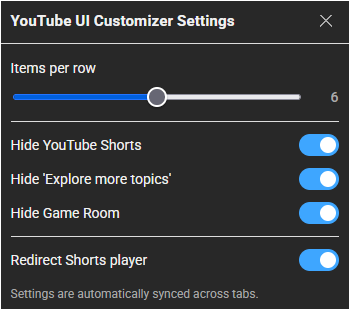
This script puts you in control of your YouTube layout. Its primary feature allows you to seamlessly customize the video grid by adjusting the number of thumbnails per row. Additionally, it helps you declutter your feed by hiding annoyances like Shorts, the newly added Game Room (Playables), and 'Explore' sections, while also offering an automatic redirect from the Shorts player to the standard video player.


Features

  • Customizable Grid Layout (Main): Take control of your homepage and subscription feeds. Set the number of video thumbnails displayed per row (from 2 to 10) using a simple slider in the settings menu.
  • Hide Annoyances: Keep your interface clean and focused on regular videos by completely hiding:
    • All Shorts content (from shelves, feeds, search results, and navigation menus)
    • The "Game Room" (Playables) section
    • The "Explore more topics" shelves
  • Shorts Player Redirect: Automatically redirects the vertical Shorts player to the standard, familiar video player interface for a consistent viewing experience.
  • Cross-Tab Syncing: Settings are automatically synced across all your open YouTube tabs, ensuring a seamless experience without manual updates.

Getting Started

Access the settings via your userscript manager's menu:
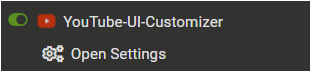
  1. Open the Tampermonkey (or equivalent) menu in your browser.
  2. Select YouTube UI Customizer Settings.
  3. Configure your preferences in the modal window.

Settings Menu

Settings Panel


Tested Environment

  • This script is primarily developed and tested on Firefox with Tampermonkey.
  • It is also confirmed to work on Chromium-based browsers, but testing on these platforms is less extensive.

This script is open-source and licensed under the MIT License.