ArchTranslator

Useful tools for ArchWiki translators, now written in TypeScript.

Terá de instalar uma extensão como Tampermonkey, Greasemonkey ou Violentmonkey para instalar este script.

You will need to install an extension such as Tampermonkey or Violentmonkey to install this script.

Terá de instalar uma extensão como Tampermonkey ou Violentmonkey para instalar este script.

Terá de instalar uma extensão como Tampermonkey ou Userscripts para instalar este script.

Terá de instalar uma extensão como Tampermonkey para instalar este script.

Terá de instalar uma extensão de gestão de scripts de utilizador para instalar este script.

(Já tenho um gestor de scripts de utilizador, deixe-me instalá-lo!)

Terá de instalar uma extensão como Stylus para instalar este estilo.

Terá de instalar uma extensão como Stylus para instalar este estilo.

Terá de instalar uma extensão como Stylus para instalar este estilo.

Terá de instalar uma extensão de gestão de estilos de utilizador para instalar este estilo.

Terá de instalar uma extensão de gestão de estilos de utilizador para instalar este estilo.

Terá de instalar uma extensão de gestão de estilos de utilizador para instalar este estilo.

(Já tenho um gestor de estilos de utilizador, deixe-me instalá-lo!)

Autor
bonk-dev
Instalações diárias
0
Total de instalações
7
Classificações
0 0 0
Versão
2.0.5
Criado
24/05/2024
Atualizado
20/03/2025
Tamanho
50 KB
Licença
MIT
Aplica-se a

ArchTranslator

License Badge

Useful tools for ArchWiki translators, now written in TypeScript.

Usage

  • Install the UserScript
  • Change the active language (the default is Polish):

Change language tool

Build

You can build the script yourself:

Clone the repo: git clone https://github.com/bonk-dev/arch-translator.git

Remember to install the dev dependencies: npm install

Single build: npm run build

Build on change: npm run watch

The three (two usable) files will be in the build/ directory:

  • arch-translator.user.js - ready to use UserScript
  • arch-translator.srcmap.user.js - ready to use UserScript but with inlined sourcemap
  • arch-translator.js - raw output from esbuild (no UserScript header)

Features

  • Copies and pastes the original source;
  • Inserts the localized {{TranslationStatus}} template;
  • Inserts the English interlanguage link;
  • Sorts the header elements according to the ArchWiki style;
  • Scans the page content for already translated articles.

Translated articles scanner

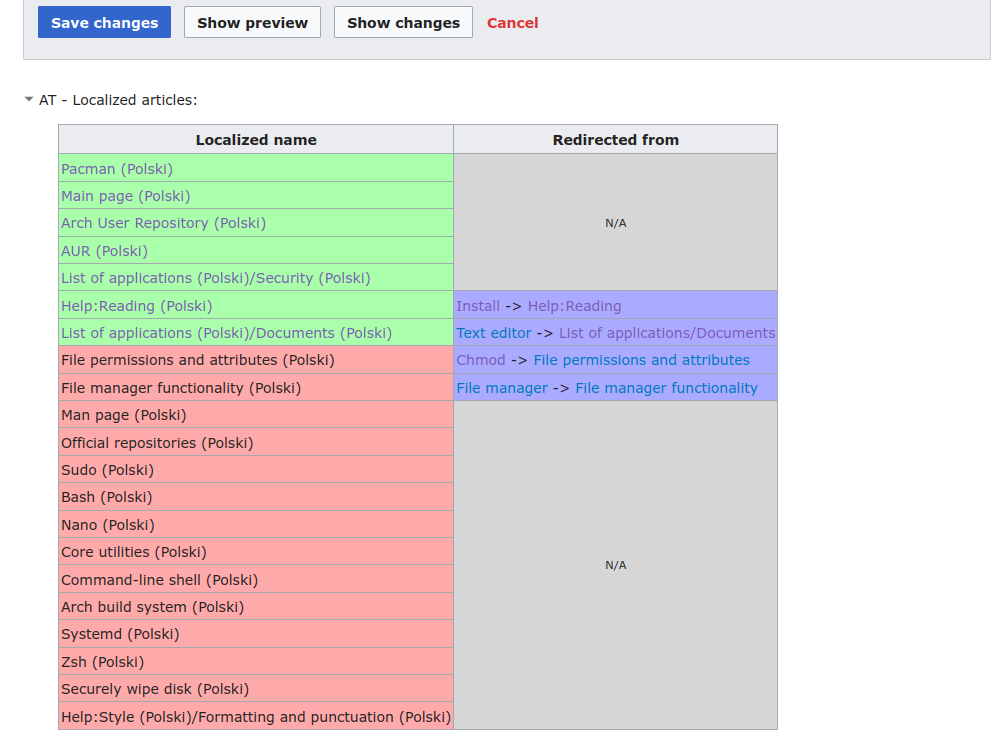
The script scans the article for links to other articles and checks if these articles have been already translated to the language of choice.

In this example we can see that the page content contains many links to English pages. Pages highlighted in green have a translation page. Translated articles scanner UI