Google Search Reddit Preview

Preview Reddit posts directly inside Google Search results — score, comments, status tags, full-text preview, and embedded media. Core data fetched client-side directly from official APIs; no intermediate middleman servers.

Aby zainstalować ten skrypt, wymagana jest instalacje jednego z następujących rozszerzeń: Tampermonkey, Greasemonkey lub Violentmonkey.

You will need to install an extension such as Tampermonkey to install this script.

Aby zainstalować ten skrypt, wymagana jest instalacje jednego z następujących rozszerzeń: Tampermonkey, Violentmonkey.

Aby zainstalować ten skrypt, wymagana będzie instalacja rozszerzenia Tampermonkey lub Userscripts.

You will need to install an extension such as Tampermonkey to install this script.

Aby zainstalować ten skrypt, musisz zainstalować rozszerzenie menedżera skryptów użytkownika.

(Mam już menedżera skryptów użytkownika, pozwól mi to zainstalować!)

You will need to install an extension such as Stylus to install this style.

You will need to install an extension such as Stylus to install this style.

You will need to install an extension such as Stylus to install this style.

Będziesz musiał zainstalować rozszerzenie menedżera stylów użytkownika, aby zainstalować ten styl.

Będziesz musiał zainstalować rozszerzenie menedżera stylów użytkownika, aby zainstalować ten styl.

Musisz zainstalować rozszerzenie menedżera stylów użytkownika, aby zainstalować ten styl.

(Mam już menedżera stylów użytkownika, pozwól mi to zainstalować!)

Autor
StonedKhajiit
Dziennych instalacji
0
Wszystkich instalacji
25
Oceny
1 0 0
Wersja
0.9.5
Utworzono
29-04-2026
Zaktualizowano
23-05-2026
Rozmiar
707 KB
Licencja
MIT
Dotyczy

Google Search Reddit Preview (English)

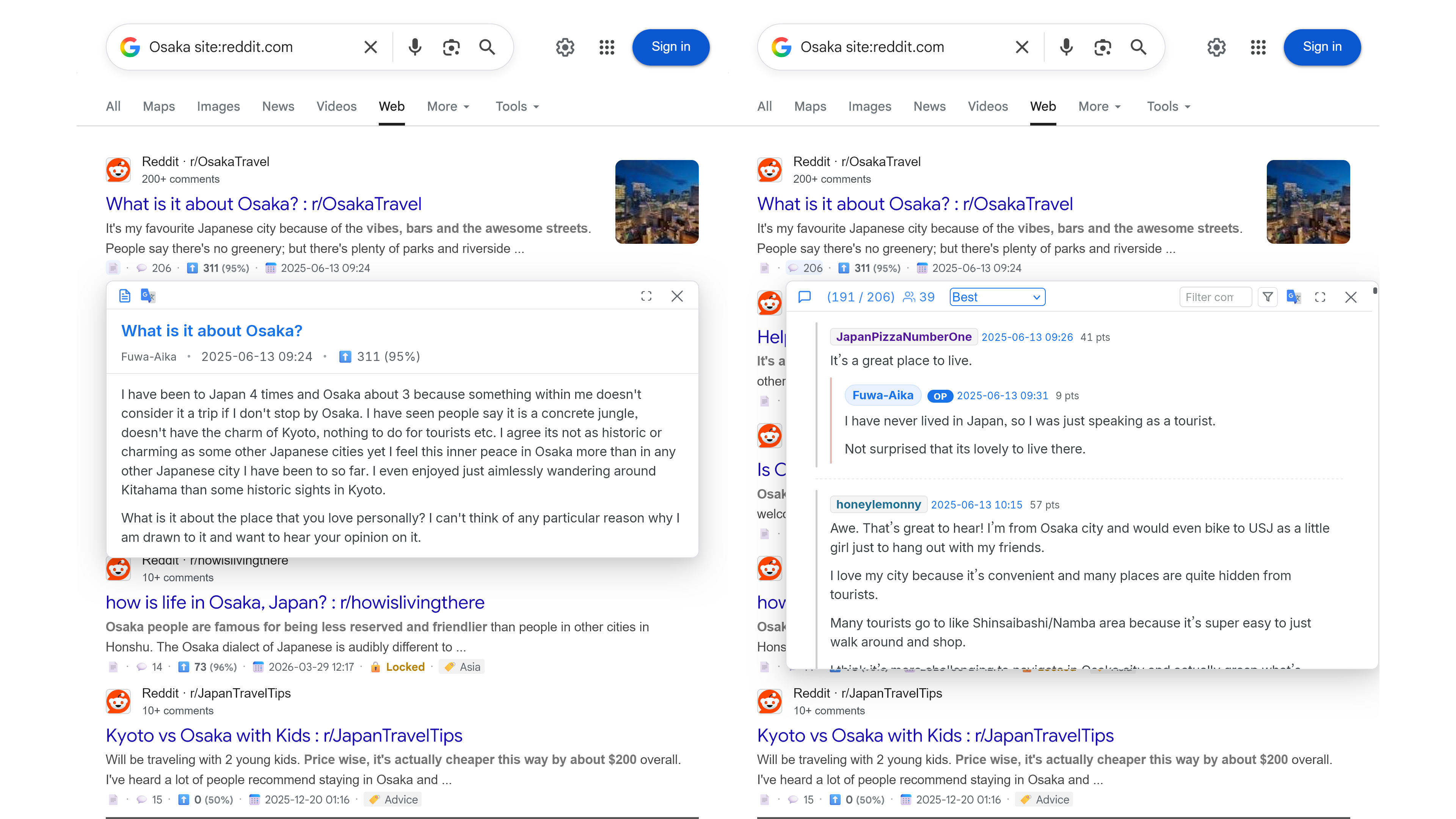
📱 Preview Mode 1: Floating Hover Preview

Floating Hover Preview

▶️ Watch the Floating Hover Preview demo video

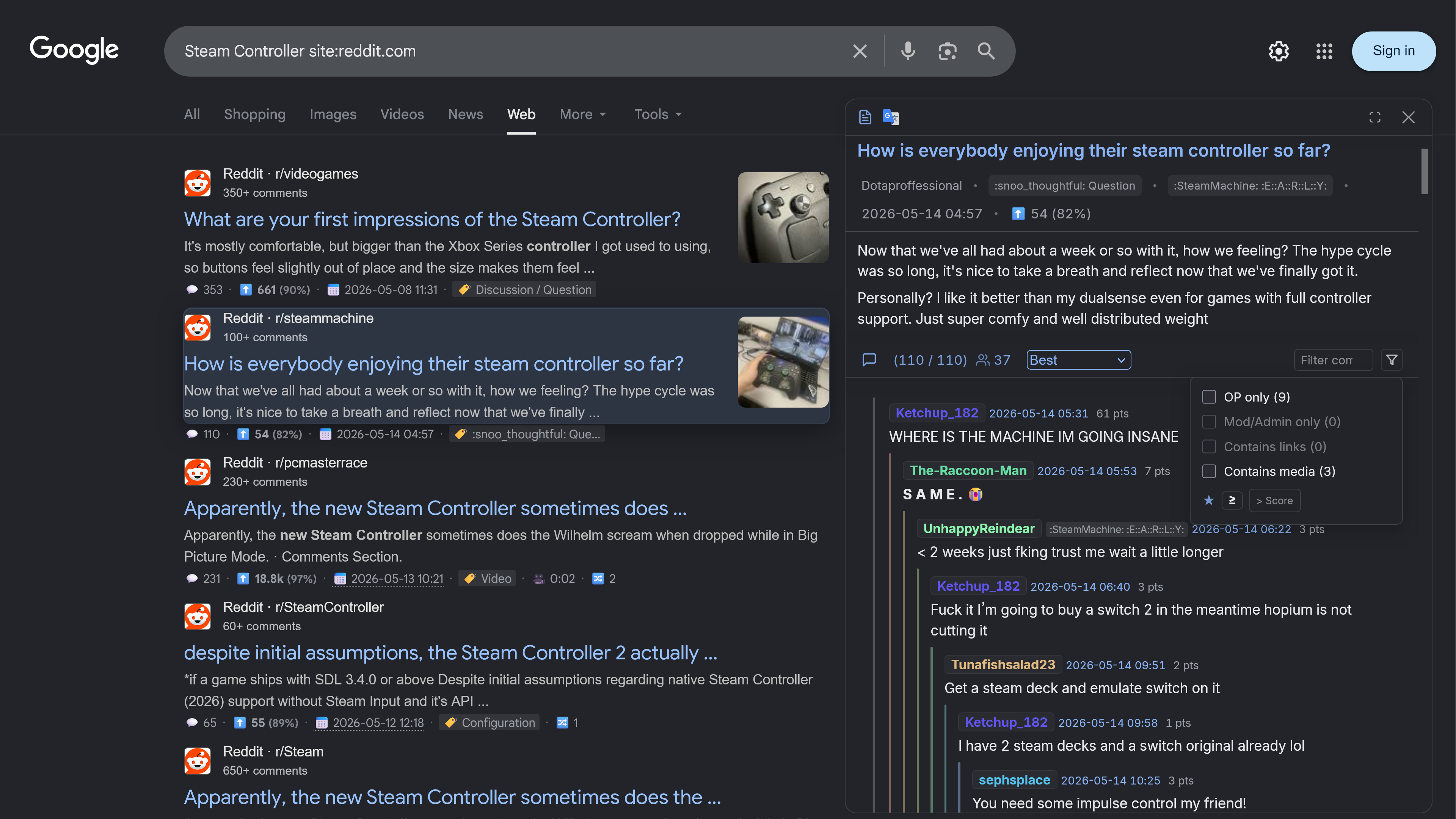
💻 Preview Mode 2: Right Side-panel Mode

Right Side Panel Preview

▶️ Watch the Right Side-panel Mode demo video

This is a lightweight userscript designed to enhance your Google search experience by integrating Reddit API data directly. It provides rich metadata, inline post previews, interactive comment browsing, and smooth embedded media playback right inside Google search results — including Google Programmable Search Engine (cse.google.com) — eliminating the need to constantly open new tabs. The script runs 100% client-side; core post and comment payloads are fetched directly from the official Reddit JSON API, and external media details (e.g., Imgur, RedGIFs, Bluesky) are resolved straight from their respective official platforms, with absolutely no unofficial middleman or proxy server involvement.

Key Features

  • 🤖 AI Post & Comment Summary: Generates post and comment summaries (supporting browser-based local AI or cloud Gemini), with options to customize summary prompts and validate API keys in the settings.
  • 📝 Copy as Markdown: Click 📋 in the preview header to copy the entire post (title, body, gallery/video links, nested comment trees, and the AI Summary) in clean Markdown blockquotes.
  • 📊 Real-time Search Metadata: Instantly view scores, upvote ratio, comment counts, Reddit Awards, and post dates (supports relative, standard absolute, and localized absolute formats).
  • 👁️ Interactive Dual-state Preview Panel: Hover to expand, click to pin. Features a maximize button () and a default full-height layout for side-panel previews. Implements Hover Intent logic and a motion buffer zone to avoid flicker.
  • 🎬 Inline Media Player & Parsers: View and play various media types directly inside the preview window or comment threads, eliminating the need to open new tabs:
    • Reddit Native Media: Supports single images, native galleries (rendered in a space-saving, layout-shift-free Carousel Mode by default, with a one-click toggle to vertical stack), and v.redd.it native videos with full audio track synchronization and looping.
    • Imgur Ecosystem: Displays Imgur images and automatically converts dynamic .gifv / .gif links into HTML5 video players with volume control.
    • GIPHY Stickers & GIFs: Automatically converts GIPHY webpage links in comments into direct official CDN animated images, sandboxed securely with lazy loading enabled for privacy and layout stability.
    • Embedded Video Players: YouTube links support timestamp starts (t=) under the privacy-enhanced youtube-nocookie.com domain. Vimeo (with secure hash h= parsing), Dailymotion, and RedGIFs links support inline one-click ▶ playback. Players automatically destroy upon preview close to prevent background audio leakage.
    • X (Twitter) & Bluesky Cards: Automatically converts X (Twitter) and Bluesky (bsky.app) post links into responsive, elegant inline cards, displaying post text, author details, and attached media directly.
  • 💬 Hierarchical Comment Tree & Advanced Filtering:
    • 10-Color Indentation Lines: Comments are rendered in a nested hierarchical tree differentiated by 10 looping sidebar colors. Supports clicking the sidebar or pressing Enter to collapse/expand threads.
    • OP Filter & Collapse Toggle: Click "OP Only" to filter author comments. Includes a "Collapse Replies" button to hide all nested replies and show only top-level parent comments.
    • External Links & Media Filters: Checkboxes allow quick filtering of comment branches containing external references (Contains links) or media attachments (Contains media).
    • Keyword Highlight & Search: Search by keywords or author names with navigation buttons. Press Enter to jump to the next match, or Shift+Enter for the previous match.
    • Author Color Identification (Default Enabled): Assigns unique colors to active participants (≥ 2 comments) using a 360-degree color wheel and golden ratio to minimize color collisions.
    • Unique Participants Count & Top Debaters Tooltip: Displays a monochrome SVG icon showing the number of unique participants; hovering reveals a multi-lingual tooltip detailing the top 10 most active contributors and their comment counts.
    • Dynamic Sorting & Collapse: Sort comments dynamically (Best, New, Hot, Q&A, etc.) while maintaining search filters. Automatically collapses common bots, command prompts, and deleted/removed comments. Parses nested Crossposts.
  • 🌐 Experimental Real-Time Translation Engine (Google Translate API):
    • Direct Official Endpoint: Connects directly to Google's translation endpoints for fast, stable machine translation, utilizing smart batching to reduce network overhead.
    • 34-Country Expansion: Choose from 34 global languages in the settings panel, rendered natively in your localized language.
    • Bilingual & Monolingual Modes: Supports side-by-side bilingual or translation-only views. Seamlessly integrates with inline media embeds, restoring media players post-translation.
  • ⚙️ In-App Settings & Accessibility:

    • Independent Settings Console: Set font size, default volume, layout modes, timestamp format, awards, and translation options in an in-app English/zh-TW/Japanese modal. Provides a reset option.
    • Theme Adaptation: Automatically adapts to Google's Light and Dark themes.
    • Full Keyboard A11y Control: Press Esc to close previews or lightboxes, / to navigate gallery images, Tab to focus code blocks, and Enter to copy code blocks.
  • 🖼️ Full-Screen Gallery Lightbox:

    • Click any image or the 🖼️ badge on a search card to open a full-screen viewer. Supports mouse-wheel zoom (1×–10×), drag-to-pan, ← / → navigation, double-click zoom, and background preloading (±3 adjacent images) for smooth transitions.
    • Dismissing the lightbox only unlocks the pinned state, keeping the parent preview window open so you can resume reading comment threads.

Privacy, Performance & Limits

  • 🔐 Privacy Policy: 100% client-side operation. Post and comment payloads are fetched directly from the official Reddit API (and external media is queried straight from their official platforms). No unofficial third-party intermediate servers are involved, and the script never collects, tracks, or stores your search or browsing history.
  • ⚡ Performance & Failover: API requests are triggered only on hover. Results are cached in localStorage for 30 minutes and shared across tabs. Includes an automatic failover router (automatically redirects requests to alternate official endpoints like old.reddit.com or new.reddit.com if rate-limited with 429 or timed out).
  • ⚠️ Boundary Conditions: If the post author has deactivated their account, the "OP Only" filter will display an explanatory tooltip and safely disable itself. Unsupported minor video links are safely kept as external links to prevent script errors. In Firefox Private Browsing mode, lightbox image downloading is blocked and unavailable due to strict browser sandbox isolation.

Installation & Setup

  1. Step 1: Install a userscript manager extension — Violentmonkey is the recommended primary choice, with Tampermonkey also fully supported.
  2. Step 2: Click here to install this script from Greasy Fork.
  3. Step 3: Hover your cursor over a Reddit card in Google search results to expand previews and lightboxes. The script also activates automatically on Google Programmable Search Engine (cse.google.com) result pages. (Customize your font and volume under "⚙️ Settings" in the script manager menu).

Third-Party Dependency & Credits

Click to expand Credits & Third-Party Library details

This userscript imports and utilizes the following external open-source library to provide full media playback compatibility:

  • hls.js (v1.6.16)
    • Source URL: https://cdn.jsdelivr.net/npm/[email protected]/dist/hls.min.js
    • Purpose: Powering HLS/M3U8 streaming playback for Reddit-hosted videos (v.redd.it). Reddit's fallback MP4 links are video-only; the HLS manifest is required to combine video and audio tracks. This library enables seamless, synchronized video and audio playback inside browsers that do not natively support HLS (e.g., Chrome, Firefox).
    • License: Apache License 2.0 (Developed by VideoDev Team)
  • DOMPurify (v3.4.5)
    • Integration: Bundled locally into the userscript distribution via Vite.
    • Purpose: Protecting against Cross-Site Scripting (XSS) and Mutation XSS (mXSS) attacks. The script sanitizes untrusted Reddit post descriptions and comment payloads using DOMPurify's strict whitelist sanitizer before rendering them inside the preview panel.
    • License: Apache License 2.0 / MPL 2.0 (Developed by Cure53)

Permissions & Security Transparency

Click to expand Permissions & Connect domains details

To maintain high transparency and security, all declared permissions (@grant) and domain connections (@connect) serve strict, single-purpose functions, and never compromise user privacy:

1. Declared Permissions (@grant)

  • GM_xmlhttpRequest: Performs cross-origin requests to safely fetch post data and comments directly from Reddit's official APIs.
  • GM_addStyle: Dynamically injects and applies the script's light/dark responsive CSS stylesheet.
  • GM_setValue / GM_getValue: Secures and persists your custom preference settings (e.g., font size, default volume) locally inside your browser.
  • GM_registerMenuCommand: Registers the "⚙️ Settings" command inside your userscript manager's menu for easy access.
  • GM_download: Bypasses cross-origin browser restrictions to directly download high-resolution images or videos to your local machine when the download button in the lightbox is clicked, eliminating the need to manually save files in a new tab.

2. Declared Connections (@connect)

The script only connects to the following whitelisted domains to parse content, with absolutely no tracking or analytical pixels:

  • reddit.com / *.reddit.com: Retrieves official Reddit post payloads, comments, and native HLS streams.
  • generativelanguage.googleapis.com: Connects to Google's official Gemini API to provide AI summarization.
  • translate-pa.googleapis.com: Connects to Google's official real-time translation endpoints to provide low-latency, stable machine translation for posts and comments.
  • api.imgur.com: Resolves Imgur media details and dynamic endpoints.
  • redgifs.com and its subdomains (e.g., api.redgifs.com, media.redgifs.com): Resolves and plays RedGIFs inline video streams.
  • *.bsky.app / embed.bsky.app: Parses text and attached media for Bluesky social card rendering.

(Note: Media elements directly rendered via standard HTML5 <iframe>, <img>, or <video> tags—such as YouTube, Vimeo, Dailymotion embedded players, and GIPHY/Imgur static images—are natively and securely loaded by your browser's default sandbox. Because they do not trigger the script's cross-origin API requests, they do not require and are not included in the @connect directive.)