Greasy Fork is available in English.

Wyszukiwanie obrazów Google - Pokaż wymiary obrazu

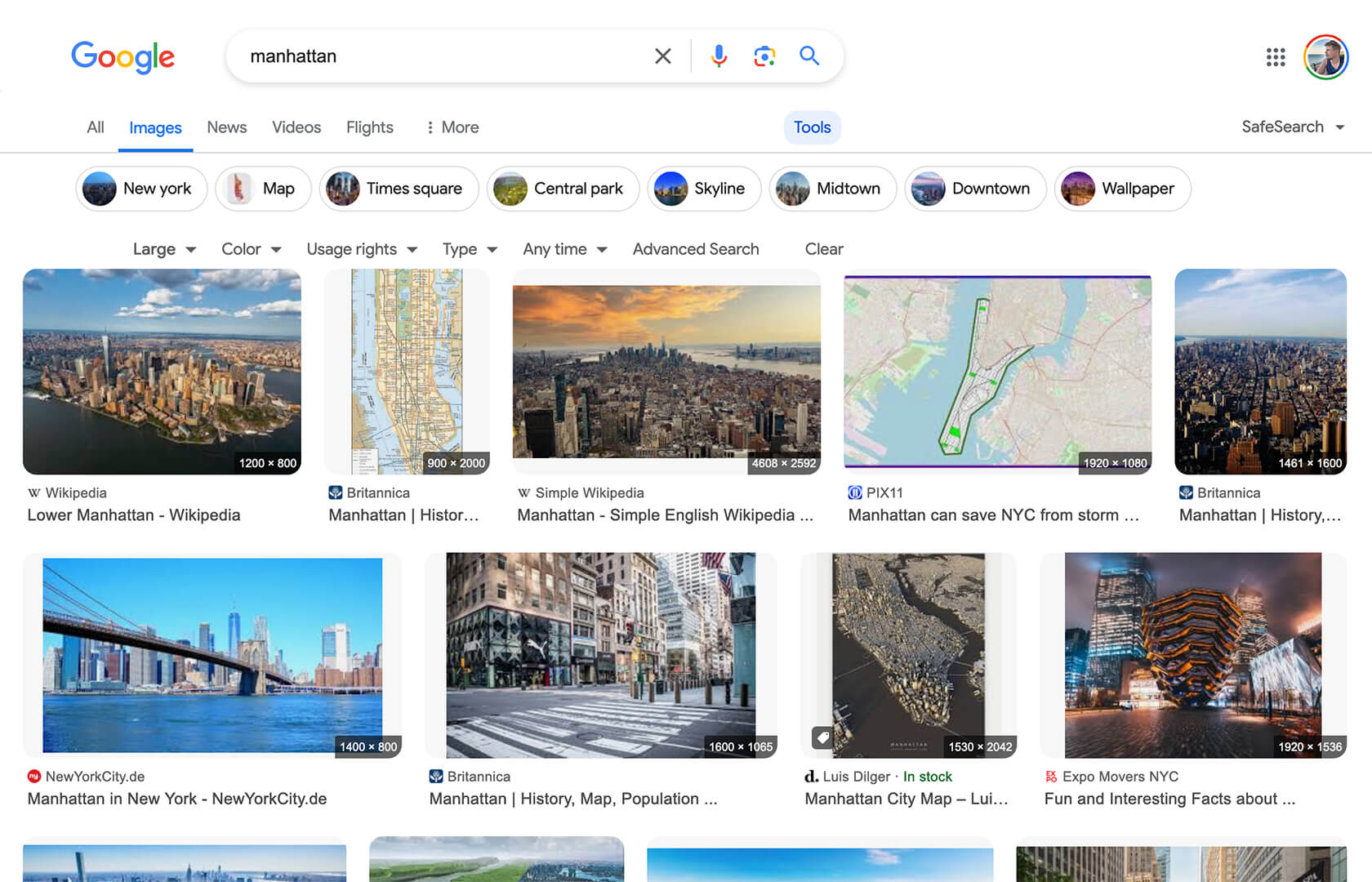
Wyświetla wymiary obrazu (np. "1920 × 1080") dla każdej miniaturki na stronie wyników wyszukiwania obrazów Google.

Aby zainstalować ten skrypt, wymagana jest instalacje jednego z następujących rozszerzeń: Tampermonkey, Greasemonkey lub Violentmonkey.

You will need to install an extension such as Tampermonkey to install this script.

Aby zainstalować ten skrypt, wymagana jest instalacje jednego z następujących rozszerzeń: Tampermonkey, Violentmonkey.

Aby zainstalować ten skrypt, wymagana będzie instalacja rozszerzenia Tampermonkey lub Userscripts.

You will need to install an extension such as Tampermonkey to install this script.

Aby zainstalować ten skrypt, musisz zainstalować rozszerzenie menedżera skryptów użytkownika.

(Mam już menedżera skryptów użytkownika, pozwól mi to zainstalować!)

You will need to install an extension such as Stylus to install this style.

You will need to install an extension such as Stylus to install this style.

You will need to install an extension such as Stylus to install this style.

Będziesz musiał zainstalować rozszerzenie menedżera stylów użytkownika, aby zainstalować ten styl.

Będziesz musiał zainstalować rozszerzenie menedżera stylów użytkownika, aby zainstalować ten styl.

Musisz zainstalować rozszerzenie menedżera stylów użytkownika, aby zainstalować ten styl.

(Mam już menedżera stylów użytkownika, pozwól mi to zainstalować!)

Autor
Tad Wohlrapp
Dziennych instalacji
4
Wszystkich instalacji
11 005
Oceny
56 2 6
Wersja
1.6.0
Utworzono
19-04-2020
Zaktualizowano
24-12-2025
Rozmiar
11,1 KB
Kompatybilność
Kompatybilny z przeglądarką Firefox Kompatybilny z przeglądarką Chrome Kompatybilny z przeglądarką Opera Kompatybilny z przeglądarką Edge
Licencja
MIT
Dotyczy

Icon

Google Image Search - Show Image Dimensions

This userscript reintroduces image dimensions on thumbnails on the Google Image Search results page.

Screenshot

Screenshot

Installation

To use userscripts you need to first install a userscript manager. They come as extensions for various browsers:

After you have installed a userscript manager, head over to greasyfork.org/scripts/401432 and click on the green "Install this script" button there.

Usage

After you have installed a userscript manager and this script, just visit the Google Image Search page (https://www.google.com/imghp) and start searching 😃