Scroll Buttons

Adds scroll buttons to Dead Frontier Marketplace which lets you quickly jump up or down to the next item with different name. Scrolling happens from the top item perspective - it logs the first visible item inside the marketplace list and scrolls until the top item becomes something else, based on different item name or different data-type.

Voor het installeren van scripts heb je een extensie nodig, zoals Tampermonkey, Greasemonkey of Violentmonkey.

Voor het installeren van scripts heb je een extensie nodig, zoals {tampermonkey_link:Tampermonkey}.

Voor het installeren van scripts heb je een extensie nodig, zoals Tampermonkey of Violentmonkey.

Voor het installeren van scripts heb je een extensie nodig, zoals Tampermonkey of Userscripts.

Voor het installeren van scripts heb je een extensie nodig, zoals {tampermonkey_link:Tampermonkey}.

Voor het installeren van scripts heb je een gebruikersscriptbeheerder nodig.

(Ik heb al een user script manager, laat me het downloaden!)

Voor het installeren van gebruikersstijlen heb je een extensie nodig, zoals {stylus_link:Stylus}.

Voor het installeren van gebruikersstijlen heb je een extensie nodig, zoals {stylus_link:Stylus}.

Voor het installeren van gebruikersstijlen heb je een extensie nodig, zoals {stylus_link:Stylus}.

Voor het installeren van gebruikersstijlen heb je een gebruikersstijlbeheerder nodig.

Voor het installeren van gebruikersstijlen heb je een gebruikersstijlbeheerder nodig.

Voor het installeren van gebruikersstijlen heb je een gebruikersstijlbeheerder nodig.

(Ik heb al een beheerder - laat me doorgaan met de installatie!)

Maker
Lucky11
Dagelijks aantal installaties
0
Totaal aantal installaties
7
Beoordelingen
0 0 0
Versie
1.0
Gemaakt op
11-10-2025
Bijgewerkt op
12-10-2025
Grootte
26,4 KB
Licentie
MIT
Wordt toegepast op

Scroll Buttons Custom Dead Frontier Script

This Tampermonkey script enhances the Dead Frontier Marketplace by adding scroll buttons that allow players to quickly navigate between items with different names. The scrolling logic is based on the first visible item, scrolling until the top item changes based on the item's name or data-type.
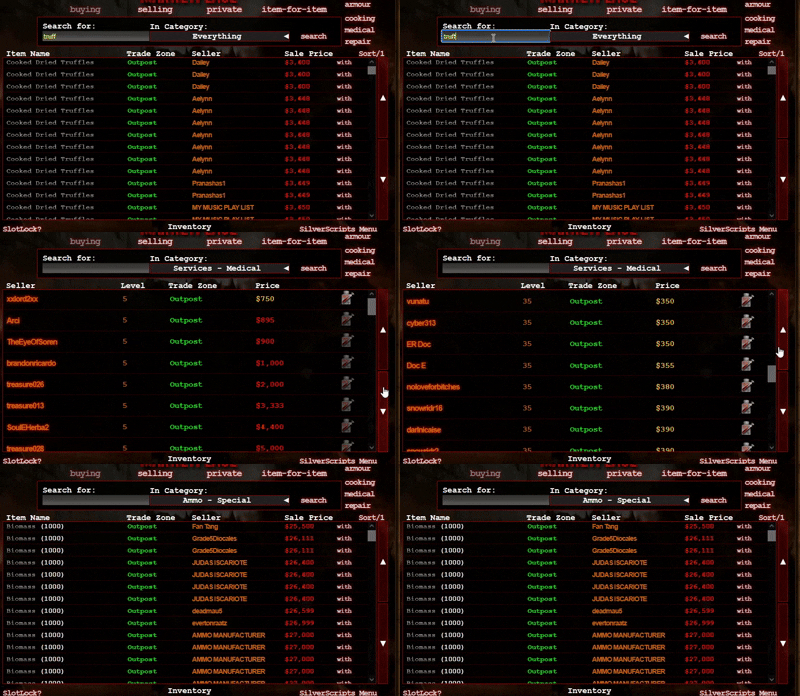
Scroll Script in Action

Features

  • Scroll Up/Down: Quickly jump to the next item in the marketplace.
  • Keyboard Controls: Use keyboard keys (Arrow Up/Down or W/S) for scrolling, with configurable options to disable them.
  • Smooth Scrolling: Optional smooth scrolling animation.
  • Customization Options by editing the script code: Ability to ignore bullet counts and tagged colors during navigation. Although I recommend staying with default settings as those ignore everything except renamed items.

Configuration Options

OptionDescriptionDefault
ignoreBulletCountIf true, ignores bullet counts next to item names while scrolling.false
ignore_GC_MC_tagsIf true, ignores (GC) and (MC) tags next to item names.false
Ignore_Colour_StatsIf true, it ignores color and bullet counts for simplified navigation.true
smoothScrollIf true, enables smooth scroll animation.true
disableArrowKeysIf true, disables scrolling with Arrow keys.false
disableWSKeysIf true, disables scrolling with W and S keys.true

Usage

Install this script using a userscript manager like Tampermonkey. Once installed, navigate to the Dead Frontier Marketplace page, and you will see the scroll buttons appear.