OpenAI Playground (ChatGPT) - Continue Button
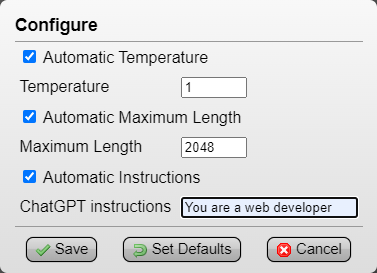
press the [Continue] button instead of 'Add message > type continue > Ctrl+Enter', configure panel optionally saves 'Temperature', 'Maximum Length' and 'Instructions'

ही स्क्रिप्ट इंस्टॉल करण्यासाठी तुम्हाला Tampermonkey, Greasemonkey किंवा Violentmonkey यासारखे एक्स्टेंशन इंस्टॉल करावे लागेल.

You will need to install an extension such as Tampermonkey to install this script.

ही स्क्रिप्ट इंस्टॉल करण्यासाठी तुम्हाला Tampermonkey किंवा Violentmonkey यासारखे एक्स्टेंशन इंस्टॉल करावे लागेल..

You will need to install an extension such as Tampermonkey or Userscripts to install this script.

ही स्क्रिप्ट इंस्टॉल करण्यासाठी तुम्हाला Tampermonkey यासारखे एक्स्टेंशन इंस्टॉल करावे लागेल..

ही स्क्रिप्ट इंस्टॉल करण्यासाठी तुम्हाला एक युझर स्क्रिप्ट व्यवस्थापक एक्स्टेंशन इंस्टॉल करावे लागेल.

(माझ्याकडे आधीच युझर स्क्रिप्ट व्यवस्थापक आहे, मला इंस्टॉल करू द्या!)

ही स्टाईल इंस्टॉल करण्यासाठी तुम्हाला Stylus सारखे एक्स्टेंशन इंस्टॉल करावे लागेल.

ही स्टाईल इंस्टॉल करण्यासाठी तुम्हाला Stylus सारखे एक्स्टेंशन इंस्टॉल करावे लागेल.

ही स्टाईल इंस्टॉल करण्यासाठी तुम्हाला Stylus सारखे एक्स्टेंशन इंस्टॉल करावे लागेल.

ही स्टाईल इंस्टॉल करण्यासाठी तुम्हाला एक युझर स्टाईल व्यवस्थापक इंस्टॉल करावे लागेल.

ही स्टाईल इंस्टॉल करण्यासाठी तुम्हाला एक युझर स्टाईल व्यवस्थापक इंस्टॉल करावे लागेल.

ही स्टाईल इंस्टॉल करण्यासाठी तुम्हाला एक युझर स्टाईल व्यवस्थापक इंस्टॉल करावे लागेल.

(माझ्याकडे आधीच युझर स्टाईल व्यवस्थापक आहे, मला इंस्टॉल करू द्या!)

लेखक
drhouse
दैनिक इंस्टॉल
0
एकूण इंस्टॉल
118
रेटिंग
0 0 0
आवृत्ती
3.0
बनवली
2023-05-05
अपडेट केली
2023-09-09
आकार
4.88 KB
License
CC-BY-NC-SA-4.0
यांवर लागू होते:

OpenAI Playground (ChatGPT) - Continue Button


(Tampermonkey Menu > OpenAI Playground (ChatGPT) - Continue Button > Configure)
Automatic Temperature: set to '1', can be useful to save another Temperature (example, save as '0' for GPT output related to code script) (default: 1)
Automatic Maximum Length: set to '2048' (max), this way GPT will output text without needing to use 'Continue' nearly as much (default: 2048)
Automatic Instructions: optional, saves a prompt guide (example, 'You are a web developer') (default: empty)


press the single [Continue] button instead of having to repeatedly click and type 'Add message > continue > Ctrl+Enter' to continue GPT's output


I also wanted to bring attention to this OpenAI ChatGPT and Playground Redesign RazorGlass userstyle I found, I think it makes Playground look much better: