GitHub Repo Notes

Add local notes to GitHub repository, support data export and import

スクリプトをインストールするには、Tampermonkey, GreasemonkeyViolentmonkey のような拡張機能のインストールが必要です。

You will need to install an extension such as Tampermonkey to install this script.

スクリプトをインストールするには、TampermonkeyViolentmonkey のような拡張機能のインストールが必要です。

スクリプトをインストールするには、TampermonkeyUserscripts のような拡張機能のインストールが必要です。

このスクリプトをインストールするには、Tampermonkeyなどの拡張機能をインストールする必要があります。

このスクリプトをインストールするには、ユーザースクリプト管理ツールの拡張機能をインストールする必要があります。

(ユーザースクリプト管理ツールは設定済みなのでインストール!)

このスタイルをインストールするには、Stylusなどの拡張機能をインストールする必要があります。

このスタイルをインストールするには、Stylus などの拡張機能をインストールする必要があります。

このスタイルをインストールするには、Stylus tなどの拡張機能をインストールする必要があります。

このスタイルをインストールするには、ユーザースタイル管理用の拡張機能をインストールする必要があります。

このスタイルをインストールするには、ユーザースタイル管理用の拡張機能をインストールする必要があります。

このスタイルをインストールするには、ユーザースタイル管理用の拡張機能をインストールする必要があります。

(ユーザースタイル管理ツールは設定済みなのでインストール!)

作者のサイトでサポートを受ける。または、このスクリプトの質問や評価の投稿はこちら通報はこちらへお寄せください
作者
Ivans-11
1日のインストール数
0
累計インストール数
5
評価
1 0 0
バージョン
1.3
作成日
2025/05/14
更新日
2025/05/15
大きさ
18.1KB
ライセンス
MIT
対象サイト

Ever starred a GitHub repo and forgot why?

This script lets you add private notes to any repository — whether you starred it or not and whoever it belongs to.

GitHub Repo Notes

A Tampermonkey script that allows you to add local notes to GitHub repositories

Features

  • Add and modify notes for repositories in GitHub repository list or detail pages
  • Notes are saved in local storage and invisible to other users
  • Import and export note data using the floating button at the bottom right of the page

Usage

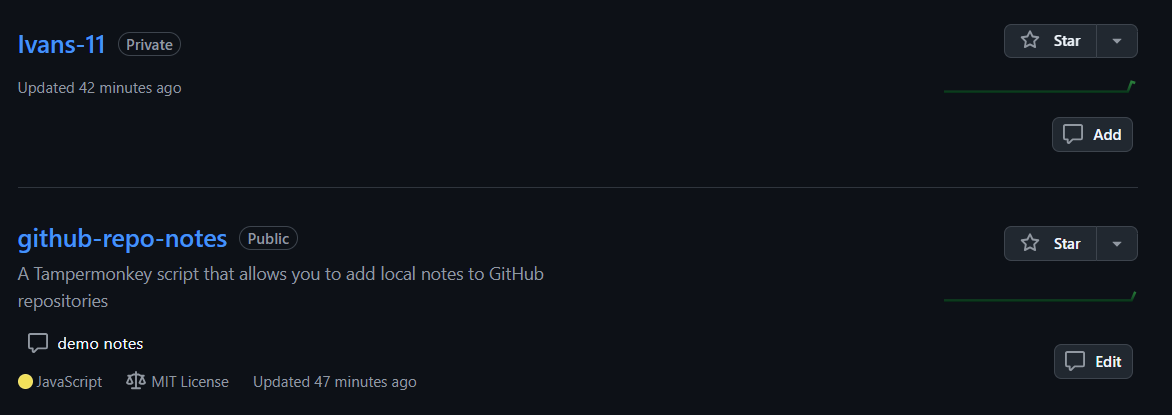
  1. On GitHub repository list page:

    Repository List Demo

    • A note button appears on each repository card
    • Click the button to add or edit notes
    • Notes are displayed on the repository card
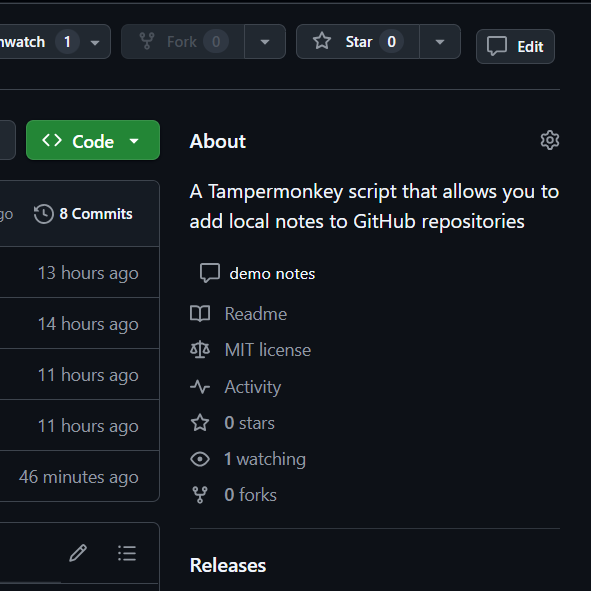
  2. On repository detail page:

    Repository Detail Demo

    • A note button appears in the top action bar
    • Click the button to add or edit notes
    • Notes are displayed below the repository description

Notes

  • Note data is saved in browser's local storage
  • Clearing browser data will result in data loss, you can use export and import feature to backup
  • Notes are not synchronized between different browsers, you can use export and import feature to sync between browsers