Bitbucket: header color

Allows changing the header color of Bitbucket to any color!

スクリプトをインストールするには、Tampermonkey, GreasemonkeyViolentmonkey のような拡張機能のインストールが必要です。

You will need to install an extension such as Tampermonkey to install this script.

スクリプトをインストールするには、TampermonkeyViolentmonkey のような拡張機能のインストールが必要です。

スクリプトをインストールするには、TampermonkeyUserscripts のような拡張機能のインストールが必要です。

このスクリプトをインストールするには、Tampermonkeyなどの拡張機能をインストールする必要があります。

このスクリプトをインストールするには、ユーザースクリプト管理ツールの拡張機能をインストールする必要があります。

(ユーザースクリプト管理ツールは設定済みなのでインストール!)

このスタイルをインストールするには、Stylusなどの拡張機能をインストールする必要があります。

このスタイルをインストールするには、Stylus などの拡張機能をインストールする必要があります。

このスタイルをインストールするには、Stylus tなどの拡張機能をインストールする必要があります。

このスタイルをインストールするには、ユーザースタイル管理用の拡張機能をインストールする必要があります。

このスタイルをインストールするには、ユーザースタイル管理用の拡張機能をインストールする必要があります。

このスタイルをインストールするには、ユーザースタイル管理用の拡張機能をインストールする必要があります。

(ユーザースタイル管理ツールは設定済みなのでインストール!)

このスクリプトの質問や評価の投稿はこちら通報はこちらへお寄せください
作者
andrybak
1日のインストール数
0
累計インストール数
3
評価
0 0 0
バージョン
6
作成日
2023/02/10
更新日
2025/11/01
大きさ
2.04KB
ライセンス
MIT
対象サイト

Bitbucket: header color

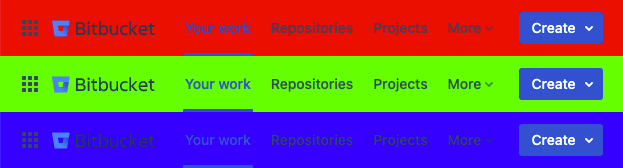
Screenshot of "Bitbucket: header color" in action

Some instances of Bitbucket are deployed with custom look and feels, which have unfortunate color of the header. This user style allows changing the color of Bitbucket header to any color.

This style supports both Bitbucket Server and Bitbucket Cloud.

Instructions

The style uses @url-prefix rules to work on any domain that starts with the word bitbucket. If your Bitbucket instance uses a domain which doesn't start with the word bitbucket, you'll have to manually add your custom domain. Up-to-date instructions are at https://github.com/rybak/atlassian-tweaks#custom-domains

Source code

Source code and full history can be seen on GitHub: https://github.com/rybak/atlassian-tweaks/blob/main/bitbucket-header-color.user.css

See also

More user scripts and user styles for Confluence, Jira, and Bitbucket in set Atlassian Tweaks.